2025-02-25
One of the most commonly asked questions we get about coding agents like Positron Assistant, Databot, or side::kick() is whether they can be used with local models.
The answer is technically yes, but we don’t recommend it. You can connect to local models from Positron Assistant and Databot through an OpenAI API-compatible endpoint, and you can use side::kick() with any model that connects through ellmer::chat(). However, local models–at least the ones that can reasonably run on your laptop–are not capable enough to be useful in these tools right now.
We understand why local models are appealing. They address two major concerns with using LLMs: cost and privacy. Coding agents that use paid, remotely hosted models can easily cost $100 per week. And if you work with protected or confidential data, running a model entirely on your laptop sounds ideal. With a non-local model, you need to trust your model provider with your data.
The problem is that the current local models simply aren’t capable enough yet. For this post, we focus on models that are small enough to run on a high-end laptop at a reasonable speed. We’ll show results from an evaluation that tests how well different models can perform a basic code refactoring task, a fundamental capability for any coding agent.
To assess how well various models work for coding agents, we considered a table stakes capability for a coding agent: code refactoring. Generally, to refactor code, a coding agent needs to:
This is a common task that a coding agent should almost always execute perfectly. If an agent can’t reliably refactor code, it’s not going to be useful for more complex work.
For this evaluation, Simon created helperbench, an evaluation that tests how well agents can carry out a simple refactor. To be scored as correct, the agent needs to correctly refactor a bit of code into a helper function. The evaluation was run ten times for each model.
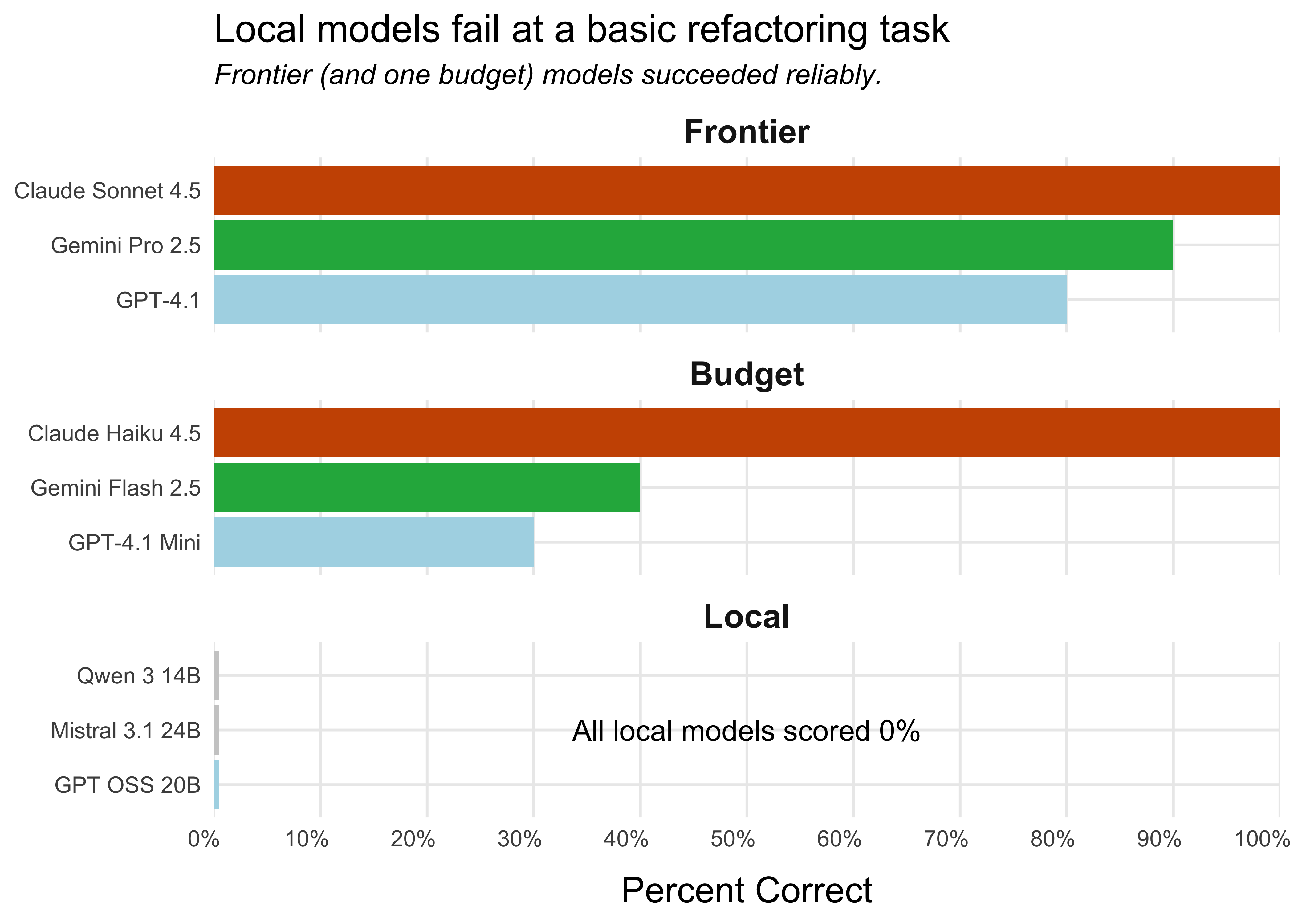
The tested local models were unsuccessful across the board. The score for each local model is 0%, meaning that they never successfully refactored the code. The frontier models and the budget model Claude Haiku 4.5, however, were reliably able to refactor the code.1 Two Anthropic models, Claude Sonnet 4.5 and Claude Haiku 4.5, had perfect scores, successfully refactoring the code ten out of ten times.
What about larger local models?
We only tested models that met two criteria: (a) could run on a laptop at a reasonable speed, and (b) worked with OpenRouter. We used OpenRouter to test all models to ensure a level playing field.
We did test one such model, Qwen3 Coder 30B, and it performed surprisingly well (70% success rate). However, it is too large to run on even a high-end laptop unless aggressively quantized, which ruins performance, so we excluded it from our analysis.
There are local models that are too big to be run on even high-end laptops, but could be run on a dedicated server. These models likely perform better than the smaller ones.
For more details on model choice, see Simon’s post on his personal blog.
The local models never successfully refactored the code, while the frontier and budget models ranged from moderately to highly successful.
This is just one evaluation, but code refactoring is a core skill of coding agents, and this was a relatively simple task. We would need local models to successfully refactor at least some of the time before trusting them in a coding agent like Positron Assistant or Databot.
Each local model has its own way it tends to fail:
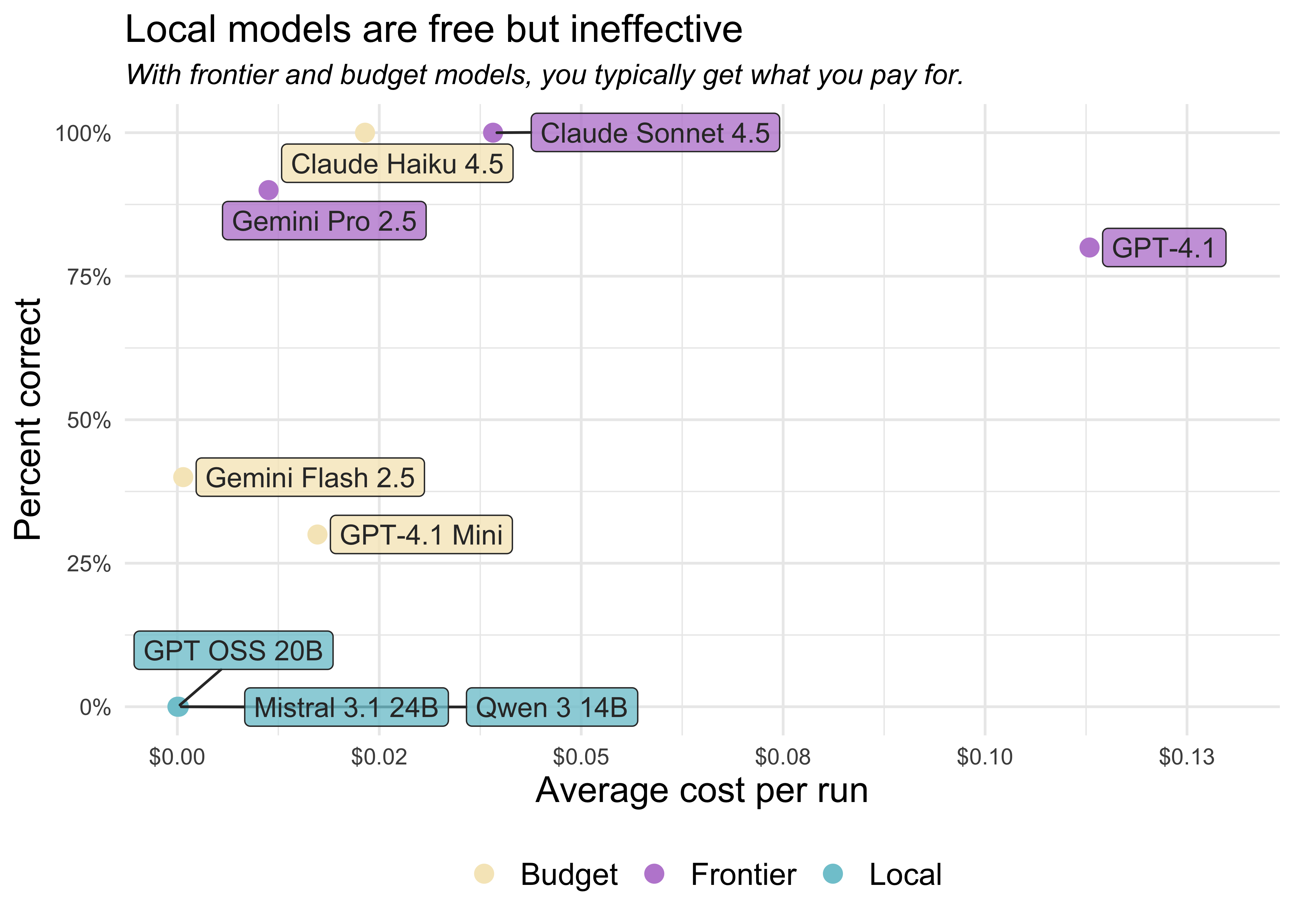
Within each category (frontier, budget, and local), there are substantial differences in the average cost per refactor. It costs Claude Sonnet 4.5 around four cents to carry out all the steps needed to refactor the code, while it costs GPT-4.1 around eleven cents.
Note that this is the price per refactor task, not per token. Different models use different numbers of tokens for the same task. Some models “think” for a while before acting, using up more tokens than those that don’t, while others struggle to use the tools correctly, using up tokens in their attempts to resolve tool errors.
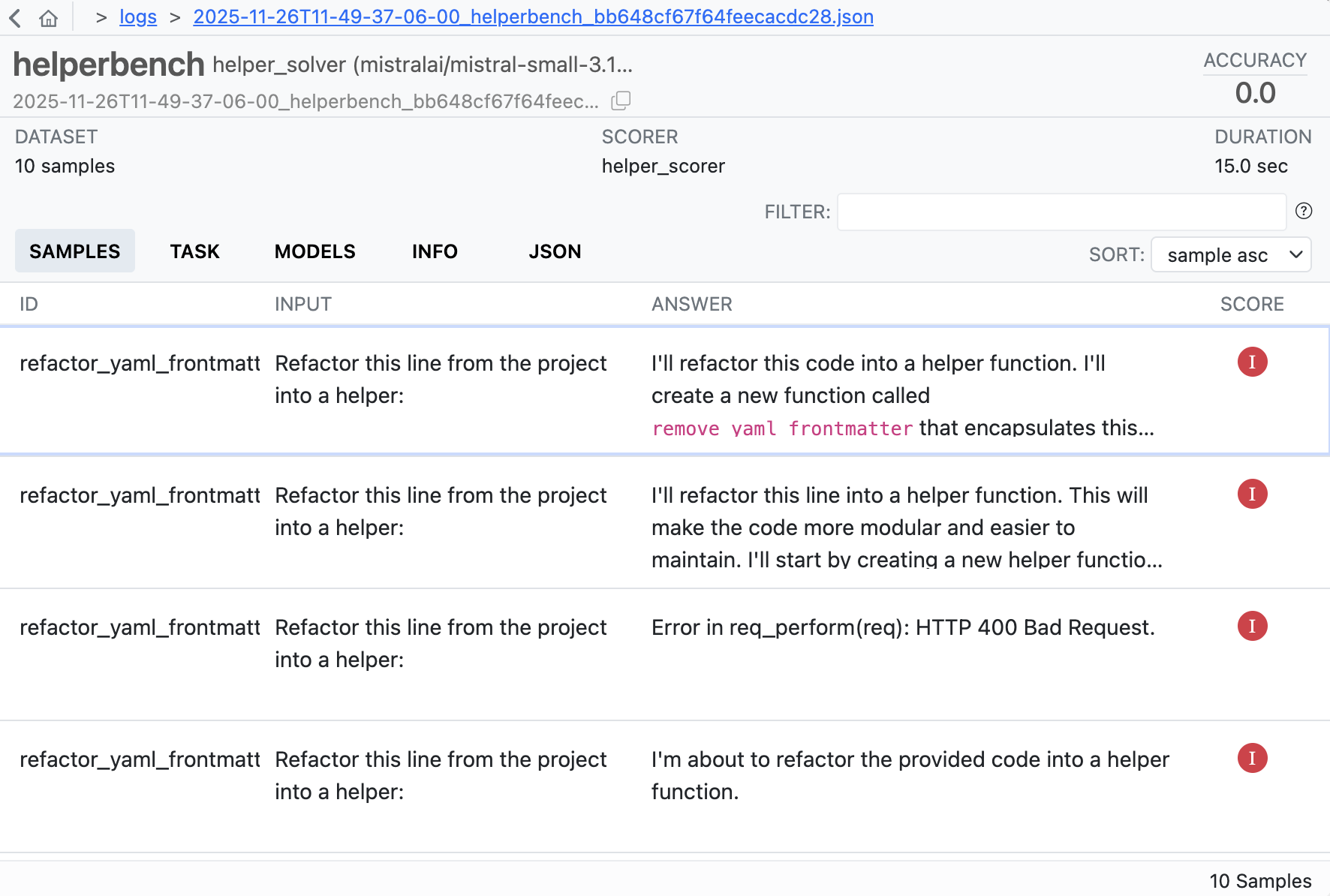
You can explore the logs from each of these runs in more detail here. The logs show the full conversation between the agent and the tools, including all tool calls, errors, and the agent’s reasoning process. This lets you see exactly where and how each model succeeded or failed. For example, here’s a screenshot of the log summary for Mistral 3.1 24B:
helperbench was implemented with the vitals package. You can install helperbench to run the evals yourself with pak::pak("simonpcouch/helperbench").
The evaluation gives models the following function:
fetch_skill_impl <- function(skill_name, `_intent` = NULL) {
  skill_path <- find_skill(skill_name)

  if (is.null(skill_path)) {
    available <- list_available_skills()
    skill_names <- vapply(available, function(x) x$name, character(1))
    cli::cli_abort(
      c(
        "Skill {.val {skill_name}} not found.",
        "i" = "Available skills: {.val {skill_names}}"
      ),
      call = rlang::caller_env()
    )
  }

  skill_content <- readLines(skill_path, warn = FALSE)

  # Remove YAML frontmatter if present
  content_start <- 1
  if (length(skill_content) > 0 && skill_content[1] == "---") {
    yaml_end <- which(skill_content == "---")
    if (length(yaml_end) >= 2) {
      content_start <- yaml_end[2] + 1
    }
  }

  skill_text <- paste(
    skill_content[content_start:length(skill_content)],
    collapse = "\n"
  )

  # ...
And then asks them to refactor part of the code into a helper. Here’s the exact prompt:
Refactor this code from my project into a helper:
# Remove YAML frontmatter if present
content_start <- 1
if (length(skill_content) > 0 && skill_content[1] == "---") {
  yaml_end <- which(skill_content == "---")
  if (length(yaml_end) >= 2) {
    content_start <- yaml_end[2] + 1
  }
}
The agent is allowed to work until it thinks the task is complete, meaning it can make failed tool calls and then attempt to correct them. When the agent finishes, the results are scored as follows:
You can see more details about the evaluation implementation here.
Local models are compelling. They’re free to run and can keep your data entirely private. However, the models that are small enough to run on a laptop just aren’t as capable as the current best paid models.
The good news is that the field is advancing rapidly. There are larger open-weights models that could be run on more powerful hardware (like dedicated GPU servers) which are likely to perform substantially better than the laptop-sized models tested here. Local models may at some point catch up to or surpass today’s frontier models. Until then, if you want to effectively use coding agents, we recommend using the most capable model you can, which today is probably going to be Claude Sonnet 4.5, Claude Opus 4.5, or OpenAI GPT-5.
If data privacy is a concern, know that the major model providers can provide zero data retention agreements and other arrangements, allowing you to use their LLMs even if you work with confidential or protected data. To learn more, check out this recent blog post on trust, privacy, and LLMs.
Frontier models include models from the major AI labs that we would use for a daily driver coding assistant. The budget models are a step down from the frontier models, typically less reliable but also cheaper. The local models are models that you can run on a laptop.↩︎