2023-05-18
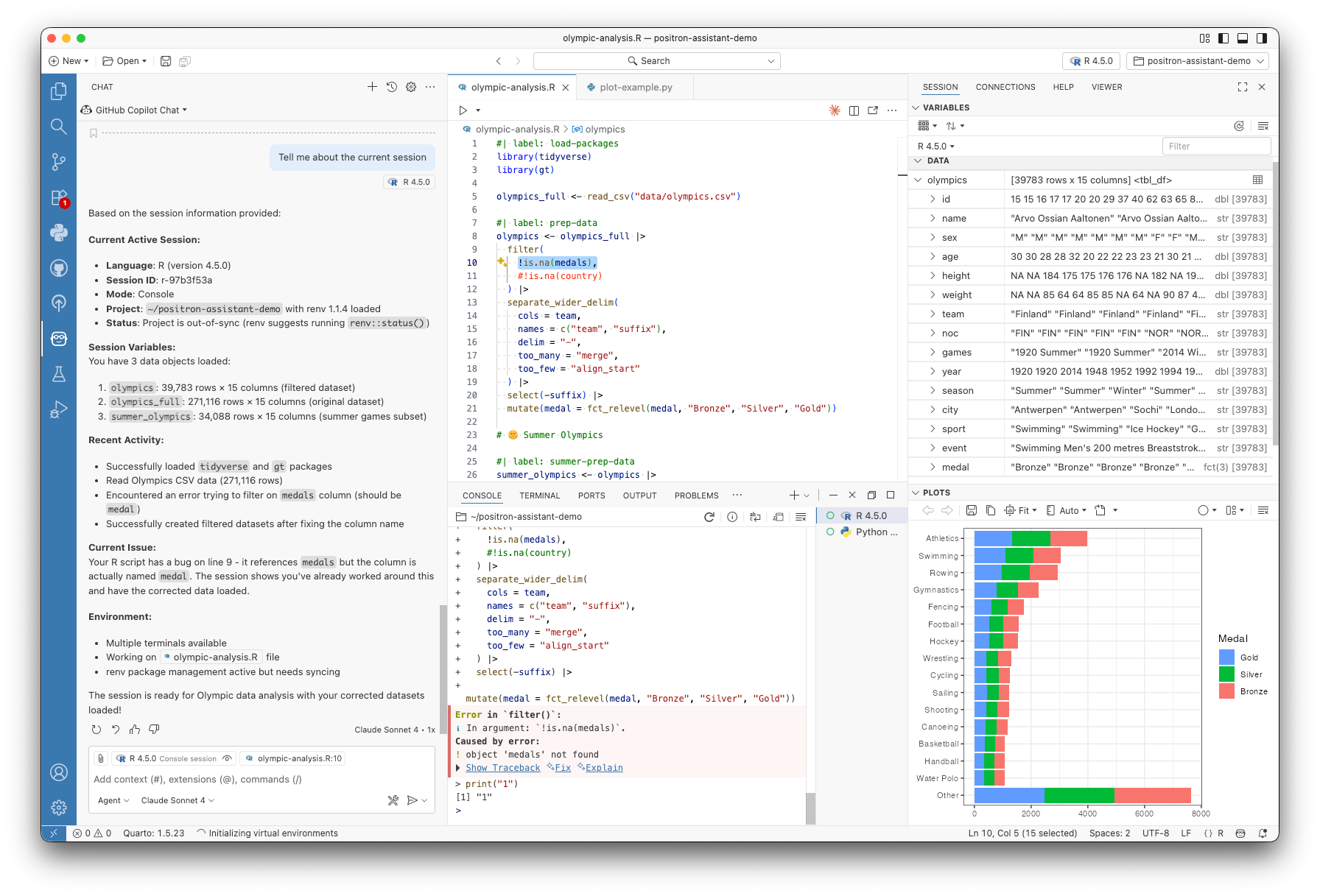
Positron Pro 2025.10.1 introduces significant new capabilities to both the Data Explorer and preview features for Positron Assistant, enabling you to work faster.
Connect to More AI Models: Easily integrate your preferred providers, with preview support for GitHub Copilot, AWS Bedrock, and OpenAI or OpenAI-compatible model providers, to use your existing subscriptions while still gaining the additional benefits of Positron Assistant.
Resolve Errors Faster: Get immediate AI assistance for runtime errors directly in the console, allowing you to diagnose, understand, and fix issues quickly.
Control your Copilot code completions experience: Snooze or disable Copilot completions by file type when you need to focus.
Efficient Data Exploration: Pin, filter, and sort your data with ease, and instantly generate reproducible code for your analysis steps, saving you time and ensuring consistency.
(#16495): Fixed issue with high GPU/CPU utilization on macOS Tahoe
(#16532): Fixed an issue where ongoing R Markdown render output was lost when after a browser refresh
(rstudio-pro#6377): Extend CSRF protection to the export endpoint
(rstudio-pro#9312): Fixed a regression that caused the image selection dropdown in the New Session dialog to fail to update when the cluster selection changed to a different cluster of the same type
(rstudio-pro#9199): Fixed an issue where disabled session types were shown in the New Session dialog when creating a new session for an existing project
(rstudio-pro#8055): Fixed an issue where Positron/VS Code sessions could crash due to the remote extension host terminating unexpectedly
(rstudio-pro#9109): Fixed an issue where the user service was not logging full error details during user creation failures
A major focus of this release is unlocking access to a wider universe of model providers. While we are excited about being able to support more user choice here, we have observed that Positron Assistant and Databot perform best with Anthropic models. Additionally, some models are too underpowered or lacking in critical capabilities, including tool-calling, to properly Positron Assistant itself to the quality we expect.
Note
In the future, we intend to provide additional guardrail checks for models that have the core capabilities necessary to provide a positive Positron Assistant experience which, at a minimum, would be tool-calling support. Small or lower-tier models are likely to produce worse outputs or fail at tasks.
Caution
While Databot can also use models via a Custom Provider, we currently only suggest using Anthropic models with Databot per our testing during its Research Preview.
Positron Assistant now has preview support for GitHub Copilot for both completions and chat.
When you have GitHub Copilot added as a model provider, GitHub Copilot models, chat participants, and tools are now available in the chat pane and inline chat, in addition to inline code completions.
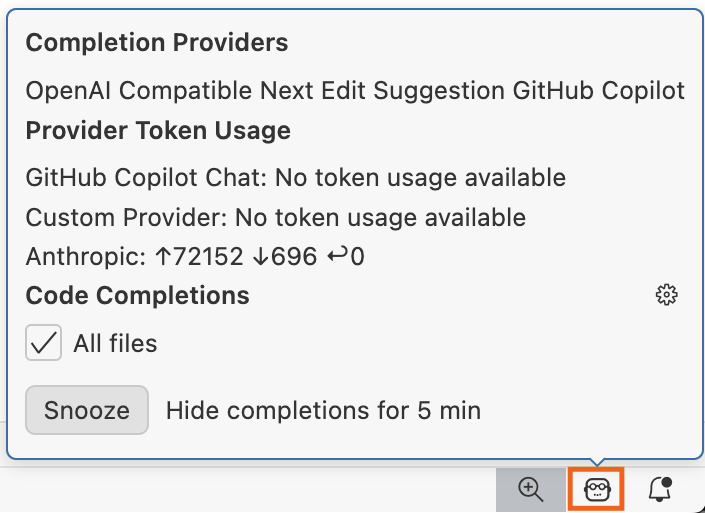
Completions from an LLM such as GitHub Copilot can be very useful, but sometimes they can be distracting or interfere with other completions from the Python or R LSP.
You now have more control over when you see Positron Assistant completions:
Snooze these completions temporarily from the Assistant status bar popup.
Disable completions for the current file type (or all files) from the same status bar popup.
Use the new Positron Assistant: Toggle (Enable/Disable) Completions command to quickly toggle these completions on or off.
This release also introduces preview support for AWS Bedrock as a model provider, enabling enterprise users to keep their chats within their AWS environment.
To enable Positron Assistant with AWS Bedrock, you can add the following specific user-level settings:
In settings.json, to enable AWS Bedrock you will need at least the following two items:
"positron.assistant.enable": true,
"positron.assistant.enabledProviders": ["amazon-bedrock"]
Via the Command Palette, run the command Positron Assistant: Configure Language Model Providers to open the Provider Configuration dialog
In the “Configure Language Model Providers” dialog:
Select “Amazon Bedrock” from the list of providers
Click the “Sign in” button
Signing in should be near instant. Positron Assistant will automatically register supported models. In Posit Workbench, administrators can configure Workbench Managed Credentials for AWS to simplify the AWS authentication process.
For more information, please see the Positron Assistant + AWS Bedrock announcement.
We have added experimental support for OpenAI via API key as a model provider. This configuration also allows you to set custom OpenAI base URLs. From the OpenAI model list, we currently suggest using GPT-5, GPT-5 Pro, GPT-5-Codex, or GPT-4.1. These models must be enabled on your API key prior to using them in Positron Assistant. Ultimately, not all models are equivalent, and for now we suggest using powerful frontier models to have the best experience.
It’s also important to configure OpenAI’s API for appropriate throughput based on user counts. Your team should plan for higher tiers with additional token throughput and requests per minute. Insufficient throughput on lower usage tiers will lead to rate limiting from OpenAI.
To enable OpenAI as an option, you will need to modify your settings.json:
"positron.assistant.enabledProviders": [
     "openai" //## <-- For using OpenAI directly
]
Note
The direct OpenAI option will change from “openai” to “openai-api” in the next release to avoid naming conflicts we have recently observed with other tools and model providers.
Building on OpenAI support, we are excited to introduce experimental support for Custom Providers that adhere to the OpenAI API standard. This is a powerful feature that allows you to bring your own arbitrary model provider and connect Positron Assistant to almost any compatible endpoint. For more information, please see the Positron GitHub discussions on Custom Providers.
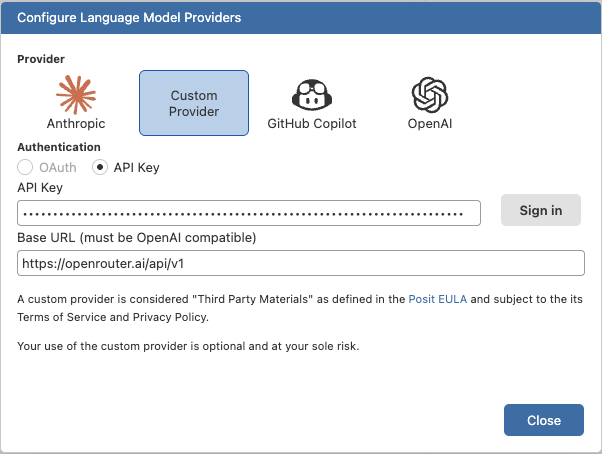
Custom Providers may be interesting for teams that require:
In the future, we intend to provide additional guardrail checks for models that have the core capabilities necessary to provide a positive Positron Assistant experience, which at a minimum, would be tool-calling support. In future iterations of Custom Provider support, we intend to at least warn users if models do not meet sufficient requirements to provide the expected user experience.
Assistant and Console are two of Positron’s defining features, and now they integrate even deeper to streamline your coding experience. Assistant is now ready to help with any errors you encounter in the Console!
Tracebacks get two new options, ✨Fix & ✨Explain. Clicking on these options sends your session to Assistant, which then automatically gets to work on a solution. Assistant automatically receives all the context it needs to help: the traceback you’re troubleshooting, your recent code inputs, and the active file, so you don’t have to manually copy and paste this information!
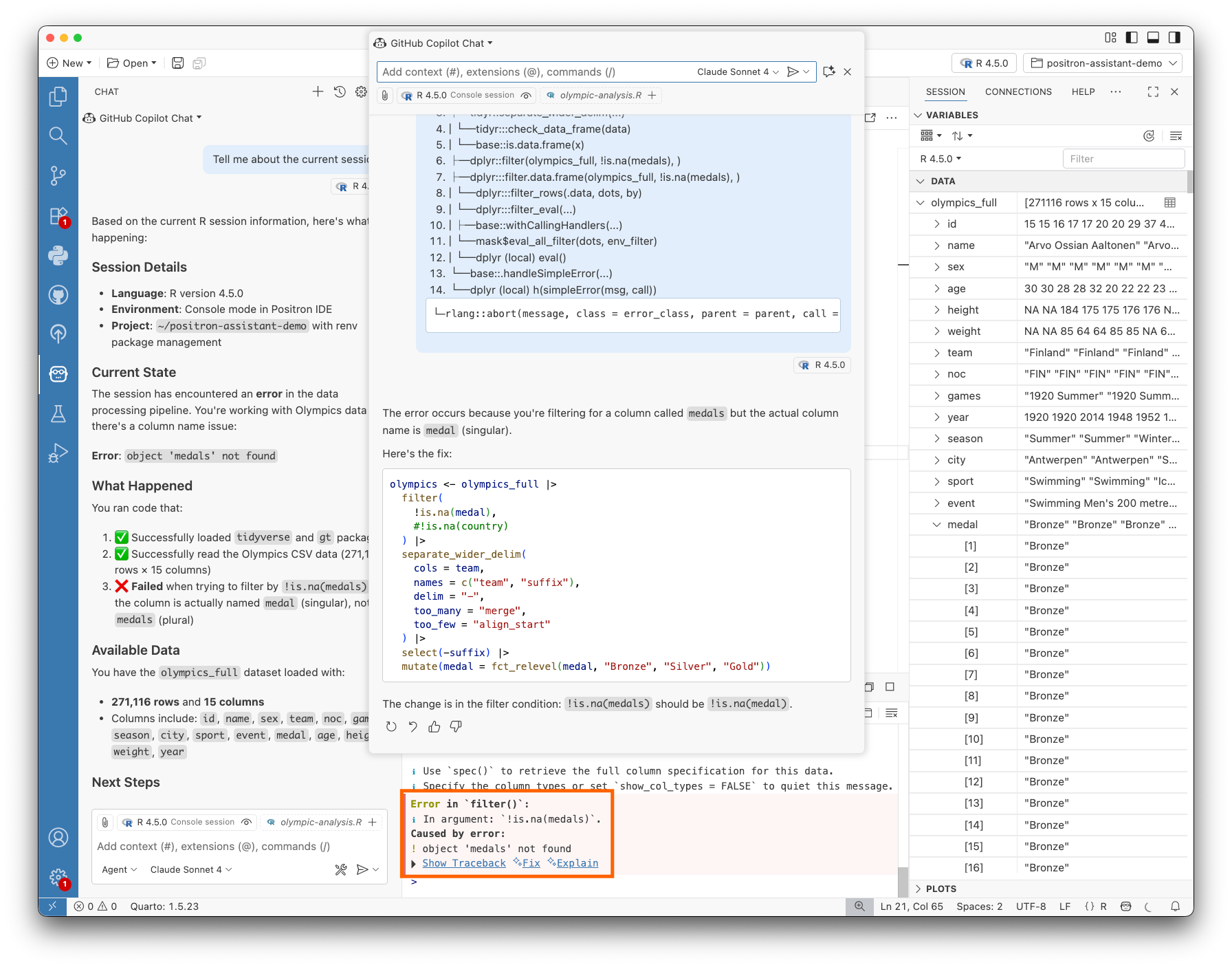
Fix does what it implies: it summons Assistant to diagnose and propose a fix for the code you’re running. You can run the suggested code directly in the Console, or apply the fix in an Editor if you’re coding in files. Assistant will look at the traceback to see where the error originates, and let you know if the fix should be applied to a file instead of in the Console. With Fix, Assistant takes the lead and gives you a short and sweet resolution, without too much fluff — just a one or two line explanation.
Explain takes a different approach: instead of having Assistant debug and resolve the error itself, it will instead provide you with a detailed analysis of what the code is doing and possible paths towards a solution. This is great for when you’re working on a domain-specific problem, or want to be more hands-on with the fix; it gives you, the user, more freedom to troubleshoot on your own. Think of it as a pairing partner right in the Console!
The Data Explorer also has new features to help you focus on key columns and navigating larger datasets during exploratory analysis.
Pin Columns and Rows: You can now pin important columns or rows to keep them visible while scrolling through large datasets. When a column is pinned in the data grid, its corresponding row in the Summary Panel gets pinned as well, maintaining consistency across views.
Filter and Sort the Summary Panel: The Summary Panel now allows you to sort and filter columns, helping you quickly find summary statistics for specific columns. You can sort alphabetically by name, group by data type, or filter by column name to narrow down the list.
Convert to Code: To make your analysis more reproducible, the Data Explorer now features a “Convert to Code” button. This powerful new feature generates the code that replicates the filters and sorts you’ve applied in the UI. With one click, you can copy dplyr code for R data frames or pandas/polars code for Python, and paste it directly into your script or console to continue your analysis. For on-disk data, SQL code can be exported.
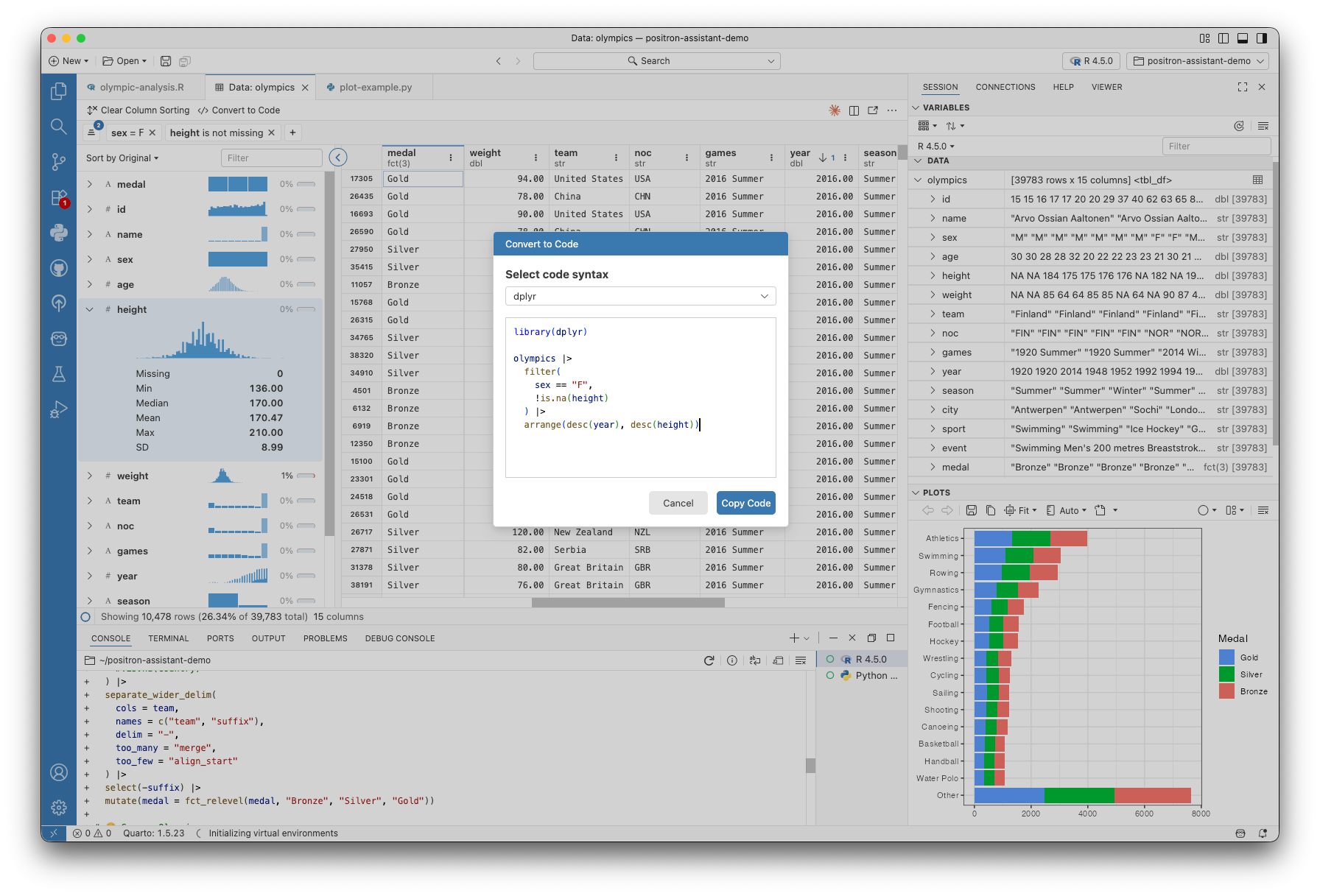
We’re excited to see how you leverage these new connections and controls in your data science workflows. For a complete list of all changes and bug fixes, please see the full release notes.