2024-08-01
If you’re an Apache Spark user, you benefit from its speed and scalability for big data processing. However, you might still want to leverage R’s extensive ecosystem of packages and intuitive syntax. One effective way to do this is by writing user-defined functions (UDFs) with sparklyr. UDFs enable you to execute R functions within Spark, harnessing Spark’s processing power and combining the strengths of both tools.
The sparklyr package is a package that provides an R interface to Spark. With sparklyr, you can execute distributed R code within the Spark environment. For Databricks users, it allows you to remotely connect to your Databricks clusters and provides a dplyr back-end, a DBI back-end, and integration with RStudio’s Connection pane.
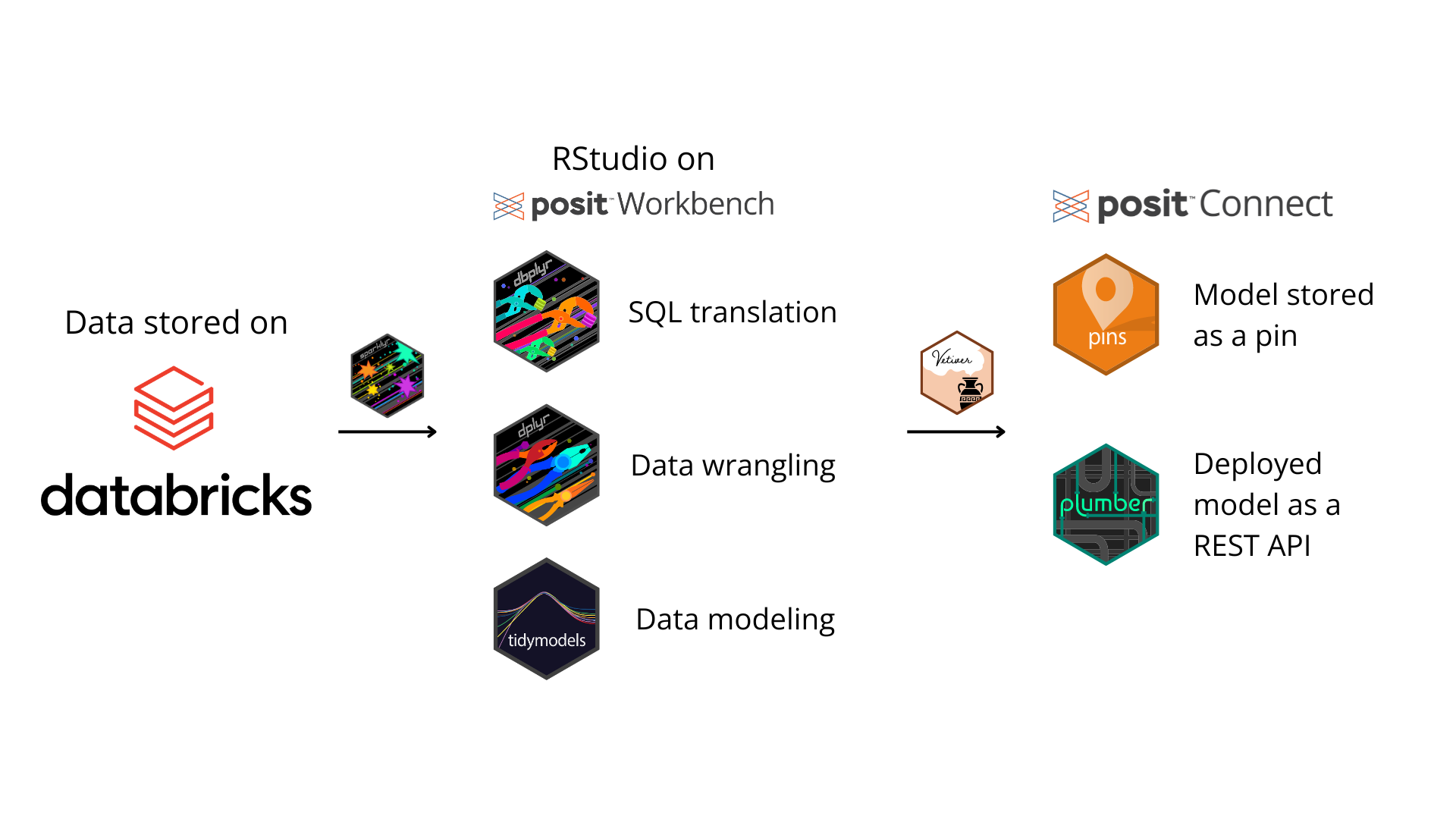
Let’s walk through an example of a sparklyr workflow.1 After installing the necessary packages and setting up your credentials, you can use sparklyr to access your Databricks cluster in RStudio. Then, with tidymodels, train a machine learning model and run predictions. Once you’ve trained your optimal model, save it as an R object. The R object can be uploaded to Databricks, saved as a pin, or stored in another suitable location. In this example, we use the vetiver package to store the model as a pin and deploy it as a REST API on Posit Connect. Here’s a simple illustration of the workflow:
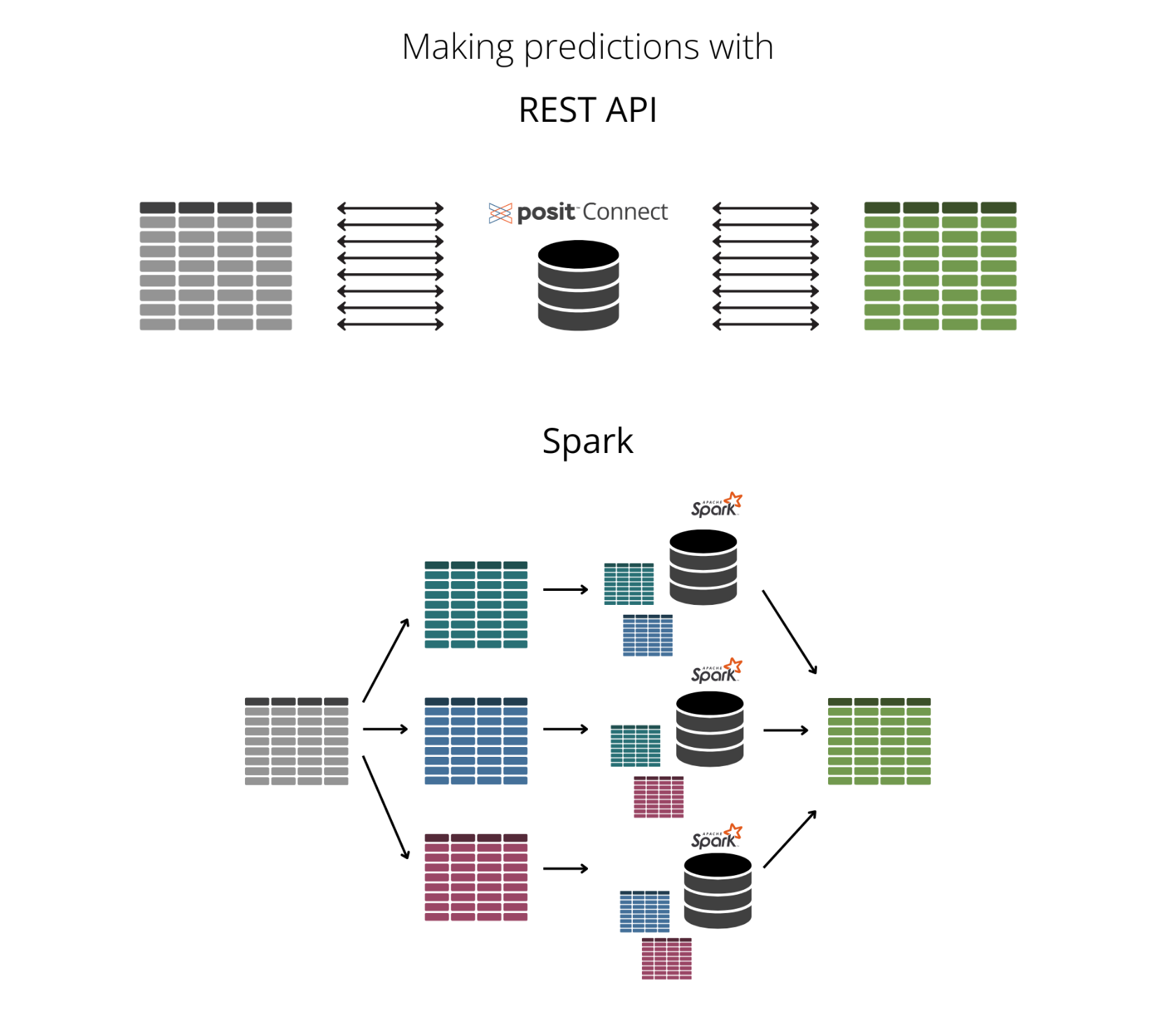
In this example, whenever we make a prediction, we ping the REST API each time. So, if we run 10 predictions, we hit the REST API 10 times. While this isn’t a significant issue for a small number of predictions, it becomes problematic as the number of predictions increases. Each API request incurs some latency, and making a large number of requests can lead to significant delays in receiving predictions. Frequent API calls can also increase the load on the API server, potentially causing it to become overloaded, slow down, or even fail to respond.
To address this, we can instead use UDFs. UDFs allow us to run R functions directly within the Spark environment, eliminating the need for repeated API calls. By using Spark, we can parallelize these requests. Parallelization divides a computational task into smaller subtasks that can be executed simultaneously across multiple processors. This not only reduces latency but also optimizes the use of Spark, ensuring faster, more reliable predictions without overloading an API server.
Here’s an illustration of the difference between hitting a REST API and parallelizing in Spark:
One of the key features of sparklyr is its support for spark_apply(), which enables you to write UDFs in R to access Spark’s processing power without needing to switch to another language. Once you’ve written your desired R code, you wrap it in spark_apply() to execute it in Spark instead of your local processor.
In the example below, we connect to a Databricks cluster using sparklyr’s spark_connect(). Then, we create lendingclub_dat from a table stored in the Databricks catalog.
# At the time of publishing, this requires pysparklyr 0.1.5 and reticulate 1.38.0.
# pak::pak("reticulate")
# pak::pak("pysparklyr")
library(sparklyr)
library(dplyr)

sc <- spark_connect(method = "databricks_connect")

lendingclub_dat <- tbl(sc, I("hive_metastore.default.lendingclub"))
Next, we prepare the data for making predictions using dplyr functions.
lendingclub_prep <- lendingclub_dat |>
  select(term, bc_util, bc_open_to_buy, all_util) |>
  mutate(term = trimws(substr(term, 1, 4))) |>
  mutate(across(everything(), as.numeric)) |>
  filter(!if_any(everything(), is.na))
Now, we can create our first user-defined function by wrapping the R function nrow() in spark_apply(). Spark splits the row count into multiple discrete jobs, which are processed independently and in parallel by Spark’s distributed computing framework. The results from all jobs are then aggregated to produce the final result, in this case, a 15 x 1 table. These 15 jobs are run in parallel - maybe not all at the same time, but at least several of them concurrently. This approach avoids the need for thousands of REST API calls.
lendingclub_prep |>
  spark_apply(nrow) |>
  collect()
To increase performance, use the following schema:
columns = "x long"
# A tibble: 15 × 1
x
<dbl>
1 10000
2 10000
3 10000
4 4294
5 10000
6 10000
7 10000
8 4269
9 10000
10 10000
11 10000
12 4284
13 10000
14 10000
15 6133In a previous example, we used lending data to tune and cross-validate a penalized linear regression (LASSO) model to predict interest rates. We then used the vetiver package to store our model in a pin, available on Connect. The function below connects to our board on Posit Connect, reads the vetiver model into an object called model, and runs predictions with predict(). To successfully run the function below, ensure that key is the actual Connect API Key string, not a Sys.getenv() call.
library(vetiver)

predict_vetiver <- function(x) {
  library(workflows)
  board <- pins::board_connect(auth = "manual",
                               server = "https://pub.demo.posit.team/",
                               key = "[YOUR CONNECT KEY]")
  model <- vetiver::vetiver_pin_read(board, "garrett@posit.co/lending_club_model")
  preds <- predict(model, x)
  x$pred <- preds[, 1][[1]]
  x[x$pred >= 20, ]
}
We can test the model locally to ensure the function returns the expected results. Since we know that all_util significantly influences the prediction, we filter it to values over 130. After running predict_vetiver(), we get a predicted interest rate of 20.6.
lendingclub_local <- lendingclub_prep |>
  filter(all_util >= 130) |>
  head(50) |>
  collect()

predict_vetiver(lendingclub_local)
Connecting to Posit Connect 2024.06.0-dev+19-g0e9882e3c3 at <https://pub.demo.posit.team>
# A tibble: 1 × 5
term bc_util bc_open_to_buy all_util pred
<dbl> <dbl> <dbl> <dbl> <dbl>
1 60 98.5 77 141 20.6What if we wanted to execute the prediction function over the entire dataset (130,772 rows)? Using a REST API endpoint would require pinging Connect 130,772 times. However, we can use predict_vetiver() as a user-defined function by wrapping it in spark_apply(). This allows us to execute it in Spark — without having to edit the function at all — and only hit Connect for the number of predictions we are looking for, in this case, four.
lendingclub_prep |>
  spark_apply(f = predict_vetiver,
              columns = "term double, bc_util double, bc_open_to_buy double, all_util double, pred double")
# Source: table<`sparklyr_tmp_table_3349841c_98ac_47a0_ab76_7dcaf6e40a80`> [4 x 5]
# Database: spark_connection
term bc_util bc_open_to_buy all_util pred
<dbl> <dbl> <dbl> <dbl> <dbl>
1 60 95.4 291 129 20.0
2 60 98.5 77 141 20.6
3 60 131. 0 117 20.5
4 60 97.1 599 128 20.0By using UDFs, you can avoid the latency and server load issues associated with repeated REST API calls for faster and more reliable predictions.
Integrating sparklyr into your workflow not only enhances your data processing capabilities but also bridges the gap between Spark’s processing power and R’s usability.
Join Edgar Ruiz, developer of sparklyr, at posit::conf(2024) for his workshop, “Using Databricks with R,” to explore parallelization with Spark. See details here and register today!
For more information:
In a previous example, Predicting lending rates with Databricks and tidymodels, we explored a similar machine learning example using data from Databricks Delta Lake to create a Shiny app. For that project, we used an ODBC connection instead of sparklyr, following best practices, as our Shiny app did not require a running cluster.↩︎