Eliminating the Friction Between Exploration and Production with Jupyter Notebooks
Join our free Workshop where we’ll dive into a dataset and move from Exploration to Production using the Positron Notebook Editor.
March 25th at 11am EST. Sign up here
Last month, we released an early alpha of the Positron Notebook Editor, a batteries-included experience built from the ground up to treat Jupyter notebooks as first-class citizens within Positron. While notebooks are central to data science exploration, we found that most IDEs are built for general software development tasks, resulting in a user experience for Jupyter notebooks that is not data science aware. We focused on smoothing the edges that slow down notebook workflows, eliminating the small friction points that, when compounded, transform your daily experience.
Our March 2026 release of Positron includes upgrades to the edit and execution loop in the Positron Notebook Editor to help reduce friction as you move from exploration to production. Our vision is to transform your Jupyter notebook into a cohesive platform where you have access to everything you need to move from interactive data exploration to visualizing insights and publishing your findings.
Our latest March 2026 release of Positron includes:
Zero-Code Data Profiling with Data Explorer
The Why: A core step in the data science workflow is getting to know your data. Jupyter users often find themselves in a loop of writing repetitive df.head() or df.describe() statements just to “see” their data. This pollutes your notebook with output that distracts from the real insights and clutters the narrative. These “scratch” cells have to be created and removed as the notebook takes shape.
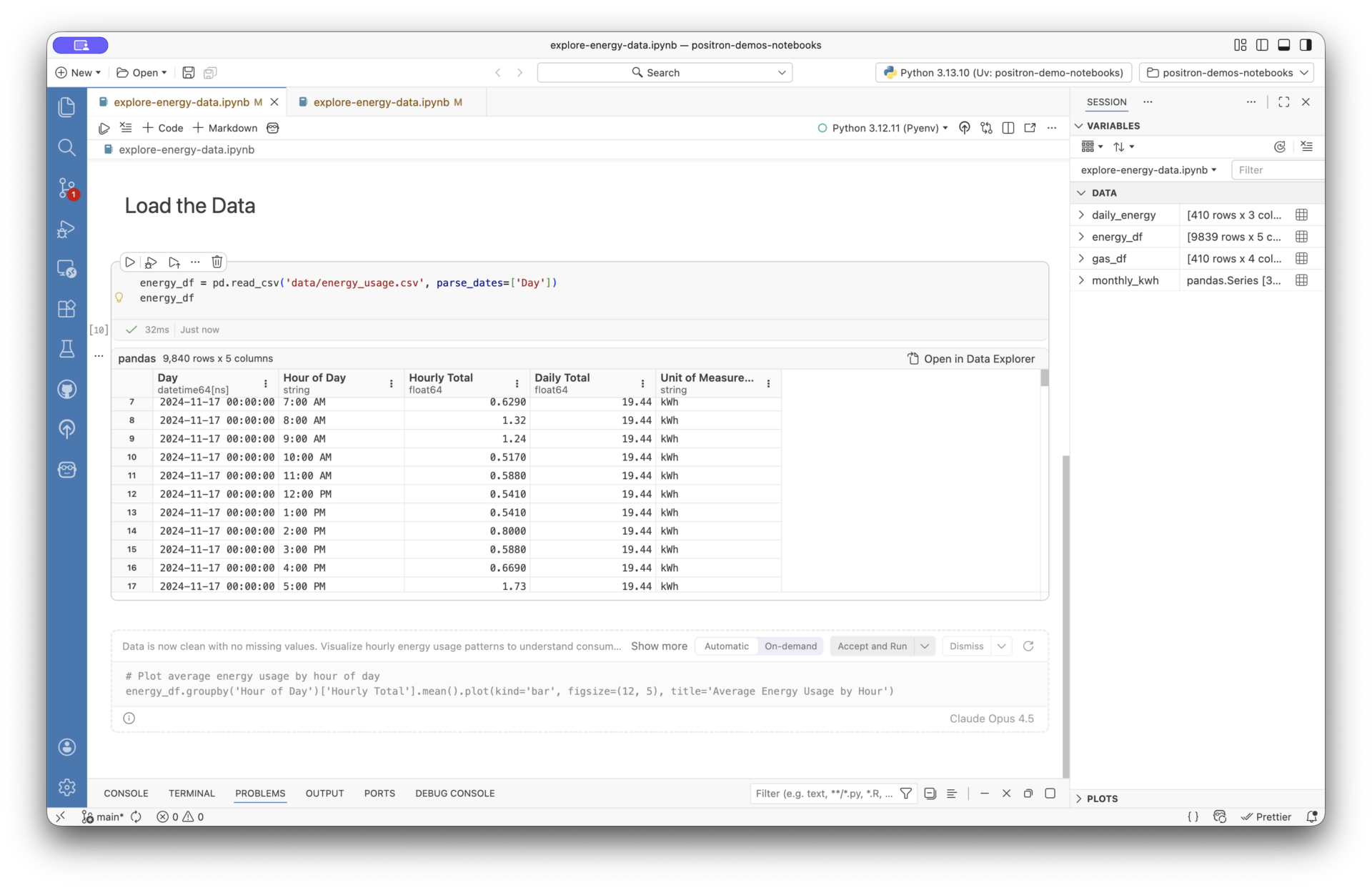
The What: We have integrated our Data Explorer directly into cell outputs. When you run a code cell that returns a Pandas or Polars DataFrame, you get a rich inline data viewer. Open the full Data Explorer to get additional summary statistics, sorting, filtering, and profiling. These explorations can be converted into code on demand, so data cleaning and filtering become part of the workflow, without having to manually write a single line of code. This allows you to skip tedious data wrangling and to speed up your analysis.
Putting this all together
Here’s a sample workflow you can try today in the Positron Notebook Editor
- Import: Open a notebook and import your data using Polars or Pandas. See your variables update in realtime as you run cells.
- Explore: Instantly sort and filter your dataframes in Data Explorer without writing repetitive df.head() code.
- Iterate: Pair with Assistant to generate a complex Plotly, Seaborn or library of your choice visualization based on your filtered data.
- Prepare: Once your analysis is solid, click on an AI Action to clean up your notebook with markdown headers and notes before sharing the notebook with a colleague.
- Publish: Publish and deploy your .ipynb as is or use Assistant to convert your code into an interactive dashboard by publishing to Connect or Connect Cloud, where you can manage access to your published report, view telemetry stats, customize urls, schedule runs for your notebook and more.
Get Started with the Alpha
The best tools are built in collaboration with the people who use them every day.
- Try it out: Download the latest Positron release and set positron.notebook.enabled to true.
- Explore the Demo: Check out our tutorial repository for examples of how to leverage the new features.
- Shape the roadmap: Book time to chat with us directly.