Trail Running Meets Data Science: Adventures with LLMs and Race Stats

About the author
Drew Coughlin is a consultant who specializes in data engineering and analysis by transforming data into meaningful insights for people and organizations. He applies the same collaborative principles from his involvement in open source and running communities by embracing their shared ‘paying it forward’ ethos. Visit his homepage at https://drewsdata.github.io/.
When we’re fortunate enough to have powerful tools combined with clean, accessible data and a clear reason to build something, it’s like winning the analytics lottery. Recently, I managed to combine my passion for the trail running community with some well-maintained trail race data and Posit’s awesome tools. The result? Something useful for fellow ultra racing enthusiasts that also demonstrates powerful features for a much broader audience building tabular data analysis dashboards.
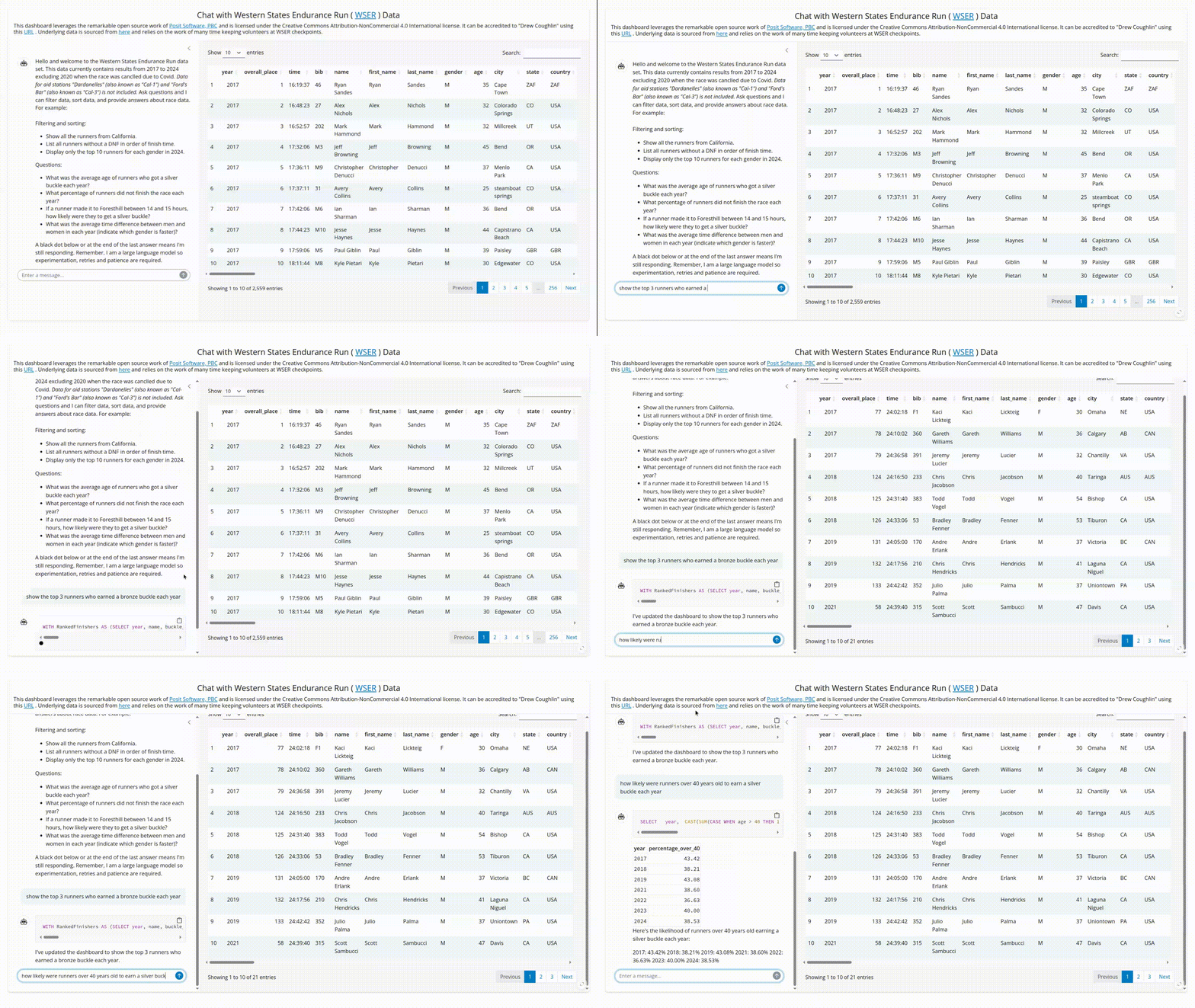
More than another dashboard
The Western States Endurance Run (WSER) is the world’s oldest 100 mile trail race and epitomizes trail running’s supportive community. I was fortunate enough to enter and finish the race a few years back so I wanted to give something back to that community. Luckily, the event organizers and volunteers keep meticulous records, which allowed me to initially develop a traditional Shiny dashboard that helps participants and enthusiasts analyze past race results.
I thought my little side project was done until I stumbled across the fantastic multilingual querychat package from Posit. This wonderful package lets you use LLMs for tabular data analysis within both R and Python Shiny frameworks. I could now take my original dashboard and transform it into something much more powerful and flexible with about the same effort it takes to decide which running shoes to wear.
How querychat wins the race
Leveraging LLMs for tabular data analysis has been in the ether for a while now but I hadn’t seen it effectively and elegantly implemented until the querychat package. Here’s why it’s so brilliant:
- It makes the LLM understand your data without sharing your data: You just supply your data table with a well defined schema and, optionally though recommended, create a simple markdown file that acts as a system prompt with any additional data descriptions and behavior instructions and the model does the rest.
- SQL without the typing: The package uses LLMs to translate user questions into SQL queries. So when someone asks “What percentage of runners over 40 years old completed the race each year?” they get an answer and the SQL that generated the answer. And I get to pretend I built an AI assistant from scratch. Win-win!
- Data privacy that doesn’t require a law degree: The LLM never sees the actual data, just the schema and data descriptions. This wasn’t an issue for publicly available race results, but it’s extremely valuable when you don’t want private data leaked to an external LLM.
- LLM knowledge not required: Details of how an LLM actually works under the hood isn’t assumed or required. All you need is your tabular data, an API key to access an LLM model and a few simple configuration components.
Both the R and Python querychat package versions are well documented. Very little is required to quickly get up and running, other than the data itself and a few configuration options in the Shiny app file. My app uses the R Shiny version of querychat, so my configuration is this simple:
GOOGLE_API_KEY <- Sys.getenv("GOOGLE_API_KEY")


querychat_config <- querychat_init(wser_results,
                                greeting = readLines("greeting.md"),
                                data_description = readLines("data_description.md"),
                                create_chat_func = purrr::partial(ellmer::chat_gemini,
                                                                    model = "gemini-2.5-flash-preview-05-20"))
The greeting.md and data_description.md markdown components referenced in my configuration aren’t even strictly required, but they are recommended for guiding both your audience and the model. The data_description.md provides system prompt data contextualization. Here are a few example lines from my app’s data_description.md file:
Display time calculation results in hours, minutes and seconds format.
Consider all text values case insensitive.
If the "finish_time" column is null then the runner did not finish the race.
Additional details on the R version configuration options are succinctly explained and the Python version configuration is very similar. Beyond that, the R Shiny app file ui and server components can be extremely basic such as mine shown below or you can add additional elements that leverage the reactive data frame from Shiny outputs and reactive expressions.
ui <- page_fillable(
  card(
           full_screen = TRUE,
           card_header("<header text"),
             layout_sidebar(
     border = TRUE,
     border_color = "#4682B4",
     bg = "white",
     sidebar = querychat_sidebar("chat", width = "33%"),
     DT::DTOutput("dt")
             )
   )
)


server <- function(input, output, session) {
  querychat <- querychat_server("chat", querychat_config)
  output$dt <- DT::renderDT({
    DT::datatable(querychat$df())
  })
}Deployment: Almost Too Easy
Posit Connect Cloud is an excellent option for hosting various analysis projects and deploying my Shiny applications there was ridiculously easy. The Posit team kindly guided me through one small manual step of tweaking the required manifest.json file telling the querychat’s duckdb package dependency to install from CRAN instead of GitHub.
We’re going to be OK in the LLM era
Turns out, adapting to the brave new world of LLMs isn’t as daunting as training for a 100-miler (thankfully). With good data and amazing frameworks like querychat and Posit Connect Cloud, we can enhance our analytics efforts without throwing away everything we know or completely reinventing ourselves. We just need to keep finding intriguing data and asking interesting questions while letting the LLMs handle some of the heavy lifting along the way.
Related Content

Introducing Positron on Amazon SageMaker

Dear Past Me: A Data Analyst's Letter on Moving Beyond Spreadsheets to...
