Interactive documents: An incredibly easy way to use Shiny
R Markdown’s new interactive documents provide a quick, light-weight way to use Shiny. An interactive document embeds Shiny elements in an R Markdown report. The report becomes “live”, a choose your own adventure that readers can control and explore. Interactive documents are easy to create and easy to share.
Create an interactive document
To create an interactive document use RStudio to create a new R Markdown file, choose the Shiny document template, then click “Run Document” to show a preview:

Embed R code chunks in your report where you like. Interactive documents use the same syntax as R Markdown and knitr. Set echo = FALSE. Your reader won’t see the code, just its results.

Include Shiny widgets and outputs in your code chunks. R Markdown will insert the widgets directly into your final document. When a reader toggles a widget, the parts of the document that depend on it will update instantly.
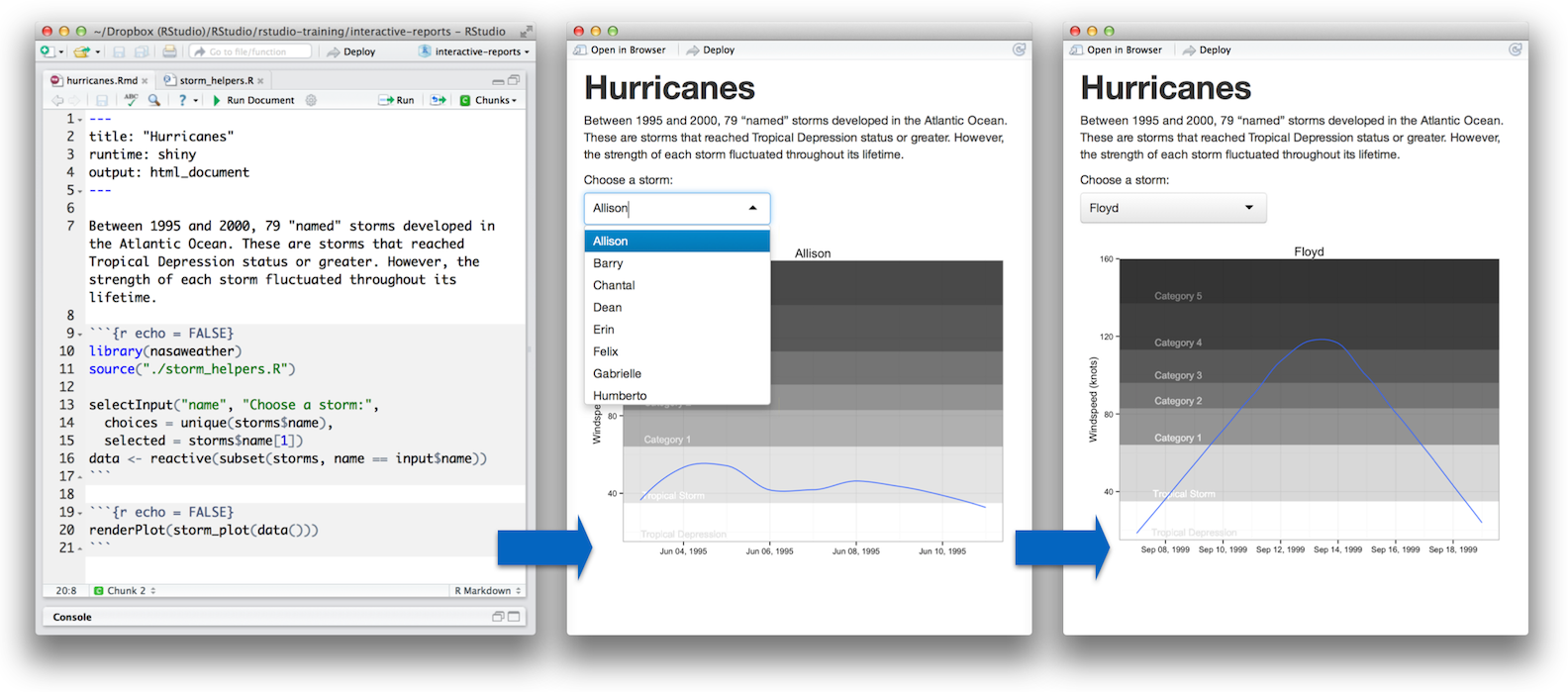
That’s it! No extra files are needed.
Note that in order to use interactive documents you should be running the latest version of RStudio (v0.98.932 or higher). Alternatively if you are not using RStudio be sure to follow the directions here to install all of the required components.
Use pre-packaged tools
Interactive documents make it easy to insert powerful tools into a report. For example, you can insert a kmeans clustering tool into your document with one line of code, as below. kmeans_cluster is a widget built from a Shiny app and intended for use in interactive documents.

You can build your own widgets with shinyApp, a new function that repackages Shiny apps as functions. shinyApp is easy to use. Its first argument takes the code that appears in an app’s ui.R file. The second argument takes the code that appears in the app’s server.R file. The source of kmeans_cluster reveals how simple this is.
Be a hero
Ready to be a hero? You can use the shinyApp function to make out of the box widgets that students, teachers, and data scientists will use everyday. Widgets can
fit models
compare distributions
visualize data
demonstrate teaching examples
act as quizzes or multiple choice questions
and more
These widgets are not made yet, they are low hanging fruit for any Shiny developer. If you know how to program with Shiny (or want to learn), and would like to make your mark on R, consider authoring a package that makes widgets available for interactive documents.
Get started!
To learn more about interactive documents visit https://bookdown.org/yihui/rmarkdown/shiny-documents.html.
Related Content

How to secure your organization's agent plugins in Posit Package Manag...

How Posit Team governs AI for enterprise data science and research
