Snowflake Native Apps vs. Connected Apps for financial services



Which Snowflake app framework fits regulated workloads in banking and insurance?
Snowflake offers two ways to build and distribute applications on its platform: Native Apps run entirely inside the consumer’s Snowflake account, while Connected Apps run in the provider’s own infrastructure and query Snowflake data across a network. For financial services and insurance teams operating under SR 11-7 (Federal Reserve guidance on model risk management), the Sarbanes-Oxley Act (SOX), the Gramm-Leach-Bliley Act (GLBA), and NAIC model laws, that distinction has direct implications for data residency, model risk management, and audit. This post walks through how the two frameworks differ and when each fits. It also covers how the Posit Team Native App brings R and Python data science (Posit Workbench, Posit Connect, and Posit Package Manager) into your Snowflake account so data stays inside of Snowflake.
If you work in financial services or insurance, you already know the tension behind that architecture choice: your data science teams need flexibility to build and iterate fast, but your compliance and IT teams need strict governance over where data moves and who touches it. Snowflake’s Native App Framework and Connected App model offer two distinct approaches to resolving that tension. And if your teams work in R and Python, Posit’s platform runs natively inside Snowflake, so R and Python teams keep their tools without breaking governance.
What’s the difference between Snowflake Native Apps and Connected Apps?
Snowflake offers two models for building and distributing applications on its platform. They share some common ground (in-place data access, role-based security, elastic compute) but differ in where application logic lives.
- Native Apps run entirely inside Snowflake. The application code, the data it processes, and the compute resources it uses all stay within the consumer’s Snowflake account. Providers package their applications using stored procedures, user-defined functions, Snowpark, and Snowpark Container Services. Consumers install them directly from the Snowflake Marketplace.
- Connected Apps operate outside Snowflake. The application’s user interface and processing layer run in the provider’s own infrastructure, but they connect back into the consumer’s Snowflake account to access data. The data itself stays in Snowflake, but the application code that processes it does not.
Here’s the short version:
| Native Apps | Connected Apps | |
| Where logic runs | Inside the consumer’s Snowflake account | In the provider’s environment |
| Data movement | None. Data never leaves Snowflake. | Data stays in Snowflake, but queries cross the network |
| Distribution | Snowflake Marketplace | Snowflake Marketplace or direct |
| Security model | Inherits Snowflake RBAC, encryption, and governance | Requires secure API credentials and external access controls |
| Best for | Workloads where data sovereignty is non-negotiable | Providers with existing application infrastructure who need Snowflake data access |
Regulatory frameworks impose specific requirements on where data resides, how models are documented, and who has access to sensitive information. Native Apps satisfy these requirements architecturally: nothing leaves Snowflake.
Why do Snowflake Native Apps matter for regulated industries?
In financial services, model risk management (MRM) requirements mean every quantitative model needs documentation, validation, and an audit trail. Credit risk models, fraud detection pipelines, and actuarial pricing workflows all fall under this scrutiny.
Native Apps address several of these concerns by design:
- Data never leaves the account. For organizations subject to the Gramm-Leach-Bliley Act (GLBA), the Health Insurance Portability and Accountability Act (HIPAA), or the General Data Protection Regulation (GDPR), this is a significant compliance advantage. There is no data egress, no external storage, and no ambiguity about where sensitive customer data resides.
- Snowflake’s security model applies automatically. Role-based access control (RBAC), encryption at rest and in transit, and audit logging all carry over to applications running as Native Apps. You do not need to build a parallel security layer for your analytics tools.
- Reproducibility is built into the architecture. Native Apps run on versioned packages within a controlled compute environment. For teams that need to demonstrate to regulators that an analysis can be reproduced exactly, this is valuable.
- FedRAMP support is available. As of late 2025, Snowflake Native Apps with containers on AWS reached Federal Risk and Authorization Management Program (FedRAMP) general availability, which matters for government-adjacent financial institutions and insurers.
Consider an insurance company that builds actuarial pricing models using generalized linear models (GLMs) in R. Today, that team might export data from Snowflake to a local environment, run the model, and push results back. Each step introduces risk: data leaves the secure network, the local environment may not match production, and the pipeline is difficult to audit. With a Native App architecture, the entire workflow stays inside Snowflake.
When should you use a Connected App instead of a Native App?
Connected apps still serve a real purpose. If your organization uses a third-party analytics vendor that has built its product on its own infrastructure, the connected app model lets that vendor access your Snowflake data without requiring you to move it elsewhere.
For financial services, common connected app scenarios include third-party data enrichment services (credit bureau data, market data feeds), marketing analytics platforms that need access to customer data for segmentation, and specialized compliance monitoring tools.
With connected apps, queries and results travel over the network between your Snowflake account and the provider's infrastructure. Your data stays in Snowflake.
For many use cases, this is perfectly acceptable. For workloads involving personally identifiable information (PII), model validation, or regulatory reporting, the native app model typically provides stronger guarantees.
What does the Snowflake + Posit architecture look like?
The picture is simpler than most enterprise data science stacks:
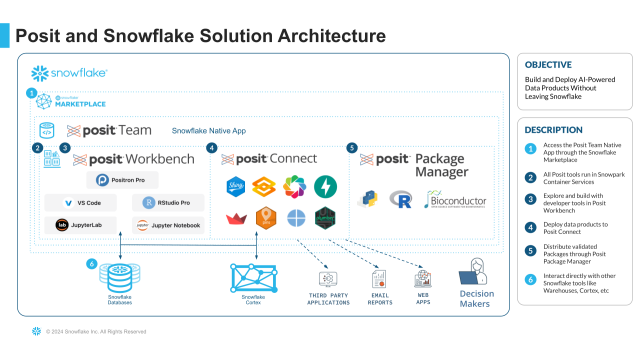
With Posit, financial services and insurance teams can run LLM-powered analytics on regulated data inside Snowflake. R and Python sessions reach Snowflake Cortex (which runs large language models (LLMs) inside your Snowflake account, on data already governed by your account roles and policies) through Snowpark or the standard Snowflake drivers. Posit Connect picks up published content from Workbench and serves it inside the same native app. The credentials your data scientists use are Snowflake credentials, so role-based access on the underlying tables also governs who can call which Cortex function on which data.
What is the Posit Team Native App on Snowflake?
The Posit Team Native App packages the full Posit data science platform (Posit Workbench, Posit Connect, and Posit Package Manager) into a single application running on Snowpark Container Services. You install it from the Snowflake Marketplace, and your data science team gets access to RStudio, Positron, Jupyter, and VS Code, all running inside your Snowflake account.
For financial services and insurance organizations, this solves a specific set of problems.
Development: Posit Workbench in Snowflake
With the Posit Team Native App, your data scientists open Posit Workbench and start an R or Python session. The IDE runs inside Snowpark Container Services, which means every query they write hits Snowflake data directly. There is no data export step, no local copies, and no ambiguity about data lineage.
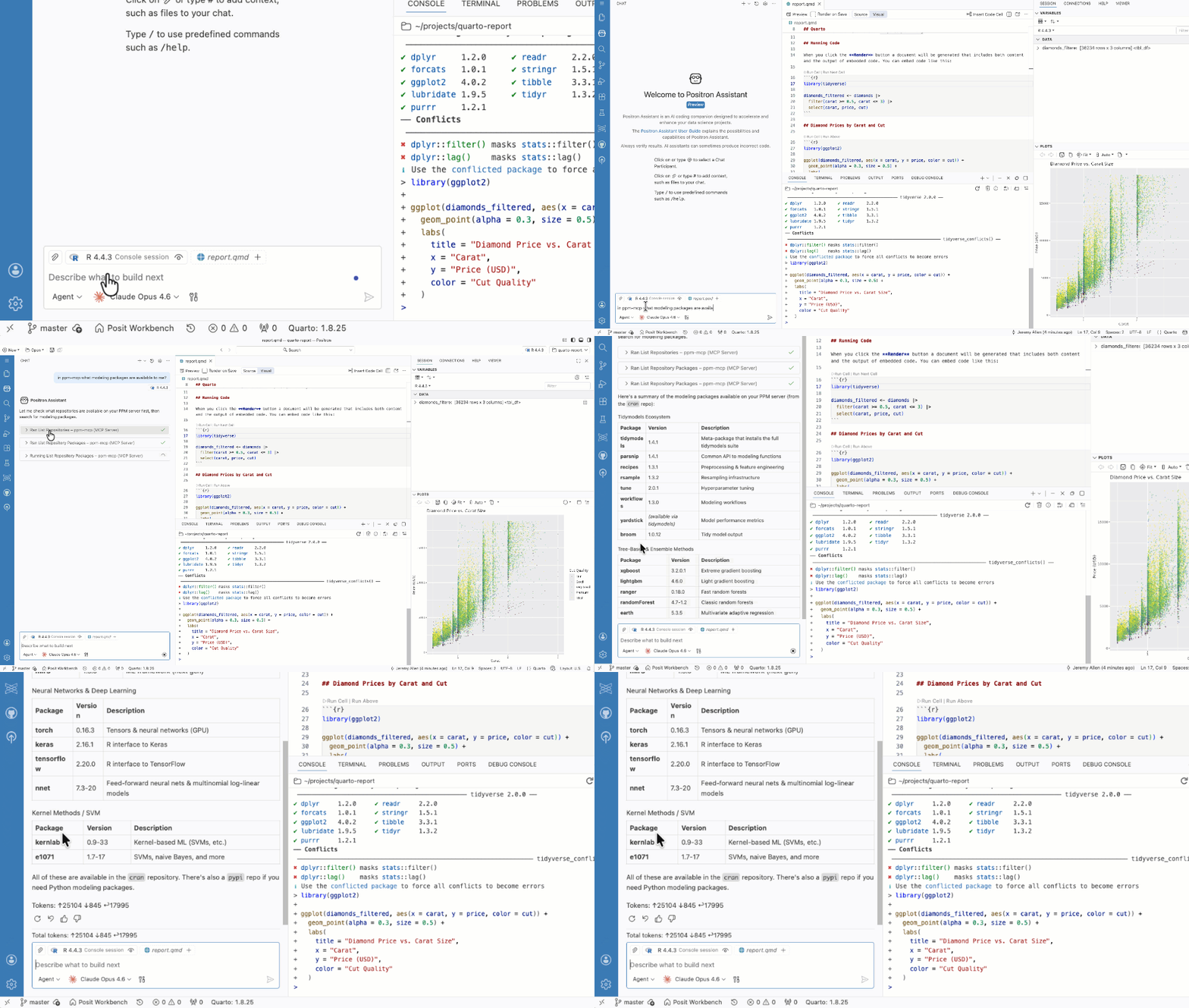
Positron, Posit’s next-generation IDE built for data science, is also available inWorkbench, part of the Posit Team Native App. It includes native AI capabilities for agentic code completion and exploratory data analysis, plus a Snowflake Cortex integration. Learn more about the Posit and Snowflake Cortex integration.
Deployment: Posit Connect in Snowflake
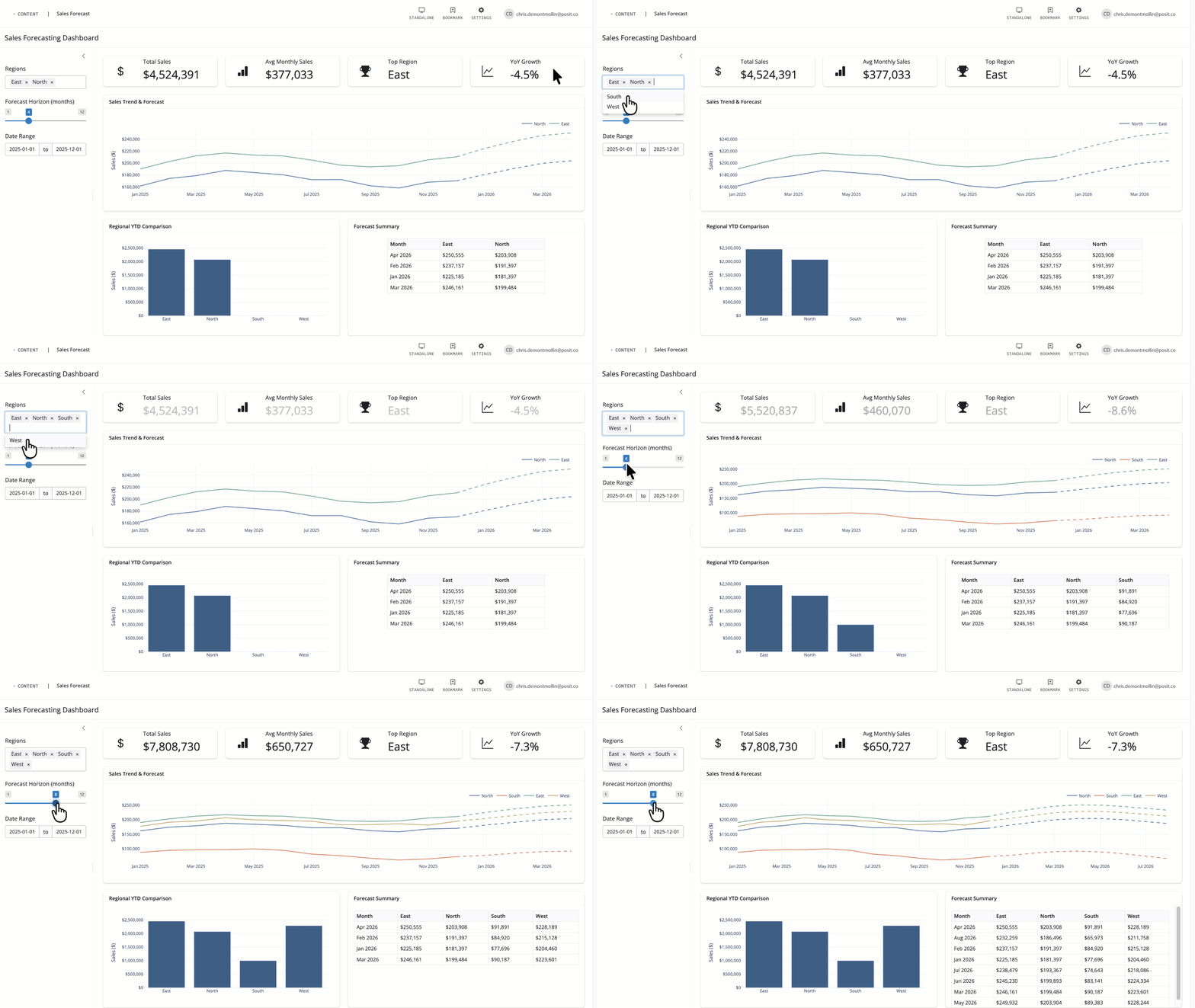
Once your team has built a model, a Shiny dashboard, or a Quarto report, they need to share it with stakeholders. Posit Connect handles deployment and access control, and it runs inside Snowflake as part of the Posit Team Native App.For example:
- Credit risk: Publish a Shiny application that lets portfolio managers explore default probability distributions by segment.
- Actuarial: Deploy a parameterized Quarto report that generates loss triangle analyses on a schedule.
- Fraud detection: Expose a scoring model as a Plumber or FastAPI endpoint that other systems call in real time.
All of these run inside Snowflake. The dashboards and reports inherit Snowflake’s role-based access control, so viewers only see data they are authorized to access. This is particularly important in banking, where different business units may have different data entitlements. Read the Posit Connect on Snowflake GA announcement.
Governance: Posit Package Manager
For regulated industries, reproducibility depends on controlling the software environment. Posit Package Manager provides curated, date-based snapshots of CRAN and PyPI packages. Packages with known vulnerabilities can be blocked. Your validation team can approve a specific set of package versions, and every data scientist in the organization uses exactly that set.
In insurance, where actuarial models built with packages like {actuar}, {ChainLadder}, or {insuranceData} may be part of rate filings subject to NAIC standards, this kind of environment control is not optional. It is a regulatory expectation. Posit Package Manager delivers it. See how Posit Package Manager supports regulated R and Python environments.
How does the Posit Team native app work end-to-end? A financial services workflow
Here’s a concrete example of how these pieces connect for an insurance organization.
An actuarial team needs to build a claims severity model. They work in R, using GLMs and the {actuar} package for loss distributions. Their workflow looks like this:
- Develop in Posit Workbench (running inside Snowflake via the Posit Team Native App). They query claims data directly from Snowflake tables, build and iterate on their model, and version their code in Git.
- Translate the model to SQL using Orbital, which converts tidymodels workflows into native SQL. This allows predictions to run at Snowflake speed, directly in the database, without moving data out.
- Deploy a Shiny dashboard to Posit Connect that lets underwriters explore model outputs by region and line of business. The dashboard queries Snowflake live, so it always reflects current data.
- Govern the environment using Posit Package Manager, which ensures every team member uses the same validated package versions. When the model goes through internal review or regulatory filing, the exact software environment is documented and reproducible.
The entire workflow happens inside Snowflake and data never leaves it. The IT team manages one platform (Snowflake) rather than a separate analytics infrastructure. And procurement goes through the Snowflake Marketplace, simplifying vendor management and allowing customers to use their existing capacity credits.
How can I get started with the Posit Team Native App?
The Posit Team Native App is available on the Snowflake Marketplace. Installation takes minutes, and your team can start working immediately. If you are evaluating how Snowflake’s application frameworks fit into your organization’s analytics strategy, here are some resources to explore:
- Posit + Snowflake partnership page for an overview of integration capabilities and the latest updates
- Curious about Posit Team, but not ready to commit? Start a 30-day free trial of the Posit Team Native App immediately — no sales calls required.
- Check out Posit’s Connected app listings on the Snowflake Marketplace: Posit Workbench / Posit Connect / Posit Package Manager
- Posit Team Native App documentation for setup and configuration details
- Snowflake Native Apps vs. Connected Apps for a deeper comparison of the two frameworks
- The enterprise guide to scaling AI-powered data science with Posit + Snowflake ebook
- Learn about Posit’s seamless integration with Snowflake Cortex
- Blog: Doing More with Cortex: Introducing the Databot Snowflake Skill for Semantic Awareness
You can also schedule a demo with a Posit expert to see the Native App in action with your specific use cases.
About Posit
Posit is the data science platform for R and Python, used by teams across financial services, insurance, life sciences, and government. Posit Team, including Posit Workbench, Posit Connect, and Posit Package Manager, gives organizations in regulated industries the tools to build, deploy, and govern analytic work inside the Snowflake AI Data Cloud. Learn more at posit.co.
About Snowflake
Snowflake delivers the AI Data Cloud — a global network where thousands of organizations mobilize data with near-unlimited scale, concurrency, and performance. Snowflake's Native App Framework and Snowpark Container Services allow software partners like Posit to run their applications inside customer Snowflake accounts, giving regulated industries a single governance framework for both data and the analytical tools that work on it. Learn more at snowflake.com.
Frequently asked questions
What is a Snowflake Native App?
A Snowflake Native App is an application that runs entirely inside a consumer’s Snowflake account, with its code, data, and compute all staying within Snowflake’s security boundary. Providers package Native Apps using stored procedures, UDFs, Snowpark, and Snowpark Container Services, and distribute them through the Snowflake Marketplace.
How do Snowflake Native Apps differ from Connected Apps?
Native Apps run inside the consumer’s Snowflake account, so data never leaves Snowflake. Connected Apps run in the provider’s own infrastructure and connect back to Snowflake to query data, which means queries and results cross a network. As of February 2026, both can be distributed through the Snowflake Marketplace.
Why do financial services and insurance teams prefer Snowflake Native Apps?
Native Apps satisfy core regulatory requirements architecturally: data never leaves the account, Snowflake’s role-based access control and encryption apply automatically, and the versioned compute environment supports reproducibility. This addresses requirements under SR 11-7 model risk management, SOX, GLBA, HIPAA, and NAIC model laws without requiring a parallel security layer.
What is the Posit Team Native App?
The Posit Team Native App packages Posit Workbench, Posit Connect, and Posit Package Manager into a single application running on Snowpark Container Services inside a customer’s Snowflake account. Data science teams get RStudio, Positron, Jupyter, and VS Code with direct access to Snowflake data, no data export required.
Can I try the Posit Team Native App before buying?
Yes. The Posit Team Native App is available on the Snowflake Marketplace with a 30-day free trial. No sales call is required to start the trial.
When should I choose a Connected App over a Native App on Snowflake?
Choose a Connected App when you’re using a third-party vendor whose product already runs on its own infrastructure, common examples include credit bureau data feeds, market data services, and marketing analytics platforms. For workloads involving PII, model validation, or regulatory reporting, Native Apps typically provide stronger governance guarantees.

Isabel Hosley

Denise Martinez
Related Content

How to secure your organization's agent plugins in Posit Package Manag...

How Posit Team governs AI for enterprise data science and research
