
The right models, right where you work
Posit AI Pass powers Posit Assistant in RStudio, Positron, and the terminal. One subscription gives you models from Anthropic and open weights models, from frontier to low cost, all tested by Posit on data science work.
New subscribers pay $5 for the first month, then $20/month after, for $15 in monthly Posit Assistant credits. Cancel anytime before your next renewal date.
Already have a model provider? Use Posit Assistant with your own key →


Updated: August 2026
Introducing Posit AI
Read the announcement about why we built an AI assistant specifically designed for the high-stakes reality of data analysis.

Workflows
See what’s possible when you think first and let the code follow
-
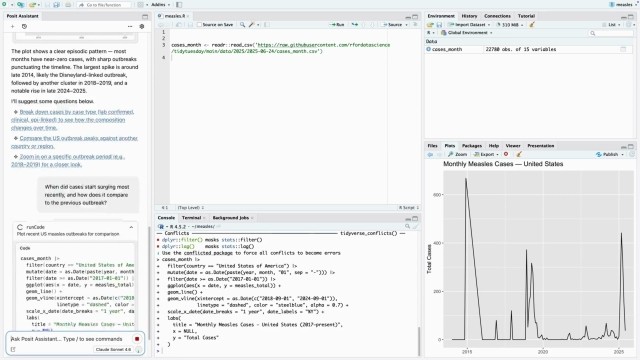
Play video Posit Assistant - Feature Hero
-
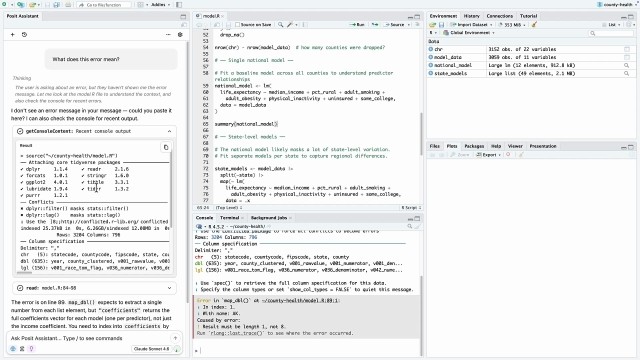
Play video Posit Assistant - RStudio - Error Message
-
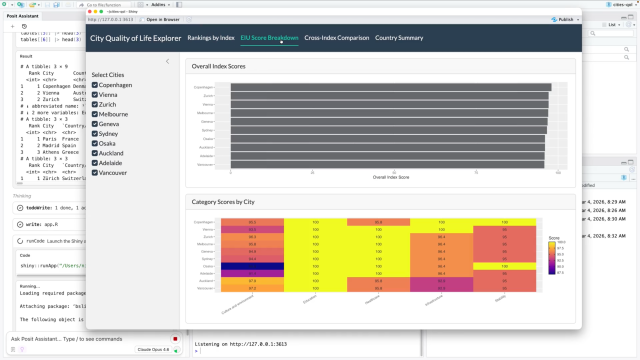


NEXT EDIT SUGGESTIONS
Work as fast as you think.
Next Edit Suggestions (NES) speeds up your coding process by offering targeted code completions as you type. Because NES can see your live R session, its suggestions are specific to what you’re actively working on. It operates in the background, surfacing helpful code for joining tables, updating packages, or anything else you’re working on.
POSIT ASSISTANT
Think deeply. Let Posit Assistant handle the rest.
Code is no longer the bottleneck. With Posit Assistant, your thinking is the only limit. It lives where you work and sees what you see, so you can ask it to instantly visualize complex patterns, reshape gnarly datasets, debug complex errors, or explain how something works, without ever leaving RStudio, Positron, or your terminal.
ZERO DATA RETENTION
Set your data retention preferences
Select models available through Posit AI Pass are backed by a Zero Data Retention agreement with our providers. For all models, you choose whether to opt in to trace data collection at sign-up.

Pricing
Starting at $20/month for the base subscription
Start for $5 this month, including everything you need to accelerate analysis:
- Posit Assistant: A monthly credit allowance for a curated lineup of commercial and open weights models selected for data science and analysis.
- Next-Edit Suggestions: Unlimited use of context-aware code completion via NES.
- Deep Context: AI that sees your live data frames and session state.
- Model Choice: Switch between Claude models and lower-cost open weights models to match model capability and token usage to your work.
- Data Privacy: Set your data retention preferences for Posit AI Pass. Select models are backed by a Zero Data Retention agreement with our providers. For more information, see our FAQ.
- Flexibility for Power Weeks: Crunching for a deadline or a monster project? If you hit your limit, activate automatic top-offs with additional funds to stay in the flow.
Data Science Lab
Watch a real analysis, raw and unedited.
In this Data Science Lab from February 2026, Hadley Wickham takes a raw TidyTuesday dataset and live-codes an analysis using Posit AI. Watch how Posit Assistant navigates the messy reality of data wrangling, missing values, and plotting syntax in real time.
Bouncing between a chatbot and RStudio feels like the old days of copying and pasting plots into a Word document. And because the chatbot doesn’t know what’s in your R session, it often gives the wrong answer. Posit AI closes the loop by embedding the chatbot in RStudio, letting it see what data and packages you have loaded and run code on your behalf.



FAQs
Posit AI Pass is a subscription that powers Posit Assistant and Next Edit Suggestions, start for $5 this month.
Posit Assistant is a specialized data science agent that runs in RStudio, Positron, and the terminal, connecting to your live R and Python sessions to write, debug, and explain code based on the work you’re currently doing. Posit Assistant can be powered by Posit AI Pass or by bringing your own API key from select model providers.
Yes. Posit Assistant is included by default with Positron, a data science IDE by Posit, where you can use it to analyze data in R or Python.
A curated lineup of Claude models and lower-cost open weights models, selected by Posit for data science work.
Select models are covered by a Zero Data Retention agreement with our providers. Across the full model lineup, conversation histories are not stored unless you opt in to data retention at sign-up.
Posit Assistant sees your live data frames, loaded packages, and environment state, instead of just reading and writing files, so it can perform the deep analysis you need to do. And it ships with data-science-specific skills for tidymodels, scikit-learn, Shiny, and Quarto.
Documentation

Give it your best shot
There are no complicated settings to configure or API keys to manage. Open your IDE, load the messiest dataset you have, and see what it feels like to work with an assistant that actually understands the way you work.