How Posit Team governs AI for enterprise data science and research




A guide for IT and data leaders on governing AI coding assistants, agents, and packages with Posit Workbench, Posit Connect, and Posit Package Manager.
How does Posit Team govern AI? Posit Team governs AI assistants, agents, and the tools they install, applying the controls you already use for human work to AI assistants and agents. Your organization can expand AI use without building and accrediting a separate AI platform. Because IT reviews one system instead of two, teams can start using AI sooner. AI-assisted work runs in the same reproducible environments, under the same access controls, as the rest of your analysis.
Posit Team is the bundle of Posit Workbench, Posit Connect, and Posit Package Manager, and Workbench includes Posit Assistant in the RStudio and Positron IDEs.
- In Posit Assistant, users set fine-grained permissions and model selection.
- In Workbench, administrators set and enforce which AI providers, models, and MCP servers Posit Assistant can use, globally, per group, or per user, so Posit Assistant sends code and data only to the providers and tools your organization has approved.
- In Package Manager, administrators govern the packages, IDE extensions, and agent plugins that users and assistants install. The Package Manager MCP server tells assistants what that policy allows, so agents follow the same package rules as people and work within them from the start instead of finding them through failed installs.
In Connect, administrators control who can publish work and which groups can use AI integrations, so teams can expand AI use one group at a time while AI-assisted work reaches decision-makers through the publishing path you already trust.
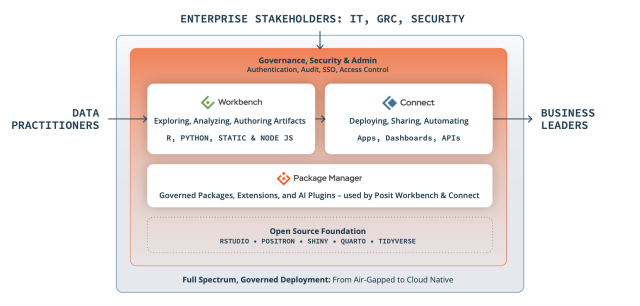
AI agents are already running in most organizations, and the open question for IT and data leaders is whether those agents run somewhere the organization can govern.
Current customers can turn these controls on in administration settings, and teams evaluating Posit Team can start a conversation with us to scope an evaluation.
Why Posit's approach to AI helps you create trustworthy insights
The people who receive your results usually cannot check them directly, so they have to trust the analysis and the software that produced it. We hold every AI feature in Posit Team to one test: can that trust be shown and verified? Four principles guide the design.
- Code first. AI output is code that people can inspect, review, and put under version control.
- Human in the loop. The data scientist directs the analysis. The assistant proposes and runs code under their supervision.
- Session aware, data private. Posit Assistant uses the context of your live session. Your data stays within your infrastructure and the AI provider you approved.
- Governable environments. Administrators set policy at the platform layer, so individual users do not have to.
Govern the AI tools your teams use, with Posit Workbench
Workbench gives administrators two kinds of settings for Posit Assistant, the data science AI agent in RStudio Pro and Positron Pro sessions. Default settings are a starting configuration that users can change. Enforced settings are limits that users cannot override, and Workbench applies them to each user when a session starts or on session reload. Both kinds use the same JSON schema as Posit Assistant's own settings file, so there is no separate policy format to learn. In preview, administrators can control
- which providers are reachable
- which models are allowed
- which MCP servers the assistant can reach
- which AI agent plugins are allowed
- whether the assistant is enabled at all
Each setting can apply globally, to a group from your existing identity provider, or to a single user. A group section overrides the global section, and a user section overrides any group. An enforced setting is a ceiling: lower layers can restrict it further but cannot loosen it, and a narrower default never overrides a broader enforced setting. For example, an administrator can turn Posit Assistant off globally, turn it on for the data science group, and turn it off again for one contractor account.
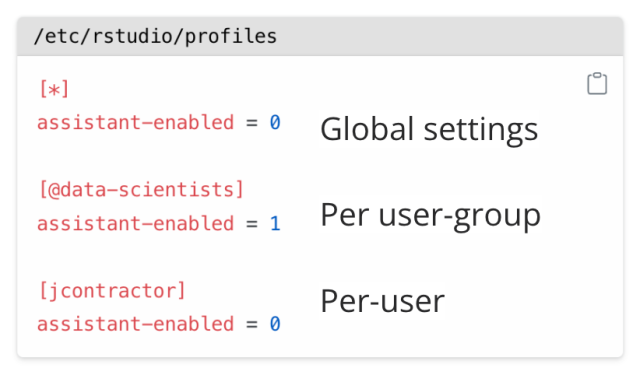
Workbench can also control which Positron extensions users may install and whether to install directly from Posit’s OpenVSX mirror or their own self-hosted Posit Package Manager instance, so teams draw from approved tools rather than reaching for unreviewed ones. Because these settings apply at the platform layer, they apply whether an analyst is typing code, running a notebook in Positron, or letting an agent do the work.
Model providers
Posit Assistant works with the model providers your organization already uses. Anthropic, OpenAI, AWS Bedrock, Microsoft Foundry, Snowflake Cortex, DeepSeek, LM Studio, GitHub Copilot, Google Vertex AI (Gemini Enterprise Agent Platform), Databricks, LiteLLM, OpenCode, Portkey, and OpenAI compatible providers with your own base URL, and more. See the linked table for their availability status.
Managed Credentials
Managed Credentials give your administrators centralized control over the authorization credentials Posit Assistant uses, with support for AWS Bedrock, Snowflake Cortex, and Microsoft Foundry. Keys stay out of user code, and requests go directly from the session to your approved provider. Because Posit Team runs in your infrastructure, Posit does not route, intercept, or store prompts, code, or responses.
Posit Assistant
Posit Assistant has its own guardrails, which users can adjust within the limits administrators set. It pauses for guidance during exploration instead of running long autonomous loops. Per-tool permissions let your team allow, ask, or deny each action, with pattern matching for finer rules, such as allowing git commands while denying rm. When a user approves an action, they choose whether the approval applies once, for the rest of the session, or for the project. Shell commands can run inside operating-system sandboxing that blocks network access and restricts writes to the workspace. Posit Assistant avoids reading secret files such as .env and .Renviron. In plan mode, the assistant proposes its approach for approval before it changes any code.
Posit Assistant also shows each user their own usage inside the IDE session, including input and output tokens and cache reads and writes, so users can see what their work costs as they go.
Detecting and logging human vs agent (on the roadmap)
Workbench plans to record R and Python console and notebook inputs from Positron Pro sessions to a central audit directory, tagging each entry to distinguish human-initiated from agent-initiated code execution. This capability has not shipped yet.
Audit scenario
Imagine a data science team must show a reviewer exactly where an AI agent contributed to an analysis that informed a published figure. Their security office has already restricted the assistant to an approved model provider through enforced settings and routed credentials through Managed Credentials, which narrows what a reviewer needs to check today. When console auditing ships, the reviewer will be able to see which inputs the agent ran in Workbench's audit directory.
For product details, see the Workbench documentation.
Govern the packages and tools AI can install, with Posit Package Manager
Package Manager has governed R and Python packages for years, and it now applies the same governance and security model to everything else your teams and their agents install. That model covers three layers: R and Python packages at runtime, VS Code extensions in the IDE, and agent plugins in the agent harness. Administrators host curated CRAN, PyPI, and Bioconductor repositories with approved subsets, so analysts and agents install from a full mirror or a vetted subset instead of the open internet.
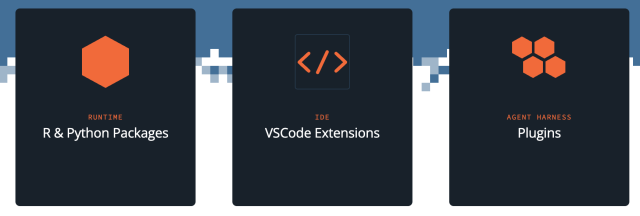
Date-based snapshots pin a repository to a known-good state, which is what reproducibility and audit reviews need. The offline downloader brings packages, binaries, extensions, agent plugins, and vulnerability metadata across an air gap.
Vulnerability blocking and reporting
Known vulnerabilities from the Open Source Vulnerabilities (OSV) database appear as metadata on each package, giving your administrators what they need to set policy and block vulnerable packages.
Blocklist rules let administrators
- block packages by vulnerability severity threshold, specific CVEs, license type, version range, and deleted-package status
- set allowlist overrides where needed
- add a cooldown period with minimum-age blocking, which holds a brand-new package release until it has aged past a set window
- set namespace-based blocking for VS Code extensions
Agent Plugin repositories
Your AI agents rely on more than packages. They also pull in skills, sub-agents, hooks, and MCP servers. Package Manager can host these Agent Plugins from the same governed, snapshot-pinned repositories it uses for R and Python packages. Administrators upload a plugin bundle directly or point Package Manager at an upstream Git repository, where new commits and tags are ingested automatically as plugin versions. Tools like Posit Assistant, Claude Code and VS Code install them through their normal marketplace flow, so the plugins your agent runs are curated, versioned, and reproducible alongside the rest of what your teams install. Agent Plugin Hosting graduated from experimental to generally available in Package Manager 2026.09.0, so administrators no longer need to enable an experimental flag first.
Package Manager MCP server
The Package Manager MCP server exposes your policy to AI assistants. It lets your agent know what is approved, which versions are pinned, and which packages have vulnerabilities, so your AI agents follow the same package policy as your researchers.
Imagine a team running an air-gapped network wants its AI assistant to suggest only packages that have cleared the cooldown period and review. The administrator mirrors approved repositories, sets blocklist rules by license type and severity, holds new releases with minimum-age blocking, and exposes the curated repository through the MCP server. Inside the disconnected environment, the assistant installs only from the governed set, and a pinned snapshot lets the team reproduce any earlier analysis.
For product details, see the Package Manager documentation.
Govern where AI-built work runs and who can reach it, with Posit Connect
Connect is where your data and research teams publish the reports, apps, models, APIs, and MCP servers that others depend on, and it governs who can reach that content and the AI services behind it. Connect provides single sign-on via SAML and OIDC across Okta, Entra ID, Google, and similar providers, along with role-based access, per-content user and group permissions, and access-request workflows.
Connect MCP server hosting
Building and testing an MCP server on a laptop is straightforward, but that setup runs into trouble the moment a teammate needs access or your security team asks how its credentials are managed. Hosting an MCP server on Connect turns it into a governed service that runs alongside the APIs and data or AI apps your team already deploys. Connect's built-in OAuth 2.1 authorization server lets AI clients authenticate users through a standard browser flow, so API keys stay out of config files. Connect’s built-in integrations handle the credential exchange to third-party services.
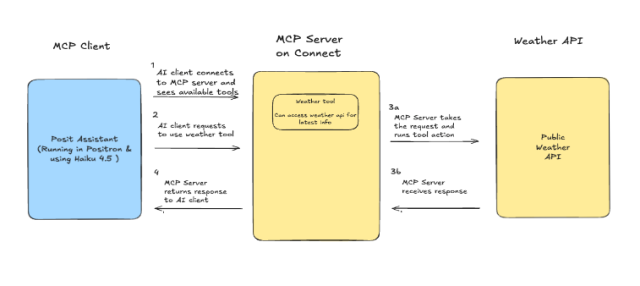
Administrators can also configure shared integrations with Anthropic, OpenAI, and Azure OpenAI models, with central rotation and auditing. Connect's audit logging records logins, deployments, permission changes, role changes, failed logins, and content sharing, and its OpenTelemetry integration sends metrics, traces, and logs to the observability backend you already run.
Imagine an organization wants AI clients across several teams to query an internal case-management database without granting anyone direct database access. A developer publishes an MCP server to Connect that exposes a small set of governed queries. Connect handles authentication, credentials can be managed centrally, and AI clients never see the credentials and can call only the tools the server exposes. Analysts get the answers they need, and the data stays behind the controls the organization already trusts.
For details, see the Connect documentation.
The same controls for human and AI work
Posit Team puts governance in every layer of the platform instead of adding a separate layer on top. Posit Assistant gives users fine-grained permissions and model selection. Workbench gives administrators enforced controls over providers, models, and access to MCP servers. Package Manager governs the packages, extensions, and Agent Plugins that people and agents install, and Connect governs the MCP servers and AI integrations that agents call.
Because these controls are part of the tools your teams use every day, the evidence a reviewer asks for comes from those same tools. Reproducible environments come from Package Manager snapshots, and audit logs come from Connect and Workbench, with human-versus-agent attribution planned for the Positron console. The controls that already make your human data science work reproducible and auditable now cover your AI work too, so there is no separate AI system to accredit and maintain.
See Posit in action
- Biogen runs AI trade-compliance workflows on Connect and raised global audit coverage from 10% to 100%.
- Gen Re processes 1,500 broker submissions a day through AI orchestration on Connect, cutting each submission from 30 minutes to 5 and saving roughly 600 hours a day. Its internal R packages are shared through Package Manager across 230 data scientists.
- Unity Health Toronto built CHARTWatch, a life-saving air-gapped early-warning system whose internal packages flow through Package Manager with version locking for reproducible deployment.
Built for regulated and disconnected environments
Posit Team runs entirely within your own infrastructure, including networks with no internet access. Workbench includes a FIPS mode with configurable AES-256 encryption, and Connect supports FIPS-compliant AES-256-GCM encryption of data at rest. All three products support configurable TLS. Customers use Posit Team in regulated environments, including FedRAMP and classified networks.
Posit Team also meets your teams where their data and compute already live. All of Posit Team runs as a managed service in Snowflake. As of September 2026, both Positron Pro and RStudio Pro are now available as options in AWS SageMaker via Posit Workbench. For teams in Palantir Foundry, a lite version of RStudio Pro is available as a managed service, and Posit Team includes built-in integrations for connecting to and running jobs on Databricks.
What is available now, in preview, and on the roadmap
Generally available today: Managed Credentials; Package Manager curated repositories for packages, IDE extensions, and agent plugins (including skills, hooks, and MCP servers), blocklist rules, minimum-age blocking, MCP server, and air-gapped downloader; Connect MCP server hosting, OAuth authorization server, audit logging, and OpenTelemetry integration.
Available in preview today: Posit Assistant enforced settings for RStudio and Positron, covering provider, model, and MCP server allowlisting, plus a single administrator control to enable Posit Assistant across RStudio Pro and Positron Pro sessions.
On the roadmap: Positron console auditing with human-versus-agent attribution.
Common questions about AI governance
Does Posit store the prompts or code sent to AI assistants? No. In Posit Team, AI requests travel from the session directly to your approved provider, and Posit does not route, intercept, or store prompts, code, or responses.
Can Posit Team run in an air-gapped network? Yes. Posit Team runs entirely within your own infrastructure, and Package Manager includes an offline downloader for packages, binaries, extensions, and vulnerability data, with offline license activation.
How does Posit show a reviewer where an AI agent contributed to an analysis? Workbench plans to record R and Python console and notebook inputs from Positron Pro sessions to a central audit directory, tagging each entry to distinguish human-initiated from agent-initiated code execution. This capability is on the roadmap and has not shipped yet.
Getting started
Posit Team brings AI governance into the workflow your data scientists and researchers already use. For a complete view of what has shipped, see each product's release notes.
We recently walked through all of this live with our AI governance team, and the recording and demo clips are available now. Check them out here!

Tom Mock

Sam Edwardes

Jeremy Allen
Related Content

How to secure your organization's agent plugins in Posit Package Manag...

From Plausible to Provable: Why We Say "Prove It With Posit"
