How to secure your organization's agent plugins in Posit Package Manager




Posit Package Manager now secures your agent plugins. Your data teams can adopt AI agents sooner, because plugins come from a repository your administrators curate, the same way they already curate R and Python packages. Host them in a dedicated plugins repository that pulls from both public and private sources and serves them, optionally pinned to a point in time, as one governed marketplace.
Your data scientists have already installed agent plugins. You probably did not approve them, and you almost certainly cannot list what they installed. That's how the ecosystem works across teams right now: someone finds a plugin they think will help and pulls it in without fully knowing what it can do. Posit Package Manager now brings positive control to your agent plugin ecosystem.
Schedule a call with our experts if you want to discuss how Package Manager fits into your architecture.
What is an agent plugin?
There are a lot of new terms in the AI agent space: skills, MCP servers, slash commands. An agent plugin bundles these resources into one package an AI tool can install:
- Skills: markdown files that teach the agent a procedure. Your internal validation workflow or your house style for Shiny modules.
- Sub-agents: separate agent configurations the main agent can delegate to.
- Hooks: shell commands the tool runs automatically on events like "before every edit" or "after every response."
- MCP and LSP servers: long-running processes the agent talks to for tools and context.
From a data scientist's perspective, this is a great way to combine your team's agent add-on capabilities into a single bundle. From an IT and security perspective, it's more concerning: skills are instructions injected into a model's context, hooks are arbitrary code that runs on a developer's machine without a prompt, and MCP servers are network-connected processes. A plugin is a shareable bundle of capability with the potential to execute arbitrary code.
A good skill turns an agent that vaguely knows R into one that follows your organization's actual review process. A plugin that bundles your internal data dictionary as an MCP server turns generic code suggestions into ones that reference your real tables. As with R and Python packages, the strategy is to limit what's approved, not block every plugin outright.
How does Posit Package Manager support plugin governance?
Package Manager has a plugins repository type. It serves plugins over a read-only Git endpoint:
https://<package-manager-address>/<repo>/latest/marketplace.gitThat endpoint is a real Git remote, so there is nothing for your users to learn:
# Claude Code
claude plugin marketplace add https://ppm.example.com/plugins/latest/marketplace.git
claude plugin install my-plugin@plugins
In Posit Assistant in Positron, users add marketplaces and plugins in the plugin manager.
Any tool that can install from a Git repo, such as VS Code, Codex, and Cursor, can install from Package Manager, enabling you to govern your data teams however they work.
You can add plugins to a Package Manager plugin repository in two ways:
- Upload your own plugins: As an administrator, you upload a plugin as a directory or as a .tar.gz or .zip bundle. This works the same way as uploading your own R and Python packages and VS Code extensions.
- Add plugins from a Git repository: Package Manager checks an upstream Git repository at regular intervals for new commits and tags, and adds each one as a new plugin version.
The specifications for agent skills, plugins, and marketplaces are still evolving. Package Manager's bundle detection stays flexible to match: it can detect a bundle defined by a marketplace.json, a single plugin from a plugin.json file, or auto-bundle a plugin from a single SKILL.md or a skills/ directory.
Can I mix public and private plugin repositories in Package Manager?
A plugins repository can subscribe to any combination of sources. So the public methodology plugin your team likes and the private plugin encoding your internal standards can be served from one URL, as one marketplace, with one governance story.
As an example, an org may want to clone from an external repository like Posit's own skills collection, posit-dev/skills. It is a public marketplace of AI skills for Posit development work, grouped into plugins by area: r-lib for R package development, shiny for app and theming work, quarto for authoring and alt text, connect for deployment, github for pull request workflows, and posit-dev for general code review and design skills.
It is a genuine multi-plugin marketplace, so Package Manager ingests each of those plugins separately, which is exactly the behavior you want when your team needs r-lib and quarto but has no use for the rest.
Your users get one line, then install by name:
claude plugin marketplace add https://ppm.example.com/agent-plugins/latest/marketplace.git

claude plugin install r-lib@agent-plugins              # from posit-dev/skills
claude plugin install validation-workflow@agent-plugins # from your internal repo
They browse public and internal plugins side by side and cannot tell which is which, because from their tool's perspective there is no difference.
What is the advantage of using Posit Package Manager to govern agent plugins?
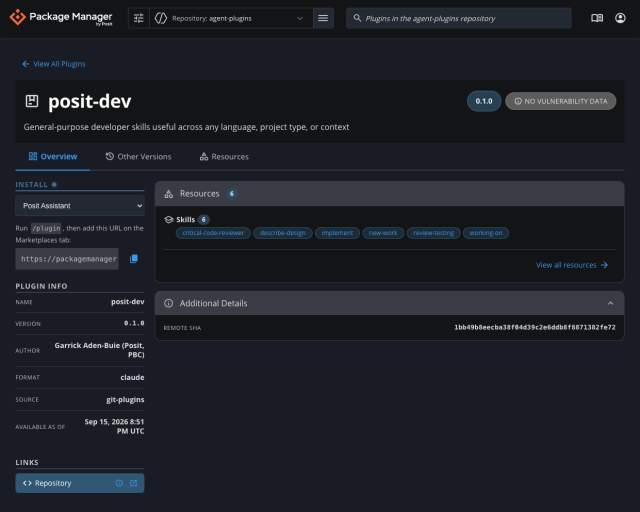
- A real inventory: Plugin repositories appear in the Package Manager web interface next to your R, Python, and VSX repositories, listable and searchable. Every plugin has a detail page showing its resources: which skills, which sub-agents, which hooks, which MCP and LSP servers. This gives you visibility into, and confidence in, the plugins you're serving.
- An approval record in the tool you already use: Plugin detail pages support the full Custom Metadata feature set. Attach a risk score, an owning team, a reviewer, a ticket number, an approval date.
- A boundary you can close: Create the repository with authenticated marketplaces only Package Manager users can download from.
- Air-gap compatibility: Package Manager already exists to serve packages to networks with no internet access. Plugins are served the same way.
How to pin a plugin repo to a date in Posit Package Manager
Package Manager can pin a plugins repository to an immutable snapshot, so an upstream change doesn't reach your users until you choose to adopt it. The frozen URL sits alongside latest on the repository's Setup page:
https://ppm.example.com/agent-plugins/2026-06-29+a7fstUZG/marketplace.gitThe identifier encodes the snapshot date plus a validating suffix, so it is reproducible. Point your teams at that URL instead of latest and they get exactly the plugins, at exactly the versions, that existed on that date. If upstream ships a new release the following week, the latest snapshot picks it up, but the pinned URL stays the same and nothing changes on anyone's machine.
Your data scientists get the plugin ecosystem and admins get an inventory, an approval trail, an authentication boundary, and immutable snapshots.
What agent plugin exploits have already happened?
Documented exploits already exist. Plugins arrive from unvetted sources, carry both instructions and executable code, run inside your most privileged development context, and update silently. In regulated environments, that shape would not pass for an R or Python package. There is no reason to accept it for agent plugins.
Skills can be a malware delivery channel. In February 2026, Snyk published research on 3,984 agent skills gathered from public skill hubs, the largest public corpus anyone had assembled.1 An October 2025 paper from EPFL researchers demonstrated the problem, hiding malicious instructions in skill files to exfiltrate data and showing that a user's approval of one action can carry over to a related harmful one.2
MCP servers get typosquatted like any other package. In September 2025, a malicious postmark-mcp npm package impersonating a legitimate project shipped an update that copied users' email communications to an attacker.3,4
Prompt injection can turn a legitimate tool into an exfiltration path. In May 2025, Invariant Labs demonstrated this against the official GitHub MCP server, a project with 14,000 stars and no vulnerability in its own code. An attacker files an issue on a public repo containing injected instructions. A user asks their agent to triage open issues. The agent reads the payload, pulls data from the user's private repositories, and publishes it in an autonomously created pull request on the public one.5
During the s1ngularity attack on the Nx build system in August 2025, a malicious postinstall script scanned developer filesystems for credentials and wallet files, posted the results to attacker-created GitHub repositories, among other hacks.6 Over 1,000 valid GitHub tokens, dozens of cloud credentials and npm tokens, roughly 20,000 files, and, in a second phase, more than 5,500 private repositories flipped to public across over 400 users and organizations.7
Frequently asked questions
- Which AI coding tools can install plugins from Package Manager? Any tool that installs from a Git repository, including Claude Code, VS Code's Chat: Install Plugin from Source command, and tools without a native marketplace command, such as Codex and Cursor, through npx skills add.
- What license tier do I need for Git-mirrored plugin repositories? A git-plugins source requires the Advanced license tier. A local-plugins source requires Enhanced or Advanced.
- Can Package Manager serve agent plugins in an air-gapped environment? Yes. Package Manager already serves packages to networks with no internet access, and plugins are served the same way.
- Is agent plugin governance generally available? Yes.
Getting started with agent plugins in Posit Package Manager
If you want to try this on a single repository:
# Mirror Posit's public skills collection.
rspm create repo --name=agent-plugins --type=plugins --description='Approved agent plugins'
rspm create source --name=posit-skills --type=git-plugins
rspm subscribe --repo=agent-plugins --source=posit-skills
rspm create git-builder --source=posit-skills --url=https://github.com/posit-dev/skills.git
Full documentation is in the Package Manager Admin Guide under AI Agent Plugins, with the per-tool install recipes in the User Guide.
Reach out to us if you are interested in purchasing Package Manager or have any questions.
References
- Snyk, "ToxicSkills: Malicious AI agent skills on ClawHub", February 5, 2026.
- David Schmotz, Sahar Abdelnabi, and Maksym Andriushchenko, "Agent Skills Enable a New Class of Realistic and Trivially Simple Prompt Injections", arXiv:2510.26328, October 30, 2025.
- Koi Security, "First Malicious MCP in the Wild: The Postmark Backdoor That's Stealing Your Emails", September 25, 2025.
- Postmark, "Information Regarding Malicious 'postmark-mcp' Package", September 25, 2025.
- Marco Milanta and Luca Beurer-Kellner, "GitHub MCP Exploited: Accessing private repositories via MCP", Invariant Labs, May 26, 2025.
- Nx, "Malicious versions of Nx and some supporting plugins were published", GitHub Security Advisory GHSA-cxm3-wv7p-598c, August 27, 2025.
- Merav Bar and Rami McCarthy, "s1ngularity: supply chain attack leaks secrets on GitHub", Wiz, August 27, 2025 (updated August 29, 2025).

Jacob Woliver

Joe Roberts

Jeremy Allen
Related Content

How Posit Team governs AI for enterprise data science and research

From Plausible to Provable: Why We Say "Prove It With Posit"
