New Posit Docker images for Workbench, Connect, and Package Manager: open source, auditable, and customizable


Posit's container images for Workbench, Connect, and Package Manager have moved to a new open source build pipeline. The images now default to Ubuntu 24.04, support ARM for Connect and Package Manager, ship in Standard and Minimal variants, and rebuild weekly to incorporate OS patches.
Containers are straightforward in concept: bundle an application with all its dependencies and run it anywhere. Running them in a production Kubernetes environment can quickly become complex. You need to inspect and audit image contents, reproduce builds reliably, and customize them to fit your organization’s security, regulatory, and compliance requirements.
We re-engineered our Docker container image pipeline for the Posit Team products: Workbench, Connect, and Package Manager. From build to deploy, all are driven by a single configuration file. The images, build definitions, and tooling are entirely open source: every supported version ships a static Dockerfile you can review that pins Python, R, and Quarto versions at each release so rebuilds are reproducible with no surprise upgrades. For IT admins managing Posit Team, this pipeline reduces the work of keeping production images current, audit-ready, and aligned with internal security baselines. Whether you deploy our standard images or build your own, you have access to the same pipeline we use.
Ubuntu 24.04 and ARM support
Posit's container images now use Ubuntu 24.04 as the default operating system. We continue to build Ubuntu 22.04 images while it remains supported.
We build multi-platform images for Connect and Package Manager, supporting both x86 and ARM architectures. Your container runtime automatically pulls the correct architecture for your host, no changes required. Workbench will add ARM support in an upcoming release.
Choose your starting point
Posit's container ecosystem is extensible by design, allowing you to quickly build out a support matrix of container images. You might need to deploy to a production Kubernetes cluster with approved R and Python versions and internal packages. Or you might just want to pull the latest image and try out a new feature. Whether you're looking for out-of-the-box or completely custom, there's a starting point that fits.
Standard images: Get running quickly
We build an opinionated set of standard images to get you up and running quickly. All you need is our helm charts or your favorite container runtime (like docker or podman), and a product license.
For example, to experiment with package registries for VS Code extensions without upgrading any existing environments, run the latest Package Manager image.
The standard image includes
- Connect, Package Manager, or Workbench
- Python, R, and Quarto, pinned and updated each product release
- Professional ODBC drivers
- The latest operating system patches
- Common system libraries and utilities like curl, git, and make
Most teams can deploy a standard image directly into staging or production, without first building and validating a base image of their own.
Minimal images: A lean base, ready to customize
Software supply chain attacks continue to impact organizations large and small. Reducing your dependency footprint to only what is required is a core component of your security hygiene.
Our minimal container images include only the relevant Posit product, the core operating system, and system packages required for product or basic script functionality.
Whether you are running Workbench, Connect, Package Manager, or the entire Posit Team suite, building on top of a minimal image gives you control of the rest. You decide which dependencies (and versions) to include and where to source them from. A smaller dependency surface means fewer CVEs to triage each scan cycle, simpler SBOMs to produce for compliance reviews, and a clearer picture of exactly what runs in your environment.
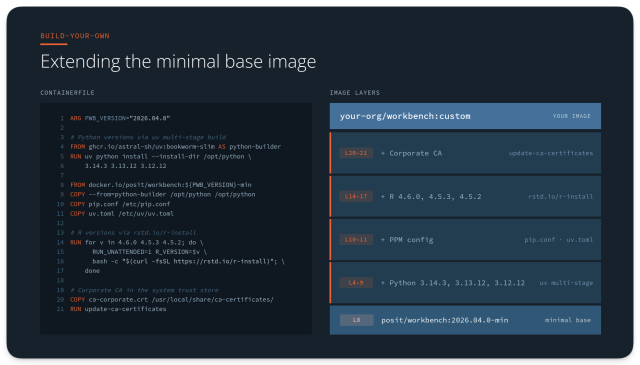
You can maintain a Dockerfile that starts from the minimal Workbench image, adds your approved Python and R versions, the CA certificate for your corporate proxy, and configures pip and uv to pull from your internal Package Manager instance. If you want to try out Posit Assistant or the Positron Notebook Editor, update the version tag and rebuild. All your customizations stay intact.
Build-your-own image: Complete control over every layer
If you have to support multiple versions of any software, you are familiar with the challenge of maintaining dependency compatibility. Regulated environments like GxP add even more complexity. Development, validation, and production environments require specific, validated language and library combinations.
We provide static Dockerfiles and common patterns for extending Posit container images, including custom CA certificates, system dependencies, specific language versions, packages, and baked-in custom configuration.
You can even manage your image builds the way we do, with our open-source bakery command line tool and GitHub Actions workflows.
How to build Posit container images with bakery
Our support agreement covers previous versions of our professional software. Our original container build pipeline grew organically as new needs arose. Over time it became difficult to add new functionality while supporting the existing builds.
When we set out to update our build pipeline, we began with a set of design principles. We use these principles to guide our decisions when we add or modify functionality and behavior.
Secure by design
Independent, static image definitions
Extensibility as a first-class capability
Configuration driven definitions and builds
Multi-platform architecture support
Test and validate images before publishing
Taming the build matrix
We needed to simplify how we define and build all the permutations of container images we produce. Today, we use bakery to build 177 unique production images across Workbench, Package Manager, and Connect.
A single bakery.yaml configuration file defines
- Metadata for labeling and annotating images
- Multiple image definitions
- Multiple operating systems and versions
- Multiple versions of an image (2026.04.0, 2026.03.1)
- Multiple CPU architectures (aarch/arm64, x86_64/amd64)
- Multiple variants (std, min)
- Multiple image repositories (docker.io, ghcr.io)
- Multiple versions of specific tooling (positron, python, R)
Building and validating these images requires chaining together multiple industry-standard tools: hadolint statically analyzes Dockerfiles and Containerfiles, docker buildx produces the images, goss validates the contents, and oras creates multi-platform manifests.
Bakery is open source and under active development, with plans to expand support for more tooling. We’d love to hear from you on GitHub Discussions. Your feedback drives what we build next.
What has changed from rstudio-docker-products?
New image names
We've standardized image names across all products:
- connect
- connect-content
- connect-content-init
- package-manager
- workbench
- workbench-session
- workbench-session-init
- workbench-positron-init
We push each image to multiple container registries:
- Docker Hub: docker.io/posit
- GitHub Container Registry: ghcr.io/posit-dev
Legacy images continue to be pushed to docker.io/rstudio and ghcr.io/rstudio.
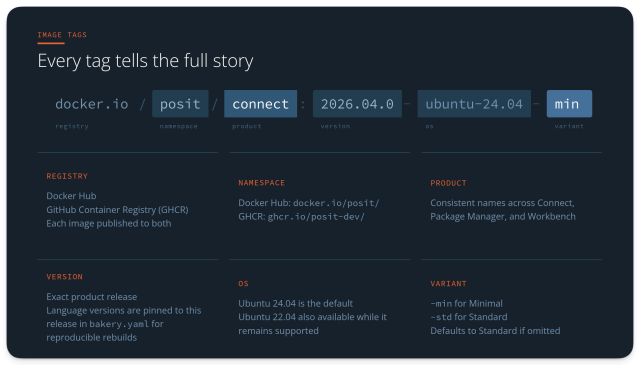
New tag format: version first, OS optional
We add a set of default tags to all images that follow community best practices.
- 2026.04.0 - Specific version, default OS, standard variant
- 2026.04.0-min - Specific version, default OS, minimal variant
- 2026.04.0-ubuntu-24.04 - Explicit OS, standard variant
- 2026.04.0-ubuntu-22.04 - Alternate OS, standard variant
- 2026.04.0-ubuntu-24.04-std - Explicit OS, standard variant
- 2026.04.0-ubuntu-24.04-min - Explicit OS, minimal variant
- latest - Latest version, default OS, standard variant
Pinned Python, R, and Quarto versions for reproducibility
Standard images include a single version of Python, R, and Quarto. Legacy images included two versions of R and Python.
We now keep dependencies up-to-date automatically, pinning the dependencies to the latest versions of Python, R, and Quarto available when a particular software edition (e.g. 2026.03) was released. These versions are written to the bakery.yaml file to ensure future rebuilds always use the same patch versions.
Pinned dependencies give validation teams a stable target. A rebuild of 2026.03 next year will produce the same R, Python, and Quarto versions it produced at release. If you work in GxP or other regulated environments, this helps to demonstrate reproducibility across audits.
Environment variables
Environment variables controlling licensing and debugging now use a Posit prefix (e.g. PPM_LICENSE_FILE_PATH instead of RSPM_LICENSE_FILE_PATH).
Legacy environment variables continue to be respected for backward compatibility.
Getting started with Posit container images
- Deploy on Kubernetes with our helm charts
- Try out the latest version of each product
docker pull posit/connect:latest
docker pull posit/package-manager:latest
docker pull posit/workbench:latest- Explore common patterns for extending the minimal images
- Read the migration guide for the Helm charts or the Connect, Package Manager, or Workbench images
- Browse our documentation
- Ask questions or share feedback on GitHub Discussions

Ben Schwedler
Related Content

Introducing usage and performance metrics in Posit Connect Cloud

Introducing Positron on Amazon SageMaker
