Snowflake Cortex AI and Posit for Banks and Insurers, Without Moving Your Data


How can financial services and insurance teams run LLM-powered analytics on regulated data inside Snowflake
Snowflake Cortex AI runs large language models (LLMs) inside your Snowflake account, on data already governed by your account roles and policies. Credit memos, claim descriptions, and policyholder records stay where they belong. Combined with the Posit Team Native App, which runs Posit Workbench, Posit Connect, and Posit Package Manager on Snowpark Container Services inside the same security boundary, financial services and insurance teams can write LLM-backed analyses, score sensitive documents, and deploy interactive applications without any regulated data leaving the account. This post walks through the architecture, then shows two complete examples:
- A credit memo summarization workflow for a commercial bank and
- A claims triage workflow for a property and casualty insurer
If you build models for a bank or an insurer, you have probably had a version of this conversation in the last year. A business stakeholder asks why the team is not “using AI” on the pile of unstructured text already sitting in your warehouse. You explain that the data is regulated, that an external API call would route policyholder personally identifiable information (PII) or credit records out of the Snowflake account, and that no one is in a hurry to draft an exception to the data egress policy. The conversation usually stops there.
Snowflake Cortex AI removes the constraint, because the model runs inside Snowflake on the data already governed by your account roles and policies. The Posit Team Native App does the same thing for the analytical workbench: Posit Workbench, Posit Connect, and Package Manager run as a Snowflake Native Application, on Snowpark Container Services, inside your Snowflake security boundary. Put the two together and your R and Python teams can write LLM-backed analyses, score sensitive documents, and deploy the result to colleagues without data leaving Snowflake.
Why does it matter where the AI model runs in financial services?
Model risk and data governance teams in banking and insurance are not arguing in the abstract. SR 11-7 (Federal Reserve guidance on model risk management) in U.S. banking, National Association of insurance Commissioners (NAIC) model laws in insurance, and Gramm-Leach-Bliley Act (GLBA) across both verticals all expect that you can answer four questions about any production model:
What data went in?
What model produced the output?
Who saw it, and when?
Can the result be reproduced?
Sending text to an external LLM API breaks the first answer the moment the request leaves your network. You no longer fully control where the payload was logged, what cache it touched, or how the provider’s data retention policy maps onto your contract. Even if the legal team is comfortable, your model validators may not be.
Cortex AI removes that exposure because the call never leaves Snowflake. A SELECT SNOWFLAKE.CORTEX.COMPLETE(...) runs on Snowflake-managed infrastructure inside the same region as your account, governed by the same role-based access control (RBAC). Output is materialized as a normal column, which means it is queryable, joinable, and visible to the same audit logs and access controls you already trust.
The Posit Team Native App applies the same logic to the IDE and the deployment platform. Your data scientists open Positron, RStudio Pro, JupyterLab, or VS Code from a browser, but the session itself is a container in Snowpark Container Services running under a Snowflake service role. Posit Connect publishes Shiny apps, Plumber and FastAPI endpoints, and Quarto reports on the same Snowpark Container services foundation. Nothing has to be routed through a corporate virtual private network (VPN) to a separate analytics virtual private cloud (VPC).
What does the Snowflake Cortex AI + Posit architecture look like?
The picture is simpler than most enterprise data science stacks:
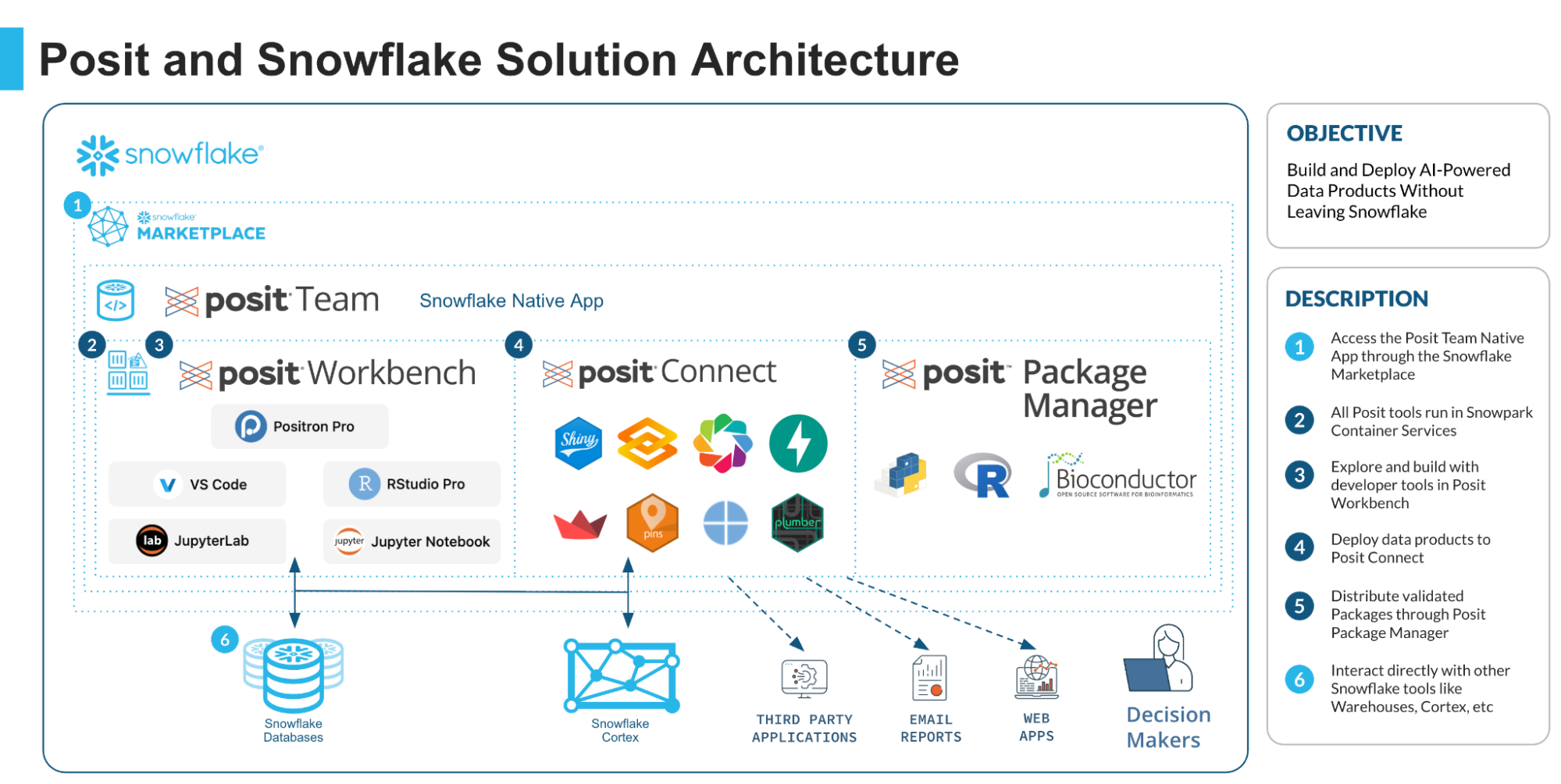
R and Python sessions reach Cortex through Snowpark or the standard Snowflake drivers. Posit Connect picks up published content from Workbench and serves it inside the same Native App. The credentials your data scientists use are Snowflake credentials, so role-based access on the underlying tables also governs who can call which Cortex function on which data.
Use case 1: How can banks summarize credit memos with Cortex AI?
A commercial banking team writes long credit memos for every renewal: typically 8 to 20 pages of prose covering financials, covenants, industry trends, and relationship history. Relationship managers need a one-paragraph summary and a structured pull of the highest-risk items before a credit committee meeting. Doing this by hand is exactly the work that the team does not have time for.
The plan: store the memos as text in a CREDIT_MEMOS table, summarize them with SNOWFLAKE.CORTEX.SUMMARIZE, and extract structured risk factors with SNOWFLAKE.CORTEX.COMPLETE against a JSON schema. From there a Shiny app on Posit Connect lets the credit committee filter and read.
Connecting from R inside Workbench
Inside a Workbench session running on the Native App, the warehouse and role are already wired up. You connect with odbc and the Snowflake driver:
library(DBI)
library(odbc)
library(dplyr)
library(dbplyr)

con <- dbConnect(
  odbc::snowflake(),
  database = "RISK",
  schema = "CREDIT"
)

memos <- tbl(con, "CREDIT_MEMOS")

tables <- dbGetQuery(
  con,
  "SELECT table_name
  FROM information_schema.tables
  WHERE table_schema = 'CREDIT'
  AND table_catalog = 'RISK'
  "
)

print(tables)
tbl() returns a lazy table reference. Anything you compose with dplyr translates to SQL that runs in Snowflake, which is the behavior you want here because the memo text is large and you do not want to pull it back to the R session.
Calling Cortex from dplyr
Cortex functions are SQL functions, so you can call them through dplyr::sql() and let the warehouse do the work:
summaries <- memos |>
  filter(REVIEW_DATE >= "2026-01-01") |>
  mutate(SUMMARY = sql("SNOWFLAKE.CORTEX.SUMMARIZE(MEMO_TEXT)")) |>
  select(MEMO_ID, BORROWER_ID, REVIEW_DATE, SUMMARY)

summaries |>
  head(5) |>
  collect()
For the structured risk extraction, you want a longer prompt and a controlled output. SNOWFLAKE.CORTEX.COMPLETE accepts a model name and either a prompt string or a chat-format payload. Using a JSON-mode prompt with mistral-large2 keeps the output parseable:
prompt_base <- "You are reviewing a commercial credit memo. Return a JSON object with the keys covenant_risks, industry_risks, financial_red_flags, and recommended_action. Each value should be a short string. Do not include any prose outside the JSON. MEMO: "

risk_factors <- memos |>
  filter(REVIEW_DATE >= "2026-01-01") |>
  mutate(
    RISK_JSON = sql(paste0(
      "SNOWFLAKE.CORTEX.COMPLETE(",
      "'mistral-large2', ",
      "CONCAT('",
      prompt_base,
      "', MEMO_TEXT)",
      ")"
    ))
  ) |>
  select(MEMO_ID, RISK_JSON)

risk_results <- risk_factors |>
  collect()
The entire pipeline above runs in the warehouse. You are paying for Cortex credits and warehouse compute, but the memo text never crosses the IDE. Because this is just SQL, your data engineering team can lift it into a scheduled dbt model or a Snowflake task without rewriting anything.
Publishing the result to the credit committee
The output is a normal Snowflake table. To put it in front of the credit committee, write a small Shiny app and publish it from Workbench to Connect with rsconnect::deployApp() or the Posit Publisher VS Code extension. The app reads from the CREDIT_MEMOS_SUMMARIZED table the pipeline above produces:
library(shiny)
library(DBI)
library(odbc)
library(reactable)
library(dbplyr)
library(dplyr)

ui <- fluidPage(
  titlePanel("Credit memo digest"),
  sidebarLayout(
    sidebarPanel(
      dateRangeInput(
        "dates",
        "Review window",
        start = Sys.Date() - 30,
        end = Sys.Date()
      )
    ),
    mainPanel(
      reactableOutput("memo_table")
    )
  )
)

server <- function(input, output, session) {
  con <- dbConnect(
    odbc::snowflake(),
    database = "RISK",
    schema = "CREDIT"
  )

  memos <- tbl(con, "CREDIT_MEMOS_SUMMARIZED")

  output$memo_table <- renderReactable({
    req(input$dates)

    df <- memos |>
      filter(
        REVIEW_DATE >= !!input$dates[1],
        REVIEW_DATE <= !!input$dates[2]
      ) |>
      collect()

    reactable(
      df,
      searchable = TRUE,
      defaultPageSize = 20
    )
  })

  session$onSessionEnded(function() {
    dbDisconnect(con)
  })
}

shinyApp(ui, server)
Because the app runs on Posit Connect inside the Native App, the user who opens it authenticates against Snowflake, and Connect can pass that identity through to the database. A relationship manager only sees the borrowers their Snowflake role grants them. From a model risk perspective, every read is logged against a known user, every prompt and model version is recorded by Cortex, and the output table is versioned alongside the rest of the warehouse.
Use case 2: How can insurers triage claims with Cortex AI?
The insurance equivalent looks similar in shape but solves a different problem. A property and casualty carrier wants to route incoming claims to the right adjuster queue and flag potential fraud signals from the free-text loss description. Today this is a rules engine plus a separate machine learning (ML) model.
To classify the claim category with SNOWFLAKE.CORTEX.CLASSIFY_TEXT, score a fraud risk tier with a constrained COMPLETE call, and surface the result through a Shiny for Python dashboard on Posit Connect, with the same scoring logic available as a callable endpoint for the claims intake system.
Snowpark from Python
Inside a Positron, JupyterLab, or VS Code session on Workbench, Snowpark for Python is a natural client:
from snowflake.snowpark import Session

session = Session.builder.getOrCreate()
session.use_database("INSURANCE")
session.use_schema("CLAIMS")
claims = session.table("RAW_CLAIMS")
Session.builder picks up credentials from the surrounding container, so there is no secret to manage in the notebook. The claims DataFrame is lazy in the same way the R tbl() object is.
Classification and structured extraction
CLASSIFY_TEXT takes a string and a list of candidate labels. For an insurer, the categories map to existing adjuster queues:
from snowflake.snowpark.functions import call_function, col, lit

categories = [
    "auto_collision",
    "auto_theft",
    "property_water_damage",
    "property_fire",
    "property_weather",
    "liability",
    "other",
]

claims_classified = claims.with_column(
    "CATEGORY",
    call_function(
        "SNOWFLAKE.CORTEX.CLASSIFY_TEXT",
        col("LOSS_DESCRIPTION"),
        lit(categories),
    ),
)
For the fraud risk tier, you want the model to consider both the description and a small structured payload (prior claims count, days since policy bind, geographic risk index). Concatenating those fields into the prompt keeps the call simple:
from snowflake.snowpark.functions import builtin

claims_scored = claims_classified.with_column(
    "FRAUD_JSON",
    call_function(
        "SNOWFLAKE.CORTEX.COMPLETE",
        lit("llama3.1-70b"),
        builtin("CONCAT")(
            lit("You are an insurance fraud analyst. Loss: "),
            col("LOSS_DESCRIPTION"),
            lit(" Prior claims: "),
            col("PRIOR_CLAIMS_24M").cast("string"),
            lit(" Days since bind: "),
            col("DAYS_SINCE_BIND").cast("string"),
        ),
    ),
)

claims_scored.write.mode("overwrite").save_as_table("CLAIMS_SCORED")
In production, you would template this more carefully and pin the model version. The point is that classification, scoring, and persistence all happen inside Snowflake, against tables your model risk team already monitors.
Serving the result to adjusters
Adjusters need a quick way to filter and explore the scored claims. Shiny for Python on Posit Connect handles that. The same Snowpark session works inside the app process because the container has the Snowflake credentials it needs:
from shiny import App, ui, render, reactive
from snowflake.snowpark import Session
from snowflake.snowpark.functions import col
import pandas as pd

session = Session.builder.getOrCreate()
session.use_database("INSURANCE")
session.use_schema("CLAIMS")
claims = session.table("CLAIMS_SCORED")

app_ui = ui.page_fluid(
    ui.h2("Claims Triage Dashboard"),
    ui.layout_sidebar(
        ui.sidebar(
            ui.input_selectize(
                "status_filter",
                "Filter by status:",
                choices=["All", "Open", "Closed", "Investigating"],
                selected="All",
            ),
            ui.input_numeric(
                "min_amount",
                "Minimum claim amount:",
                value=0,
                min=0,
            ),
        ),
        ui.output_data_frame("claims_table"),
        ui.br(),
        ui.output_text("summary"),
    ),
)

def server(input, output, session_shiny):

    @reactive.calc
    def filtered_claims():
        df = claims
        if input.status_filter() != "All":
            df = df.filter(col("STATUS") == input.status_filter())
        if input.min_amount() > 0:
            df = df.filter(col("CLAIM_AMOUNT") >= input.min_amount())
        return df.to_pandas()

    @render.data_frame
    def claims_table():
        df = filtered_claims()
        display_columns = ["CLAIM_ID", "STATUS", "LOSS_DESCRIPTION", "CLAIM_AMOUNT", "REVIEW_DATE"]
        available_columns = [c for c in display_columns if c in df.columns]
        return df[available_columns]

    @render.text
    def summary():
        df = filtered_claims()
        total_claims = len(df)
        total_amount = df["CLAIM_AMOUNT"].sum() if "CLAIM_AMOUNT" in df.columns else 0
        return f"Showing {total_claims} claims with total amount: ${total_amount:,.2f}"

app = App(app_ui, server)
Publish it with rsconnect-python or Posit Publisher and Connect handles the rest, including authentication, access control, and per-content usage logs. When your model validation team asks how a particular triage decision was made, you can point at the Connect access log, the Cortex call history in Snowflake, and the version-pinned content bundle in Connect.
What does this mean for model risk and governance?
The combination above gives you something that is hard to assemble any other way with a code-first analytical environment, an LLM, and a deployment platform that all share one identity model and one audit trail.
Concretely, here is what your model risk and compliance teams can verify without a separate evidence-gathering exercise:
Every Cortex call is associated with a Snowflake user and role, captured in the account’s query history.
Every Posit Connect deployment is a versioned bundle pinned to the package versions installed by Posit Package Manager, which can mirror an internally curated repository.
Every Workbench session runs as a container with logged start, stop, and resource usage.
Every output table from a Cortex pipeline is governed by the same RBAC, masking policies, and row access policies as the source data.
The same governance story your team already tells about SQL workloads in Snowflake is now extended to the R and Python work that has historically lived somewhere else.
How can I get started with Cortex AI and Posit Team?
If you want to try this in your own Snowflake account, start with the Posit Team Native App listing on Snowflake Marketplace and the Cortex AI documentation. The links below are the most useful starting points, and the Posit Solutions Engineering team is happy to walk through a proof of concept with your data.
Posit + Snowflake partnership page for an overview of integration capabilities
Curious about Posit Team, but not ready to commit? Start a 30-day free trial of the Posit Team Native App immediately — no sales calls required.
Learn about Posit’s seamless integration with Snowflake Cortex
Blog: Doing More with Cortex: Introducing the Databot Snowflake Skill for Semantic Awareness
Snowflake Cortex AI function reference — full list of available functions and models.
Snowflake Native Apps vs. Connected Apps for a deeper comparison of the two frameworks
Check out Posit’s Connected app listings on the Snowflake Marketplace: Posit Workbench/ Posit Connect / Posit Package
You can also schedule a demo with a Posit expert to see the Native App in action with your specific use cases.
If you build something interesting on this stack, we would like to hear about it on the Posit Community forum.
Frequently asked questions
What is Snowflake Cortex AI?
Snowflake Cortex AI is a set of built-in functions that run large language models inside a customer’s Snowflake account. Functions like SNOWFLAKE.CORTEX.COMPLETE, SUMMARIZE, CLASSIFY_TEXT, EXTRACT_ANSWER, and EMBED_TEXT_1024 are called directly from SQL, Snowpark, or any standard Snowflake driver. The model runs on Snowflake-managed infrastructure in the same region as the calling account.
How is Snowflake Cortex AI different from calling an external LLM API?
With an external LLM API, the payload leaves your network — meaning you no longer fully control where the data was logged, what cache it touched, or how the provider’s retention policy maps onto your contract. With Snowflake Cortex AI, the call never leaves Snowflake. Inputs and outputs are governed by the same role-based access control, masking policies, and audit logs as the rest of your account.
Does using Snowflake Cortex AI require moving my data?
No. Cortex AI functions run on data already in Snowflake. There is no data export, no external storage, and no network egress to a model provider. This is the core reason regulated industries — banking, insurance, healthcare — can use generative AI on sensitive text without rewriting data governance policies.
How do Posit Workbench and Posit Connect run inside Snowflake?
The Posit Team Native App packages Posit Workbench ( Positron, RStudio Pro, JupyterLab, VS Code) and Posit Connect into a single application running on Snowpark Container Services. Both products run as containers inside the customer’s Snowflake account under a Snowflake service role, so credentials, RBAC, and audit are inherited from Snowflake.
How does Posit Package Manager run inside Snowflake?
The Posit Team Native App also includes Posit Package Manager, which provides curated R and Python package repositories, and VS Code extension repos, too. Package Manager offers vulnerability reporting from the OSV database, pre-built Linux binaries that install in seconds, date-based snapshots for reproducible environments, and an MCP server with tools to guide your AI agents.
Unlike repository managers built for general software development, Package Manager is purpose-built for R and Python data science. It helps IT teams govern open-source packages while keeping data scientists productive, reducing support overhead, supporting compliance and reproducibility requirements, and extending governance to AI-assisted workflows.
Can financial services and insurance teams use Cortex AI under SR 11-7 and NAIC requirements?
Yes, and the architecture is designed to make that easier. Because Cortex calls execute inside Snowflake and outputs materialize as governed tables, model risk teams can verify what data went in, which model produced each output, who accessed the result, and whether the result can be reproduced — the four core questions SR 11-7 (U.S. banking), NAIC model laws (insurance), and GLBA require.
What Cortex AI functions are available for text analysis?
Cortex AI provides SUMMARIZE for free-text summarization, COMPLETE for general-purpose LLM completion (with model selection across mistral-large2, llama3.1-70b, and others), CLASSIFY_TEXT for categorical classification against custom labels, EXTRACT_ANSWER for question-answering over a document, and EMBED_TEXT_1024 for vector embeddings. All run as SQL functions and return columns that can be joined, filtered, and persisted like any other Snowflake data.
Together, Posit and Snowflake bring AI-powered data science where your data lives. Manage your entire data science lifecycle inside the secure, governed Snowflake AI Data Cloud with Posit Team, through the Connected App or Posit Team Native App.
About Posit
Posit (formerly RStudio) is the data science platform for R and Python, used by teams across financial services, insurance, life sciences, government, and academia. Posit Team — including Posit Workbench, Posit Connect, and Posit Package Manager — gives organizations in regulated industries the tools to develop, deploy, and govern analytic work, with deep support for the open-source R and Python ecosystems. Learn more at posit.co.
About Snowflake
Snowflake delivers the AI Data Cloud — a global network where thousands of organizations mobilize data with near-unlimited scale, concurrency, and performance. Snowflake’s Native App Framework and Snowpark Container Services allow software partners like Posit to run their applications inside customer Snowflake accounts, giving regulated industries a single governance boundary for both data and the analytical tools that work on it. Learn more at snowflake.com.

Marissa Pierce
Related Content

Tiny Doses for Tiny Babies -- How much is too much?

2026 Posit Impact Awards
