Using Service Account identities to query external data sources in published content on Posit Connect

In a previous blog post, we discussed using Posit Connect’s OAuth integrations feature to implement dynamic user identity in published apps. If you haven’t read that post, I recommend you put a pin in this article and go check that out first, because it gives a good overview of what OAuth integrations are and the family of problems they help solve.
No rush, we’ve got time. I’ll be here whenever you’re back.
In that first post, we discussed using OAuth integrations to access data in external platforms via the identity of a user interacting with published content. This allowed us to rely on fine-grained data governance policies to propagate personalized views of the data to published data science applications in Connect.
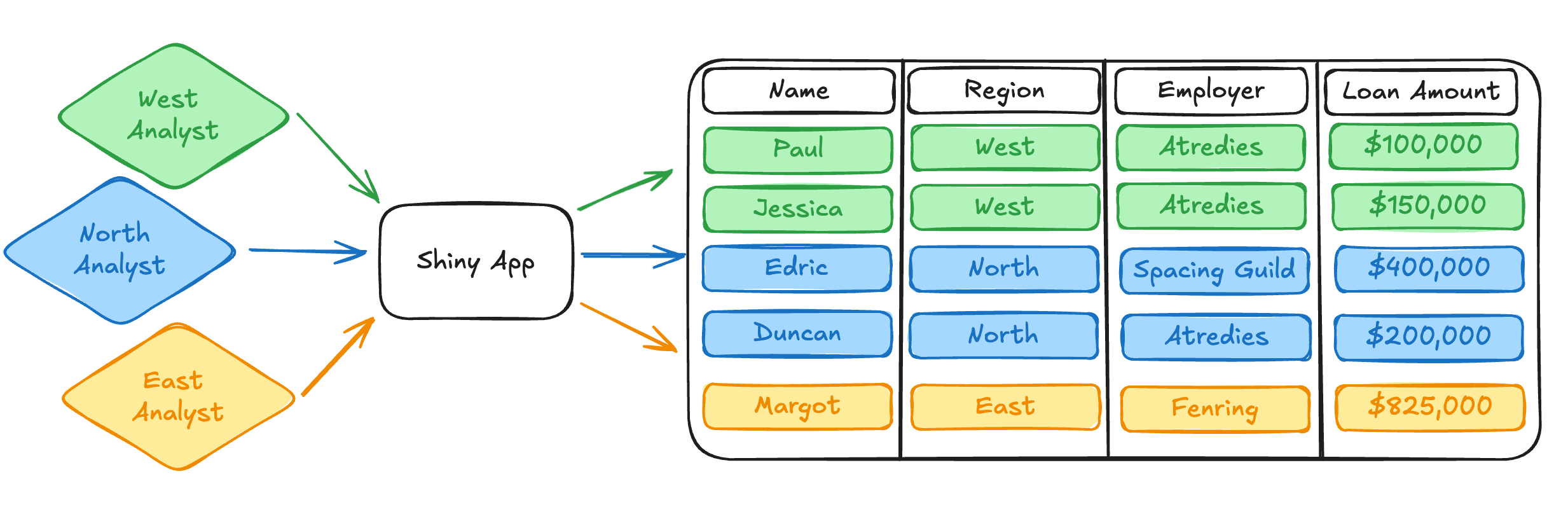
Still pretty cool stuff in my book.
Here, we’ll continue our discussion of Connect’s OAuth integrations feature, but along a parallel track: what if I don’t want or cannot use dynamic user identities when integrating with an external data source?
Dynamic user identity makes a number of assumptions about your working environment and the types of problems you’re trying to solve. These assumptions enable very powerful data access patterns in published content, but they don’t support the needs of every data science project that might be hosted on Connect. For example:
- What if my content isn’t interactive? If I have a rendered Quarto document that queries an external service and re-executes on an automated schedule, then I don’t have a named content viewer. No named content viewer means no dynamic identity. Importantly, this implies that dynamic identity is only possible for interactive content types.
- What if my Connect users don’t have accounts in the external data source? If my organizational policies don’t provision accounts for the same user in both Connect and the external service, dynamic user identity won’t work.
- Even more directly, what if I simply don’t need dynamic user identity to do my job? My data access model may not require fine-grained data access policies that differentiate access across content viewers. What if dynamic user identity is overly complex for my work?
To solve for these scenarios, Connect now supports the Service Account OAuth integration type. Rather than dynamic user identity, Service Account OAuth integrations utilize a static machine identity when communicating with an external service like Databricks or Salesforce. While these new integrations are still using OAuth as the communication mechanism for authenticating against external services, they solve a complementary set of problems with different requirements and constraints.
In this part 2 of our grand OAuth odyssey (OAuthyssey?), I hope you’ll come away with answers to the following:
- What are Service Account OAuth integrations?
- How do Service Account OAuth integrations work?
- When should I use Service Account OAuth integrations?
- Where should I look if I want to learn more?
With that, lets jump back in!
What are Service Account OAuth integrations?
We’ll continue to use the same motivating example we were using from the last post. As a refresher, we’re analyzing a simple mortgage loan dataset1, which resides in some external protected datasource. This might be a service like Databricks or Salesforce.
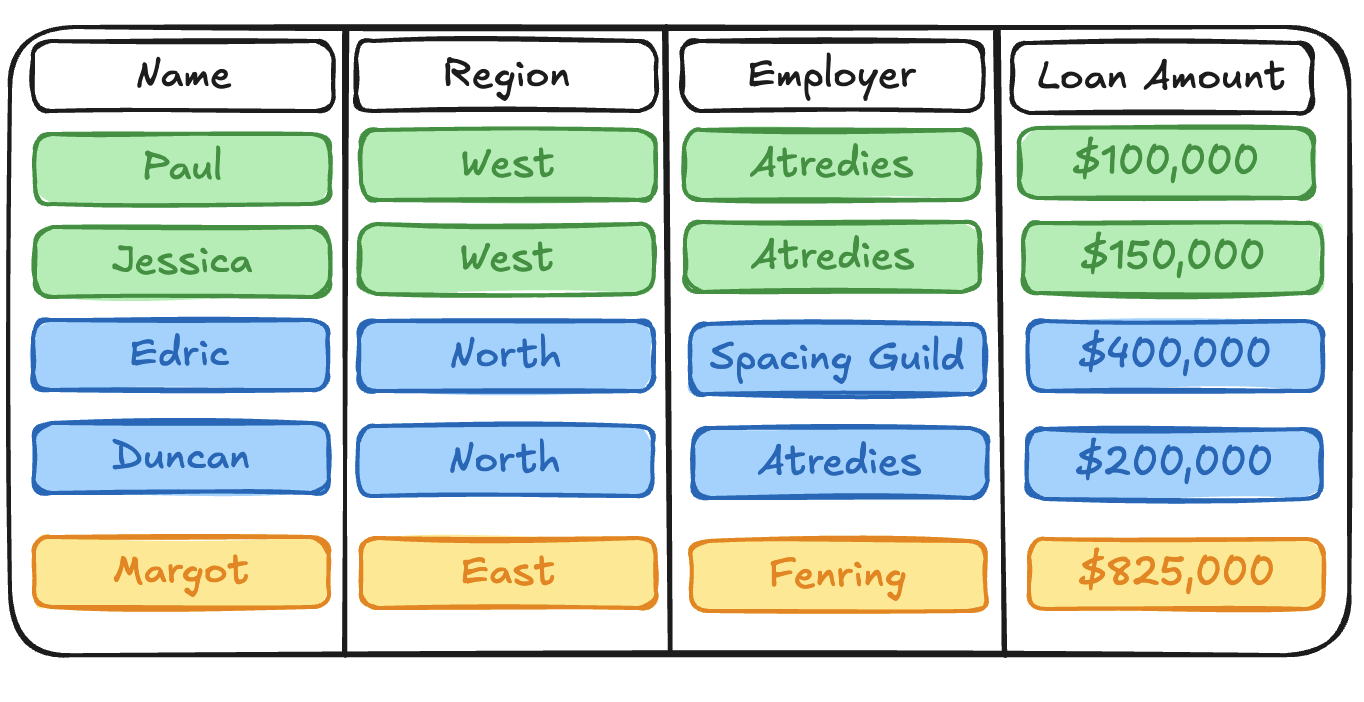
This time around, we’ve been tasked with producing a daily Quarto report that performs some simple analysis on the current state of the mortgage data. We want to automatically re-render this report every morning and kick off the workday by emailing it to a group of stakeholders in our organization.
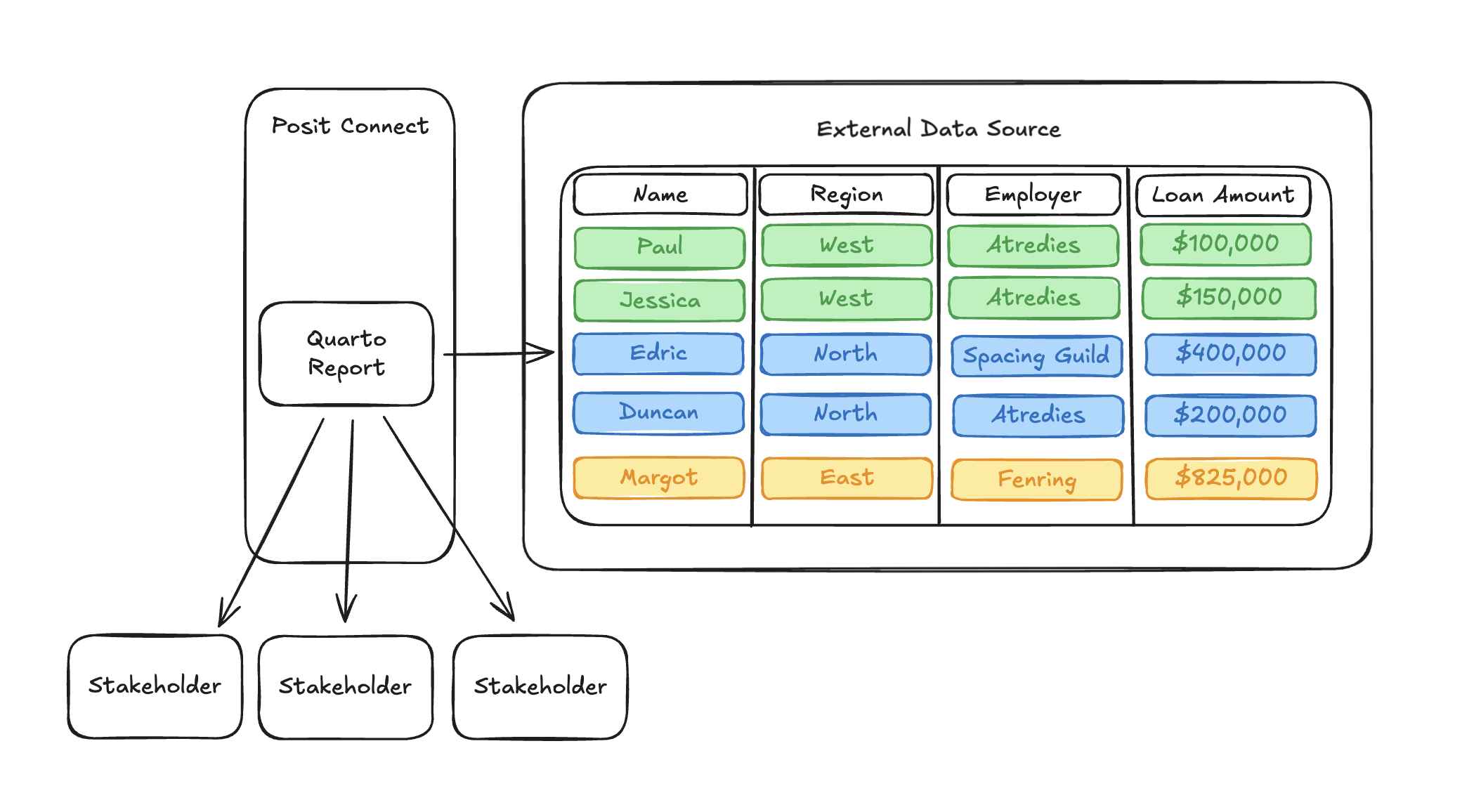
When we go to configure OAuth integration for our Quarto report so that it can query our mortgage loan dataset, we immediately run into a significant problem that will prevent our report from working.
What user identity should be used when the report is rendered? We don’t have a user interacting with the content through the browser, so there’s no way to go through an OAuth login flow like we would in an interactive Python app.
Even more fundamentally, we can’t write code in our Quarto document to acquire an OAuth access token. Remember from our previous blog post that OAuth credentials are acquired using the Posit-Connect-User-Session-Token, which is set on a session header for interactive content:
@render.text
def get_user_identity():
    # This session header doesn't exist in a rendered Quarto document. Uh-oh!
    user_session_token = session.http_conn.headers.get("Posit-Connect-User-Session-Token")

    # No session header, no way to get an OAuth access token. Unless...?
    return client.oauth.get_credentials(user_session_token).get("access_token")
In our Quarto document, there is no session through which we can acquire the Posit-Connect-User-Session-Token header. Unfortunately, this means that there’s no way to write an equivalent get_user_identity() function in rendered content.
Given the problems described above, we can conclude that dynamic viewer identity probably isn’t the best fit for this project. But does that mean we should just throw in the towel and assume we can’t make this work? Of course not! We’re problem solvers! 2
For this type of analysis, we want something simpler than dynamic user identities. Ideally, we’d like Connect to have its own credentials so that it can query the external data source as itself. This would remove the hard requirement for an interactive user’s OAuth credentials.
Support for this type of machine identity is precisely the intent of Service Account OAuth integrations.
How do Service Account OAuth integrations work?
Whenever possible, Connect now supports two types of OAuth integrations. Viewer OAuth integrations implement dynamic user identity, as we discussed in the previous blog post. Under the hood, Viewer OAuth integrations utilize the OAuth 2.0 Authorization Code grant type to make this type of interaction possible.
There are other grant types described in OAuth 2.0, including the Client Credentials grant type which supports machine identities rather than named users. Service Account Oauth integrations use this grant type when communicating with an external service.
Rather than utilizing a login / redirect flow through the browser like Viewer OAuth integrations, Service Account OAuth integrations simply require the configuration of credentials that identify the service account, usually represented by a client_id and client_secret. Once the Service Account integration is configured, Connect is able to use its credentials to request an OAuth access token, which authorizes requests against the external resource.
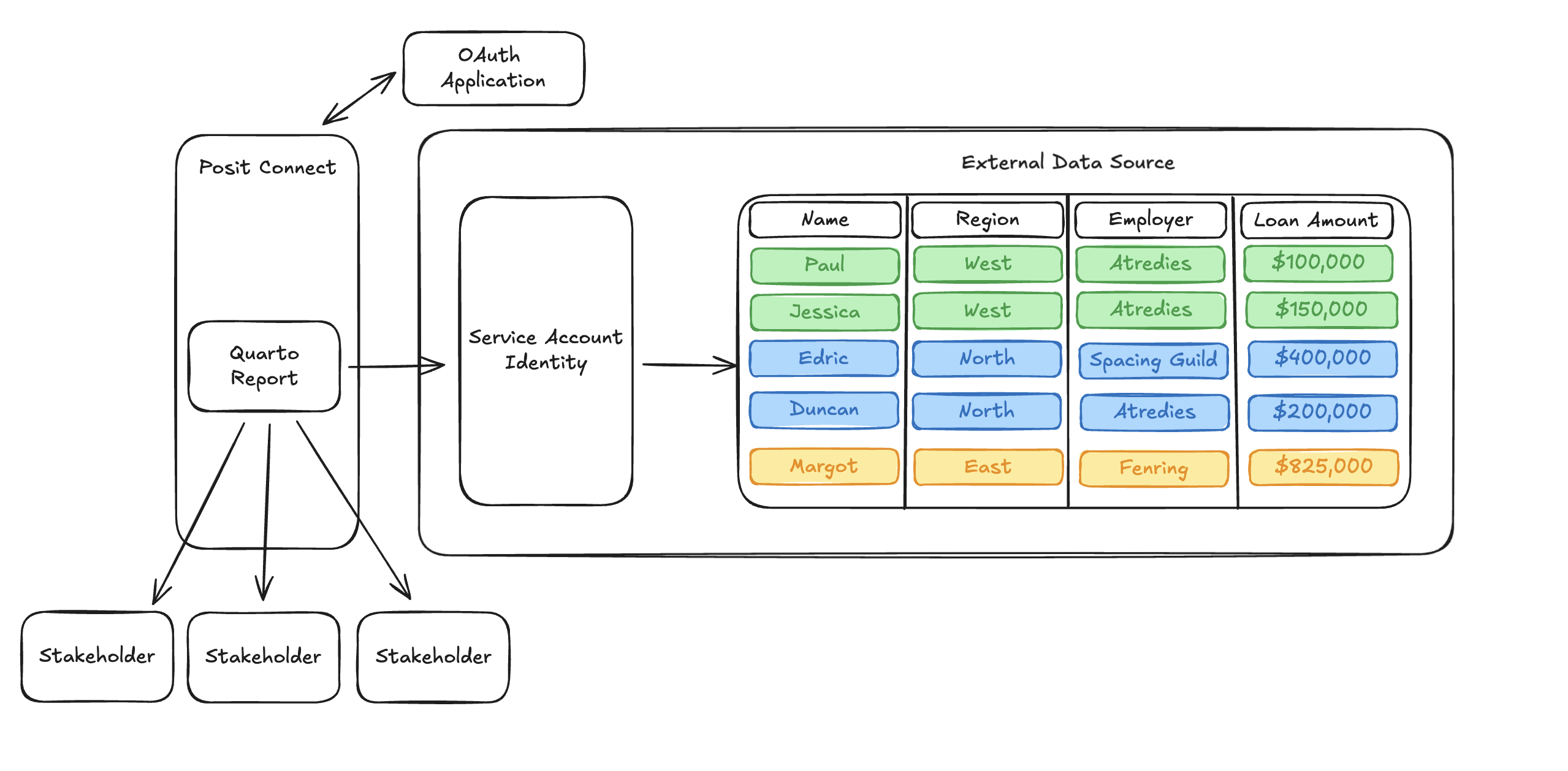
Acquiring this OAuth access token in our Quarto report looks very similar to the pattern used for Viewer OAuth integrations from the previous blog post. As we discussed above, we do not have access to the Posit-Connect-User-Session-Token in an HTTP header. Instead, we will acquire an OAuth access token using the identity of the content item itself, which is provided to all content on Connect through the CONNECT_CONTENT_SESSION_TOKEN environment variable:
import os
from posit import connect

client = connect.Client()

def get_service_account_identity():
    # Here, we grab a 'content_session_token', rather than the 'user_session_token'.
    # This environment variable is available to both rendered
    # and interactive content.
    content_session_token = os.readenv('CONNECT_CONTENT_SESSION_TOKEN')

    # The SDK method get_content_credentials queries the Connect server API to exchange
    # the content session token for an OAuth access token. This token identifies the service account
    # defined by the integration.
    return client.oauth.get_content_credentials(content_session_token).get("access_token")
Importantly, the code above makes no use of any interactive web frameworks. This is a code snippet that can be used in both rendered and interactive content.
Once we have an OAuth access token, the rest of the code used to query the external service should look very familiar. We’ll use pseudo-code here again to hand-wave over the particularities of how different services expect to consume the OAuth access token, but the pattern will look something like this:
# Query executes using the identity of the service account.
service_account_identity = get_service_account_identity()
with sql.connect(service_account_identity) as connection:
    with connection.cursor() as cursor:
        cursor.execute("SELECT * FROM loans")
        rows = cursor.fetchall()
        print(rows)
The data returned by the query is conditioned by the data governance policies configured for the service account rather than any named user. This means that no matter when, how, or by whom the content is executed, the same data access policy will be applied to the query.
Using the pattern described above, we’re able to query our mortgage dataset inside of a rendered Quarto report using a Service Account identity instead of a named user identity. This means that we can easily run our content without requiring a named user’s credentials to access protected resources and get our Quarto report rendered/emailed on a schedule, just like we wanted. Perfect! Our stakeholders are so proud!
When should I use Service Account OAuth integrations?
Before the introduction of OAuth integrations in Connect, static credentials were the only way a piece of content could communicate with an external service like Databricks. Historically, users would configure service account credentials as ad-hoc environment variables in their rendered content, which required significant duplication of work and the proliferation of sensitive credentials across many locations.
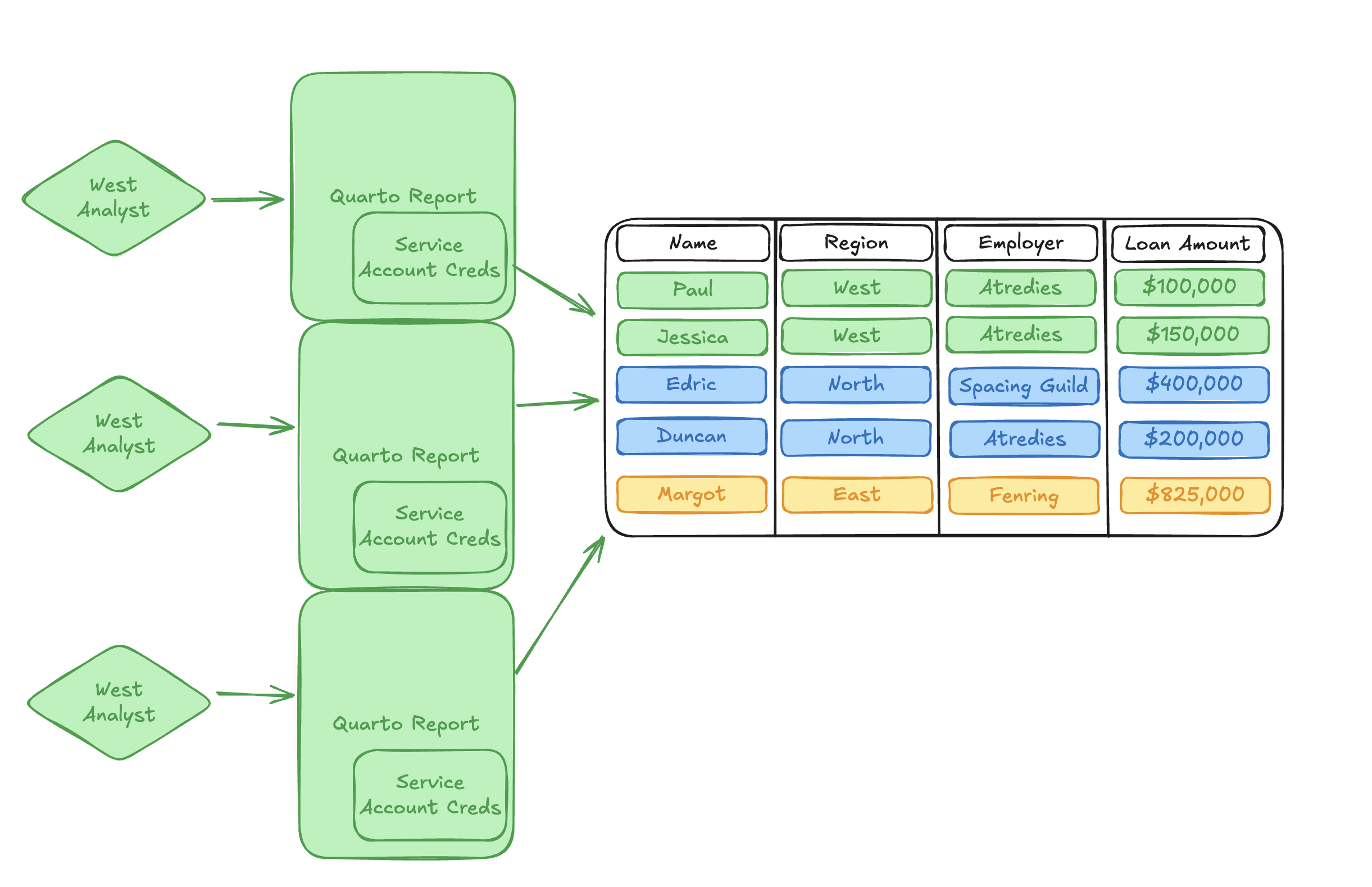
Service Account OAuth integrations serve as a direct drop-in replacement for workflows where machine identities are still the best fit for the problem, but they provide a single consolidated location where sensitive credentials can be maintained and secured by the Connect administrator. Rather than having access to the client_id and client_secret directly, content only has access to a short-lived OAuth access token, which expires shortly after being issued. These access tokens provide a much smaller surface area for credential leakage than long-lived secrets and Personal Access Tokens (PATs).
Replacing ad-hoc credential management with a Service Account integration reduces the burden on Connect administrators to audit, track, and rotate service account credentials.
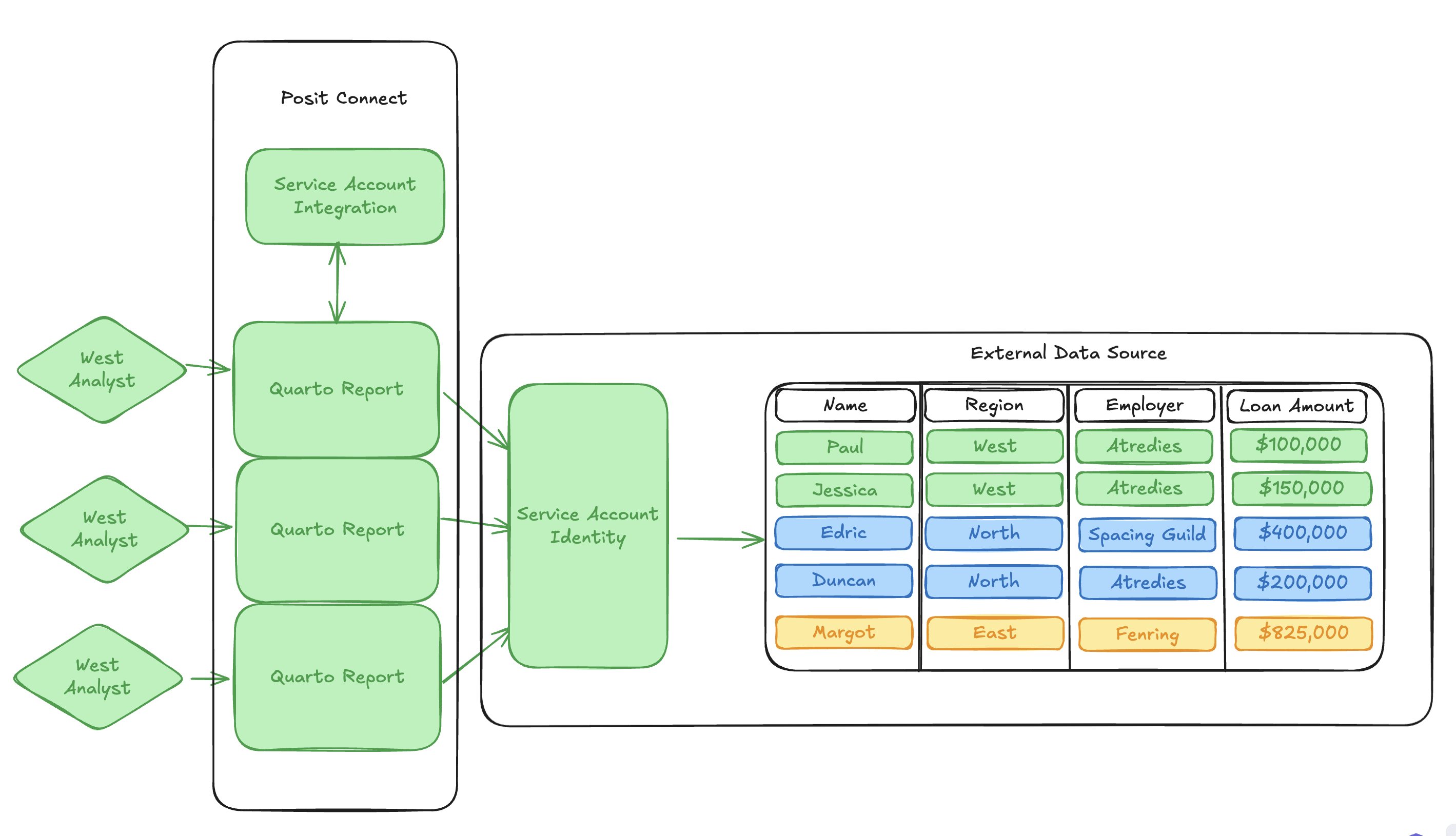
Service Account OAuth integrations also solve for communcation with external services in content types where there is no identifiable named user, such as rendered Quarto documents.
What trade-offs should I consider?
Because Service Account integrations are complementary but not identical to Viewer integrations, there are some trade-offs to consider when deciding which integration type best facilitates your published content.
Importantly, because a static service account identity is being used when querying the external service, every user who interacts with the content will see the same result. Service account integrations lose the fine-grained access control and data governance properties provided by Viewer integrations. If you require fine-grained access controls that are specific to each user, Viewer OAuth integrations are still the best approach.
Additionally, in some external vendors, OAuth is used synonymously with the particular behavior of the Authorization Code grant type. This means that not every external service has implemented the Client Credentials grant type required by Service Account OAuth integrations. Some external services implement service account workflows using strategies other than OAuth, and some don’t support service account workflows at all.
Connect only supports Service Account integrations for external services that have implemented the Client Credentials grant type. This means the feature may not be available for all integrations.3
Conclusion
As a continuation of our series of posts describing OAuth integrations in Posit Connect, we discussed Service Account integrations and spent some time thinking about when and how we might use them to solve data access problems that are complementary but distinct from dynamic user identity.
Of course, this is a very high-level overview of why and how this feature might be helpful. If you’re looking for next steps, the Connect Admin Guide, User Guide, and Cookbook are great places to continue learning.
Thanks for reading!
Footnotes
Far-future intergalactic feuds over spice notwithstanding, mortgage data is great for blog illustrations.↩︎
And I’m writing a blog post about this, so I’d better have answers!↩︎
Remember, if an external service isn’t natively supported as an integration in Connect, you can always configure a custom integration. The Service Account integration type is supported for custom integrations. See the Connect Admin Guide for additional details.↩︎
Related Content

Snowflake Native Apps vs. Connected Apps for financial services

We prove model governance by live evidence, not paperwork
