What’s New in Posit Workbench 2026.04.0: Posit Assistant in RStudio and Positron, more frequent releases, and Positron Notebook Editor



We’re excited to announce the latest update to Posit Workbench, Positron Pro, and RStudio IDE, in our “Globemaster Allium” release.
Data science teams are adopting AI coding tools quickly. In enterprise environments, though, the distance between "this looks useful" and "we can use this" stretches across security reviews, provider approvals, and infrastructure sign-offs. Quarterly release cycles widen that distance further, holding back improvements that are ready to ship while teams work around problems already fixed upstream.
This release addresses both.
- Posit Assistant, now in Preview for RStudio and Positron, brings a data-science-focused AI agent into the IDEs your team already uses, with planned BYOK support for Posit Workbench users to keep data within your organization's approved AI Providers.
- Moving from quarterly to monthly releases shortens the path from ready to shipped, giving admins smaller upgrades that are easier to plan around.
Here’s what’s new in the 2026.04.0 release.
Key highlights
- Posit Assistant (Preview): A conversational agent right inside RStudio and Positron that understands your full session context. Ask it to clean data, explore patterns, train models, or even build apps - all within your existing workflow.
- Faster release velocity: Posit Workbench and RStudio are moving to monthly releases instead of quarterly, so new features and fixes reach your environment weeks sooner in smaller, lower-overhead upgrades.
- Positron Pro independent upgrades: Positron Pro on Workbench can now be upgraded out-of-band with the current version of Workbench, giving teams access to new Positron features and fixes without waiting for a full Workbench release.
- Positron Notebook Editor (Alpha): This release brings a new, native Notebook Editor to Positron, which provides the best of a Notebook UI and data-science centric IDE features.
RStudio
RStudio now bundles Quarto 1.9 with Typst book and article support, along with experimental PDF accessibility standards for both LaTeX and Typst. Read more in the Quarto 1.9 announcement post.
You can now also deploy documents and data applications to Posit Connect Cloud with Push Button support. Posit Connect Cloud is a hosted platform for sharing data assets without managing your own infrastructure. A free plan is available.
Posit Assistant
Posit Assistant represents the culmination of over a year of AI experimentation at Posit. In mid-2025, Positron Assistant launched as a general-purpose coding assistant in the Positron IDE, while Databot was released later as a specialized, interactive EDA agent. Our team further experimented with interfaces and studied how frontier, general purpose coding agents managed context and autonomy. This research guided our development of a data-science centric agent that integrated the learnings from both Databot and Positron Assistant into a cross-IDE agent harness. The result, Posit Assistant, combines the best of modern CLI coding agents with native data-science-specific capabilities, such as direct access to the R/Python session, plots, variables, and the ability to write, evaluate, and understand code inputs and outputs.
Posit Assistant is now in preview for both RStudio and Positron. It brings a granular permissions system, specialized data science prompting and skills, a read-only plan mode, and support for customizations via Skills and MCP servers.
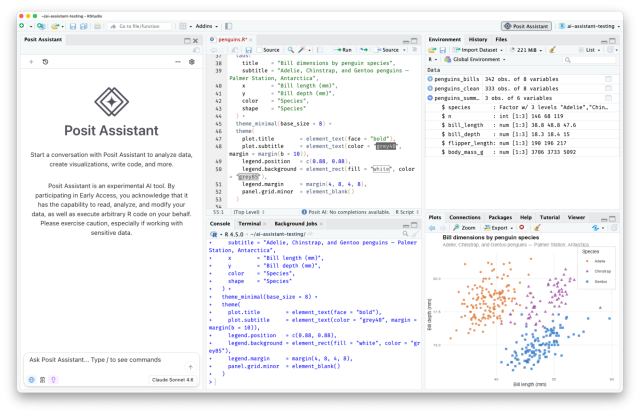
RStudio
Posit Assistant Preview
Posit Assistant is a new, optional AI agent in both RStudio and Positron, purpose-built for data science.
- Posit Assistant: A conversational agent right inside the IDE that understands your full session context. Ask it to clean data, explore patterns, train models, or even build apps - all within your existing workflow.
- Next Edit Suggestions (NES): Get smart, context-aware code completions that adapt as you type, accelerating your coding without breaking the flow.
- Posit AI is the subscription service that powers Posit Assistant on desktop.
Your privacy matters. When you create your account, you choose whether to share your trace data (including prompts and AI responses) to help improve Posit AI. If you opt out, we only retain basic operational data for 30 days, and your prompts and responses are never stored. We have a Zero Data Retention agreement with our model provider, Anthropic, meaning your data is processed to generate a response and immediately deleted.
RStudio itself remains free and open source. Posit AI is an optional subscription starting at $20/month with a free trial. Learn more.
Click the Posit Assistant icon in the RStudio toolbar to get started or visit the Posit Assistant documentation for more information.

Workbench
RStudio Pro
As mentioned above, Posit Assistant is now in public preview in RStudio. Currently, Posit Assistant on RStudio desktop is only powered by the Posit AI managed service. We’ve tested Posit Assistant extensively with the models we offer and tuned the experience around them. We want to ensure a reliably high-quality experience for our desktop users rather than one that varies depending on the model behind it.
For enterprise teams that require custom providers or stricter data boundaries, in a future release of Posit Workbench’s RStudio Pro and Positron Pro sessions we also plan to support Bring Your Own Key (BYOK) support for Anthropic, AWS Bedrock, Azure Foundry, Google Vertex, OpenAI, and Custom Providers that adhere to the OpenAI API specification.
Positron Pro
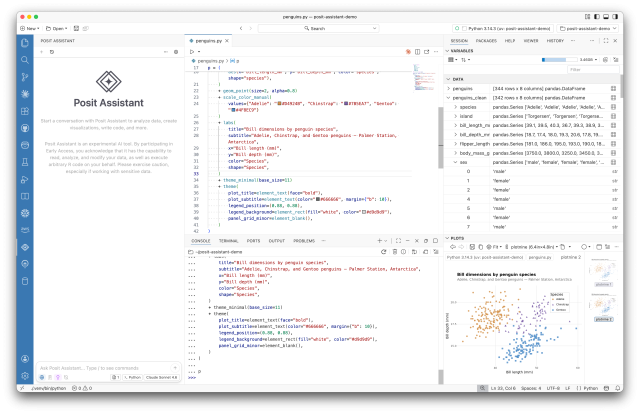
Posit Assistant Preview
Posit Assistant is a new, optional AI agent in Positron, purpose-built for data science.
- Posit Assistant: A conversational agent right inside Positron that understands your full session context. Ask it to clean data, explore patterns, train models, or even build apps - all within your existing workflow.
- Posit Assistant will soon supersede both Positron Assistant and the Databot extension, with a goal of moving to general availability in 2026.
As mentioned above, Posit Assistant will replace both Positron Assistant and the Databot tools later in 2026. To try out Posit Assistant, for now you will need to enable both Positron Assistant and the Posit Assistant. More information is available in the Posit Assistant guide.
Open your settings.json (Cmd+Shift+P / Ctrl+Shift+P, then Open User Settings (JSON)) and add:
"positron.assistant.enable": true,
"assistant.sidebarView": true,
Increasing release velocity
Starting with this release, Posit Workbench and RStudio are moving from a quarterly to a monthly release cadence. Each monthly release delivers a smaller, more focused set of changes, making upgrades lighter and lower-overhead while getting new features, improvements, and fixes into your hands faster.
A quarterly cadence meant that features, bug fixes, and security patches could sit unreleased for weeks after they were ready. Monthly releases shorten that feedback loop significantly, admins get a steadier, more predictable upgrade path with fewer changes per release, and teams no longer have to wait months for a fix or improvement that's already been built.
Positron Pro out of band upgrades
Available in all license tiers for Positron Pro sessions.
Additionally, Posit Workbench now also supports upgrading Positron Pro independently of full Workbench releases. Admins can run a new CLI command (rstudio-server install-positron) to download and install a newer compatible version of Positron, specifying a version, pointing to a local file, or simply running the bare command to get the latest stable release.
Manually-installed versions are preserved across Workbench upgrades, and load-balanced environments enforce version consistency across nodes. For Kubernetes deployments, a new standalone Positron init container and Helm chart values let admins pin a specific Positron version without rebuilding images. The Admin Dashboard also now surfaces a notification when a newer compatible Positron version is available.
Even with Workbench moving to a monthly release cadence, the bundled version of Positron Pro may still trail behind. Out-of-band updates put admins in control, they can install newer Positron Pro releases to get immediate access to new features, bug fixes, or security patches, or adopt a full Workbench upgrade where appropriate.
Positron Notebook Editor Alpha
Available in all license tiers for Positron Pro Sessions.
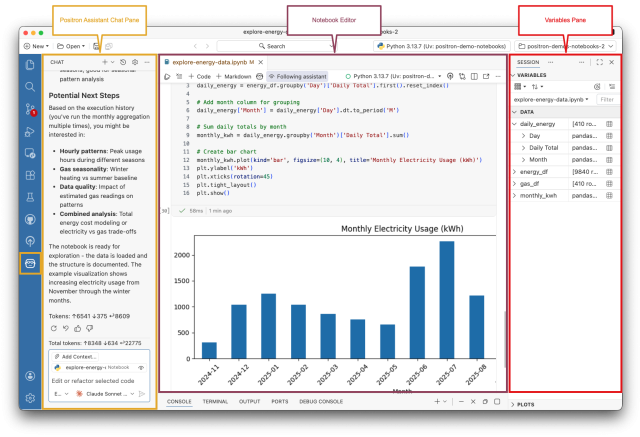
The Positron Notebook Editor is a new, purpose-built experience for working with Jupyter notebooks inside Positron, released in early alpha in February 2026. Rather than relying on the inherited Code OSS notebook editor (as VS Code does), the team built a custom editor from the ground up that treats .ipynb files as first-class citizens in a data-science-focused IDE. Out of the box, it integrates Positron's built-in capabilities, the Variables Pane, Data Explorer, environment management, Positron’s AI tooling, and one-click publishing, directly into the notebook workflow.
Traditional Notebook UIs provide a small subset of full text-editor features, while IDEs force a compromise when working with notebooks: you gain advanced editor features but lose the exploratory simplicity of the classic Jupyter experience. The Positron Notebook Editor closes that gap by pairing a streamlined notebook interface with deep, context-aware AI assistance that can see cell states, execution history, and outputs, and, with permission, edit and run cells on your behalf. The new editor also lays the groundwork for future cross-format support, including better version control, shared functionality across Quarto (.qmd) and Jupyter (.ipynb) files, and tighter connections between exploratory analysis and polished reports.
For more information see the Positron Notebook editor announcement or read through the Positron Notebook Editor section of the user guide, or watch this demo. To get started and make the Positron Notebook Editor the default Jupyter Notebook editor, enable the positron.notebook.enabled setting.
Connections Pane
Available in all license tiers for Positron Pro Sessions.
Positron's Connections Pane lets users manage and explore database connections directly within the IDE. Users can create connections either through a UI dialog or via R and Python code, then browse database schemas, navigating tables, columns, and data types, and preview table contents in the Data Explorer.
The pane supports a wide range of Python database libraries including SQLAlchemy, DuckDB, Snowflake Connector, Databricks SQL Connector, BigQuery, and others, and implements RStudio's connections contract so that any R package that worked with the RStudio Connections Pane works in Positron as well. Connections can also be opened from the Variables Pane by selecting the database icon on any connection object.
For more information, see the Connections Pane section of the user guide.
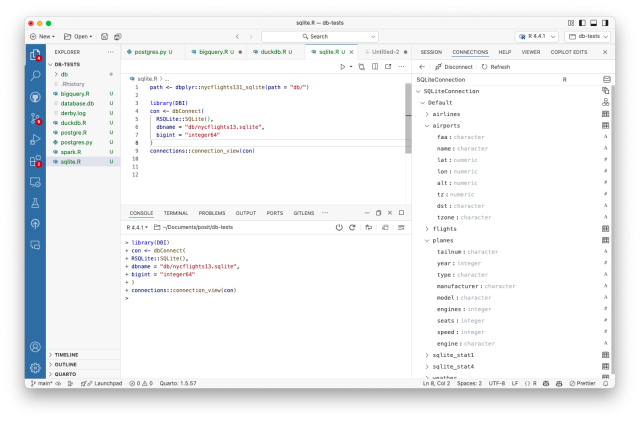
Looking ahead, the team is implementing a next-generation Data Connections system that separates authentication from code generation, allowing users to connect to catalogs, data warehouses, databases, and object stories directly from the IDE without a language runtime, explore catalogs and schemas visually before writing any code, and then generate connection code in their language of choice only when they're ready to work with the data.
PDF Viewer
Available in all license tiers for Positron Pro Sessions.
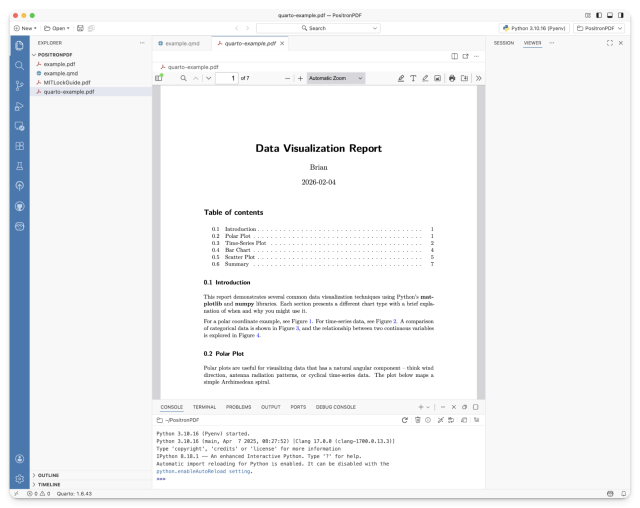
Positron now includes a built-in PDF viewer powered by PDF.js that automatically matches the IDE's theme. The viewer works across desktop and server environments, including Positron running in Posit Workbench via Docker, so data scientists can view rendered Quarto documents, reports, and other PDF output without leaving the IDE or switching to an external application.
Better R support and new debugging with R
Available in all license tiers for Positron Pro Sessions.
This release continues to deepen Positron R support across several areas. Shiny applications now run in Console sessions instead of the terminal, making it possible to use the Positron R debugger with your Shiny apps for the first time. The debugger also gains support for conditional breakpoints, log breakpoints, and hit count breakpoints. Two new commands make it easier to work with resources from R packages: R: Run RStudio Addin lets you browse and execute installed addins from the Command Palette, and R: New R Markdown from Template lets you discover and use .Rmd templates from your installed packages.
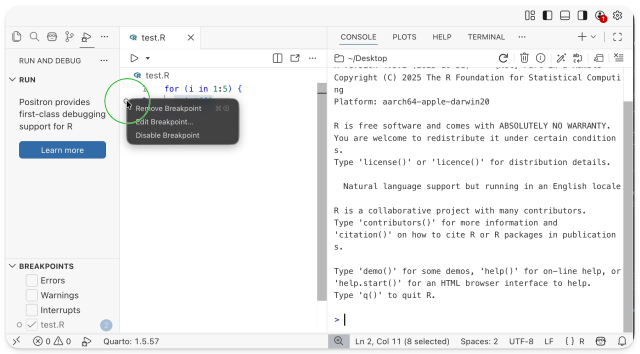
For more information on debugging with R, see the Debugging with R section of the user guide.
Positron Assistant now supports Anthropic base URLs and Microsoft (Azure) AI Foundry
Available in all license tiers for Positron Pro Sessions.
Positron Assistant now supports custom base URLs for Anthropic as a model provider and Microsoft Foundry (formerly Azure OpenAI and Azure Foundry) as a new model provider. Positron Assistant can now connect to models hosted on Microsoft Foundry, including OpenAI models and Anthropic's Claude models. The 2026.04 release of Positron ships two authentication paths: API key-based access via a custom base URL, and SSO/OAuth authentication through Microsoft Entra ID using delegated Azure credentials from Posit Workbench (Enhanced Tier), so teams can use short-lived tokens instead of long-lived API keys.
Many enterprise data science teams work inside Azure environments where models must stay within their organization's cloud boundary for compliance, data governance, or cost reasons. Until now, using Positron Assistant meant routing traffic outside that boundary. With Microsoft Foundry support, teams can use the AI assistant they already know against models their organization has already approved and deployed, without managing personal API keys or compromising on security posture. Entra ID integration means authentication flows through the same identity system already used to access Posit Workbench, so there's nothing new for IT to provision.
In Positron Assistant's provider settings, select Microsoft Foundry as your provider. You can authenticate with an API key and your Foundry endpoint URL, or if your organization uses Posit Workbench with delegated Azure credentials configured, sign in via Entra ID for automatic token management. See the Posit Workbench delegated Azure credentials documentation for setup details.
Native resource monitor
Available in all license tiers for Positron Pro Sessions.
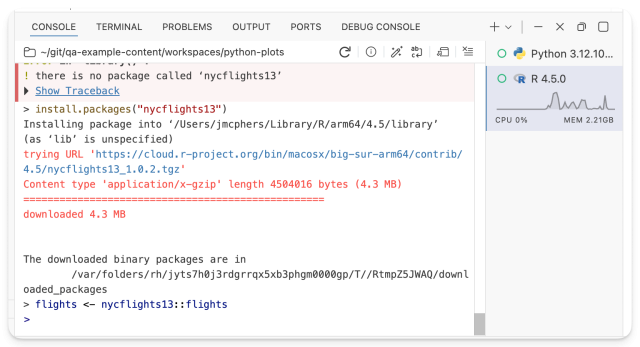
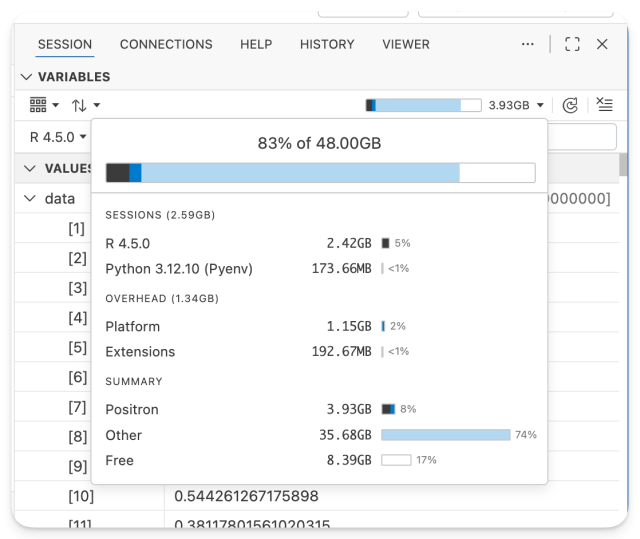
Positron now includes a built-in resource monitor, delivered in two parts.
The first addition displays per-session resource usage directly on the console tab for the currently selected session, showing memory consumed by the session and its loaded data, the effect of commands on resource usage, and whether a session is actively computing or hung.
The second addition is a global memory usage monitor in the Variables pane that shows Positron's overall memory footprint in the context of total system usage, with a detailed popup breaking down how individual components, kernels, extensions, and other processes contribute to that total.
Data scientists routinely work with large datasets and multiple interpreter sessions, and running out of memory or unknowingly consuming excessive resources can be disruptive, especially in shared server environments like Posit Workbench. The resource monitor gives users visibility into the resource usage of interactive sessions, helps them see how memory-intensive operations allocate or free memory, and distinguishes sessions that are actively working from those that may be stuck. At the global level, it shows how much system memory pressure is coming from Positron versus the rest of the system, helping users and administrators diagnose and manage resource contention before it becomes a problem.
Positron now supports environment modules
Available in all license tiers for Positron Pro Sessions.
Environment modules are a tool for managing collections of environment variables and switching between environments in a shell. They are especially popular in high-performance computing (HPC) environments to manage multiple installations of a single interpreter alongside needed libraries and tools.
Positron supports both traditional environment modules and the newer Lmod system.
For more information, see the Environment Modules section of the Positron user guide.
Positron console auditing
Available for Enhanced and Advanced license tiers.
Posit Workbench can be optionally configured to audit R and Python console and notebook inputs in Positron Pro by writing console inputs to a central location (the /var/lib/rstudio-server/audit/r-console directory by default). This feature can be enabled using the audit-r-console setting. Additionally, all inputs are annotated with metadata that indicates whether the user executed the code or an agent executed the code on their behalf.
This feature can assist with internal compliance needs and understanding of user behavior.
For more information, see the Auditing Configuration section of the admin guide.
Managed Credentials and Custom OAuth improvements
Available in Preview for Enhanced and Advanced license tiers.
Building on existing support for RStudio Pro, Azure delegated credentials are now also supported in Positron Pro and VS Code IDE sessions. When Workbench is configured to use Microsoft Entra ID for Single Sign-On (SSO), users can also be granted delegated permissions for additional Azure resources without needing to sign in again.
Azure delegated credentials support a range of use cases:
- Programmatic access to Azure services (Storage, Key Vault, SQL Database, and more) via access tokens retrieved through the posit-sdk (Python) or rstudioapi (R) packages
- Azure DevOps Git integration (RStudio Pro sessions only) for cloning and pushing to Azure DevOps repositories without managing personal access tokens
- Third-party application access for any application registered in the same Microsoft Entra ID tenant
For more information on configuring this see the Azure delegated credentials section of Admin Guide.
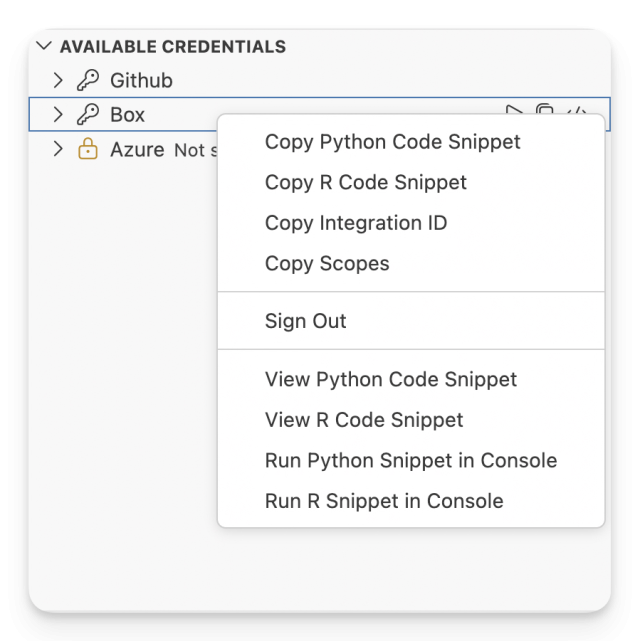
The Available Credentials view is a new UI that was added to the Posit Workbench extension sidebar. It displays custom OAuth integrations that your administrator configured and lets you manage authentication directly from the Positron IDE. It also can provide R or Python code snippets to easily make use of Custom OAuth credentials in your source files.
For more information see the Custom OAuth section of the User Guide.
Session Metadata into Database
Posit Workbench now has full support for database-backed session metadata storage by setting session-use-file-storage=0 in rserver.conf. This allows Posit Workbench to store session and project metadata in a central database rather than on the user filesystem. With session state living in the database, Workbench no longer needs to mount user home directories on the server or rely on root permissions to read user-owned files, removing two of the key blockers to deploying Workbench in locked-down container environments.
This is also progress towards our 2026-goal of enabling Workbench to run in security-hardened Kubernetes environments such as Openshift, where privileged containers and root-level access are often prohibited by organizational policy.
For more information, reference the Session Storage section of the Admin Guide.
mirai - Faster, Easier Parallel Computing on Workbench
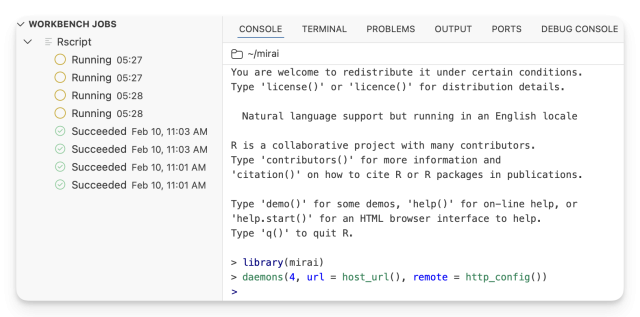
R’s framework for parallel and asynchronous computing hits v2.6.0 on CRAN. New HTTP API support makes deploying to enterprise platforms seamless, and Posit Workbench is auto-configured out of the box. Mirai daemons (workers) launch as Workbench jobs, connect back to your session, and you can start sending work to them straight away. This means the scripts prototyped on your laptop now scale to your Workbench Kubernetes or Slurm backend just by changing a single line of code. Read more on getting started at mirai or the mirai 2.6 announcement blogpost.
Positron Pro is now supported on SLES/OpenSUSE
Positron Pro is now enabled by default on SUSE Linux 15 SP7 and openSUSE 15.6. On fresh installs, the default positron.conf and positron-user-settings.json configuration files are automatically generated, matching the behavior on other supported platforms. No action is needed if you are upgrading an existing installation that already has these files configured.
Quality of Life & Infrastructure Improvements
We have included several enhancements to improve daily usability and system performance:
- Added Positron Pro support for SUSE Linux 15 SP7 and openSUSE 15.6, enabling Positron by default on these platforms
- Added version end of life warning banner to the admin dashboard. The warning threshold is configurable with workbench-admin-version-expiration-warning-days (default 182 days).
- Added server version and license information to the admin "server" page. Includes a mechanism to automatically check for updates and display a banner when a new version is available
- The RStudio documentNew API now permits arbitrary file types and extensions
Fixed:
- Fixed an issue where get_audited_job_details returned HTTP 500 when public key files were missing
- Fixed an issue where locking or deactivating a SCIM or JIT provisioned user did not immediately sign them out of Workbench
- Fixed an issue where SCIM or JIT provisioned users with special character usernames appeared as "Inactive" but could still start sessions
See full changelog here
Dependencies
- Positron 2026.04.1-10
- VS Code 1.109.2
- Ace 1.43.5
- Copilot Language Server 1.459.0
- Electron 39.8.7
- Launcher 2.21.0
- Node.js 22.20.0 (vscode server)
- Node.js 22.22.2 (copilot, Posit AI)
- Quarto 1.9.36
- rserver-saml 0.9.2
- xterm.js 6.0.0
Learn More
There’s a lot more in this release. You can read about all the features & bug fixes in the Posit Workbench and RStudio 2026.04.0 “Globemaster Allium” release in the RStudio/Posit Workbench Release Notes or Positron IDE release notes.
We’d love to hear your feedback about the new release on our community forum.
To be notified of product updates, patches, etc., please subscribe to the Products emails.

Tom Mock

Cindy Tong
Related Content

Posit Named "One to Watch" in Snowflake's 2026 Modern Marketing Data Stack Report

Posit Package Manager 2026.05.0: VS Code Extension Governance and Smarter Package Search
