Posit Package Manager 2026.05.0: VS Code Extension Governance and Smarter Package Search


Posit Package Manager 2026.05.0, released June 1, 2026, adds curated Open VSX repository support for air-gapped and regulated environments and delivers a redesigned package browsing interface with improved search, vulnerability surfacing, and accessibility. Starting with this release, we move Package Manager to a monthly cadence, so you can expect improvements and fixes toward the end of each month.
Existing customers can upgrade following the standard upgrade guide for their deployment. New customers can learn more about Package Manager or contact sales to get started.
How to govern VS Code extensions in restricted and air-gapped environments
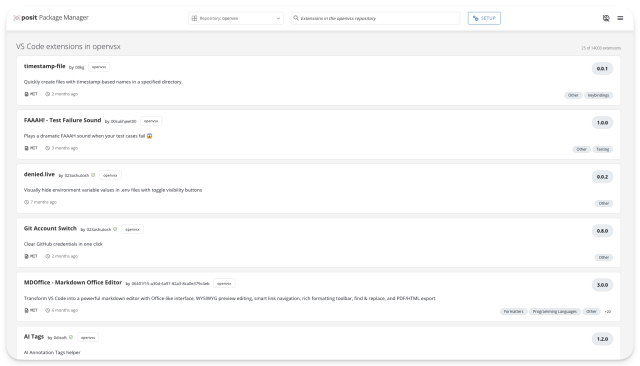
Curated Open VSX repositories let administrators define an explicit allowlist of approved VS Code extensions and versions, so only what your team has approved is available to users. This builds on the Open VSX mirroring introduced in 2026.04.0, which let teams in restricted or air-gapped environments serve extensions from their own infrastructure.
With a curated Open VSX source, you define an allowlist of approved extensions and versions in a requirements file. Version specifiers let you pin an exact release (==) or specify an approved range with >= and < operators. Before committing any changes, run rspm update without the --commit flag to preview what will be added, updated, or removed, then re-run with --commit to apply. You can also combine a snapshot date with version specifiers to reproduce exactly what was available at a specific point in time.
Use case: A security team at a financial services firm manages Positron and VS Code sessions for hundreds of analysts. After mirroring Open VSX in April, they now want to ensure users can only install extensions that have cleared an internal review. With a curated VSX source, they define an approved list, pinning exact versions for extensions like Python and Jupyter and specifying ranges for other tools. When an analyst opens the extension marketplace in their IDE, they see only the approved catalog. Adding a new extension follows the same governance workflow used for CRAN and PyPI packages: update the requirements file and run a preview before committing.
Curated Open VSX repositories are available to Enhanced and Advanced tier customers. See the quick start guide and the Curated VS Code Extension Sources section of the Admin Guide to get started.
What's new in the Posit Package Manager browsing and search interface
Package details pages now use a consistent two-column layout across R, Bioconductor, Python, and Open VSX repositories. A sidebar surfaces publisher, license, download count, and supported platforms at a glance. The main column organizes README, dependencies, distributions, vulnerabilities, version history, and metadata into expandable sections that remember your preferred state across page refreshes.
Search results are redesigned as well. Search terms are highlighted in results, and each result now shows status badges (blocked, archived, yanked, vulnerability count), publisher or author, license, download count, publication date, and keyword chips. Python distributions now include an inline SHA256 with one-click copy, and blocked or yanked distributions have distinct visual treatment so their status is immediately clear.
The redesign also includes a full accessibility pass, so teams with accessibility compliance requirements can rely on Package Manager without workarounds. Every interactive element is keyboard-reachable, aria attributes are in place throughout, and screen readers can navigate the interface cleanly.
You can explore the new interface live on P3M.
Use case: A data scientist exploring options for geospatial analysis searches Package Manager for relevant R packages. In the results, she can see at a glance which packages are blocked by her organization's policies, which have known vulnerabilities, and which are actively maintained, without opening each package individually. When she clicks through to a package she wants, the expandable vulnerabilities section auto-expands if the package is blocked, and the version history tab shows which versions were available at a given snapshot date, making it easy to match what colleagues are using in production.
See the User Guide for searching for packages and viewing package details.
Ubuntu 26.04 and R 4.6 binary package support, plus other improvements
- Platform support: Binary packages are now available for Ubuntu 26.04 (Resolute Raccoon) and R 4.6
- Bioconductor API: Archival status is now surfaced in the bioc/versions API endpoint
- Bug fixes: Several VS Code extension and package history fixes are included; see the full release notes for details
Frequently asked questions
What's new in Posit Package Manager 2026.05.0? This release adds curated Open VSX repositories for governing VS Code extensions in air-gapped and regulated environments, redesigns the package details and search interface, and extends binary package support to Ubuntu 26.04 and R 4.6. Starting with this release, Package Manager ships on a monthly cadence.
Why would I want to govern VS Code / Open VSX extensions? VS Code extensions are software and carry the similar risks as R and Python packages. They can introduce security vulnerabilities, carry license obligations, or pull in unreviewed dependencies. In regulated industries like life sciences, finance, and government, IT and security teams need full visibility into what's installed in their data science environments, including IDE extensions. Governing extensions through Package Manager gives you the same allowlist controls, audit trail, and policy enforcement you already apply to packages.
Who can use curated VS Code / Open VSX repositories? Curated Open VSX repositories are available to Enhanced and Advanced tier customers.
How do I upgrade to Package Manager 2026.05.0? Existing customers can follow the standard upgrade guide.
How to upgrade to Package Manager 2026.05.0
With our new monthly release cadence in place, this is the first in a more frequent series of updates. Existing customers can upgrade following the standard upgrade guide. For the complete list of changes, see the release notes. Questions or feedback? Reach out to your account team if you are an existing customer or

Joe Roberts
Related Content

Introducing usage and performance metrics in Posit Connect Cloud

Introducing Positron on Amazon SageMaker
