Posit AI is Now Available to All


Posit Assistant and Next Edit Suggestions (NES) enter public preview today, bringing powerful new AI capabilities directly to all RStudio users. These features can be powered by Posit AI, a subscription service that also enters general availability today and includes a free trial with no credit card required. Finally, we’re excited to release Posit Workbench and RStudio 2026.04.0 (Globemaster Allium), which introduce the Posit Assistant preview to RStudio Pro and Positron Pro sessions.
Building an AI assistant for data science
To share how we built an AI assistant tuned specifically for the complex reality of data science, we put together a short video highlighting the engineering choices behind Posit Assistant. Watch to learn more about Posit Assistant’s features like predictive modeling, thinking, and a brand new Terminal User Interface.
Posit Assistant
Posit Assistant is an agent purpose-built for data science, running inside the RStudio sidebar on frontier models from Anthropic. What makes it different from a general-purpose coding agent is its harness — the machinery that routes each task to the right combination of tools, skills, and reasoning before the model starts responding.
Exploring a new dataset might generate ggplot2 code and render a plot in the Plots pane. When fitting a model, Posit Assistant’s predictive modeling skill uses tidymodels, splitting data and holding out the test set. Debugging works backwards from the exact error in your console, not from a secondhand description of what went wrong.
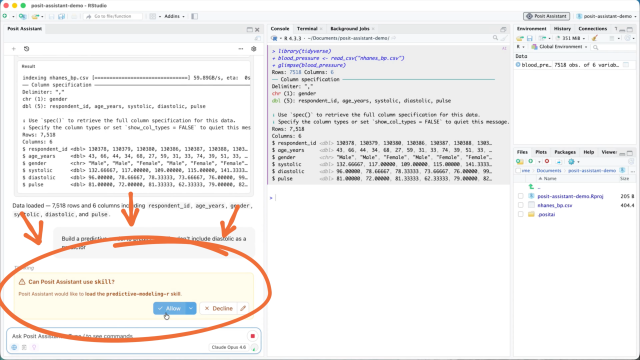
Posit Assistant’s harness is extensible. Teams can wire in their own Skills and MCP servers, so the patterns your team already relies on become patterns it follows.
A lightbulb icon in the Assistant panel toggles reasoning, where the model thinks through a problem before it acts and shows its thinking to you. Plan mode gives you a way to inspect and modify or approve its strategy before any changes land. A granular permissions system controls what the assistant can read, edit, or run. And for people who prefer the terminal, we’re working on a Terminal User Interface (TUI) that can render full-color inline plots right in the shell.
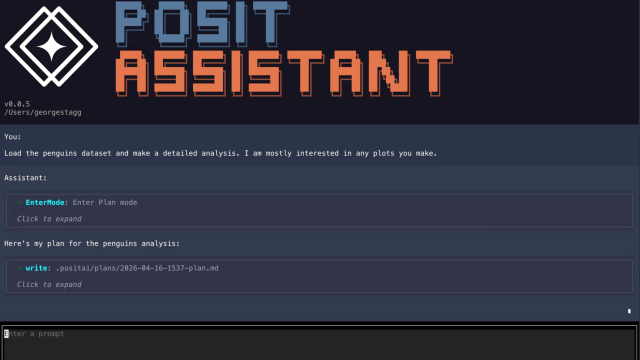
Everything Posit Assistant does is visible as code you can read, edit, and rerun.
Next Edit Suggestions (NES)
Next Edit Suggestions (NES for short) offers context-aware completions as you type. Because it sees the same live session Posit Assistant does, its suggestions reflect the columns in your loaded data frames, the helpers you defined ten minutes ago, and the packages you imported. Every Posit AI subscription includes unlimited NES usage.
Privacy
Your privacy matters to us. Posit AI is backed by a Zero Data Retention (ZDR) agreement with Anthropic, our model provider. When you send a prompt or code snippet through Posit AI, it is used exclusively to generate a response and is then immediately deleted. Your data is never used to train future models. By default, you’re opted out of sharing trace data with Posit to improve the Posit AI service, meaning we only retain basic operational data for 30 days.
Pricing
Posit AI is an optional subscription starting at $20/month with a free trial. It includes a monthly allowance of credits to power Posit Assistant and unlimited use of NES.
RStudio itself remains free and open-source. Using RStudio without AI will always remain free. The revenue from Posit AI funds our ongoing open-source mission.
For Enterprise Teams
For enterprise teams that require custom providers or stricter data boundaries, today also marks the release of Posit Workbench 2026.04.0 (Globemaster Allium). This release brings preview support for Posit Assistant to RStudio Pro and Positron Pro, complete with Bring Your Own Key (BYOK) support for Anthropic, AWS Bedrock, Azure Foundry, Google Vertex, and OpenAI. If your organization needs to keep model traffic within internally approved boundaries, Workbench now provides that path.
Try it out
You don't have to take our word for it.
Open RStudio, load the messiest dataset you have, and see what it feels like to have an assistant that actually understands your environment. Click the new Posit Assistant icon in the RStudio toolbar to start your free trial.

Nick Rohrbaugh

Alex Chisholm

Tom Mock
Related Content

What's new in Posit Team for Snowflake: May 2026
