What’s New in Posit Workbench 2026.01.0: Enhanced Admin Settings, Flexible Access Across Providers and Smarter Jobs


We’re excited to announce the latest update to Posit Workbench, Positron Pro, and RStudio IDE, in our “Apple Blossom” release. In enterprise data science, there is often a tension between two competing needs: administrators require strict control for security and compliance, while data scientists need flexibility to move quickly. This release addresses that tension directly by introducing features that give admins the governance tools they need while removing friction for data scientists connecting to data and running jobs.
Here’s what’s new in the 2026.01.0 release.
Key highlights
Workbench & Positron Pro
- Governance at Scale: New Admin-Enforced Configurations for Positron Pro allow admins to centrally manage settings, including AI Assistant access and allowed extensions, ensuring compliance without slowing down adoption.
- Universal Connectivity: We’ve expanded data access with Custom OAuth Support (in Preview), enabling secure, authenticated connections to any OAuth 2.0 compliant data source for code authorization flows.
- Smarter Workflows: Workbench Jobs now automatically discover project-specific Python virtual environments and R interpreters, ensuring your code runs in the right environment easily.
RStudio IDE
- AI in RStudio IDE: AI is coming soon. Do you want to be among the first beta testers? Sign up here: https://posit.co/products/enterprise/ai/
- Sidebar Pane: Configure an extra 5th pane as a full-height sidebar pane to display any environment or output pane.
- Find in Console: Search across console output for specific text, errors and more.
Admin-Enforced Configuration for Positron Pro
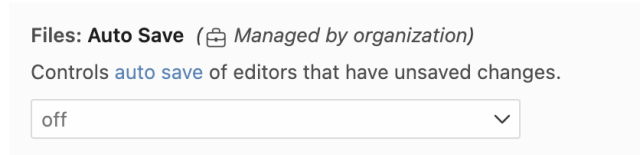
Available in all license tiers for Positron Pro Sessions.
As AI assisted coding becomes standard, enterprise IT teams face a challenge: how to enable these powerful tools while maintaining strict security and compliance standards.
In this release, we are introducing admin-enforced configurations for Positron Pro. This capability allows administrators to control immutable settings at the user or group level, ensuring that organizational policies are respected. Admin-enforced configuration helps unlock:
- Secure AI Adoption: Administrators can now manage Positron Assistant access in Positron Pro sessions. Admins can enable or disable access to Positron Assistant by user or user group. Positron Assistant currently has preview support for AWS Bedrock, GitHub Copilot, Snowflake Cortex, OpenAI, and Custom Providers.
- Extension Governance: Administrators can now control which extensions can be installed in Positron Pro sessions, preventing the introduction of unvetted or non-compliant software into the environment.
These settings integrate with Posit Workbench profiles, allowing for granular control that can differ between user groups.
Get started today with admin enforced configurations by exploring the Admin guide.
Extending Access Across Providers with Custom OAuth Support (Preview)
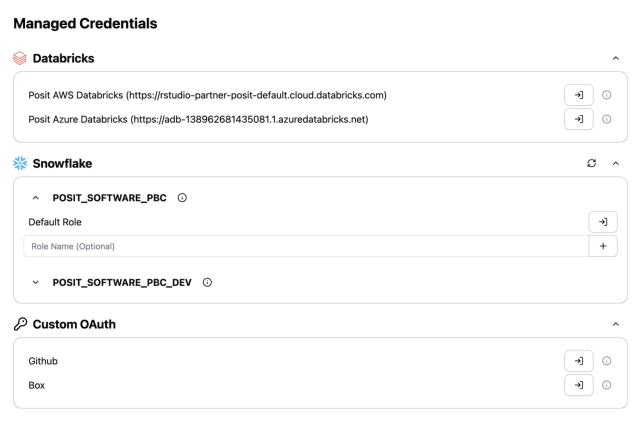
Available in Preview for Enhanced and Advanced license tiers in Positron Pro, RStudio Pro, and VS Code sessions.
Data scientists need access to data across many providers in a secure way. Previously, Workbench only offered first-party integrations for major providers like Databricks and Snowflake. With this release, we’re launching a preview of Custom OAuth Support, allowing administrators to configure any OAuth 2.0-compliant identity provider using the authorization code grant.
- For Administrators: This feature reduces engineering overhead by allowing you to access multiple OAuth-enabled services via a unified UI or a configuration file. It also enhances security by enforcing automatic short-lived token, significantly reducing the risk of credential leakage.
Explore the Admin Guide to add a new Custom OAuth 2.0 provider such as Microsoft EntraID, Box, Okta and more.
For Data Scientists: This means you can now securely access third-party APIs and services programmatically from Workbench sessions via short-lived OAuth tokens without having to manage sensitive data credentials manually. Tokens are automatically refreshed when possible, reducing the need for manual re-authentication, letting you focus on the analysis, not storing credentials.
Look for upcoming rstudioapi and posit-sdk-py releases and updates to the User Guide that will include Custom OAuth support.
Improved Python and R Discovery for Workbench Jobs
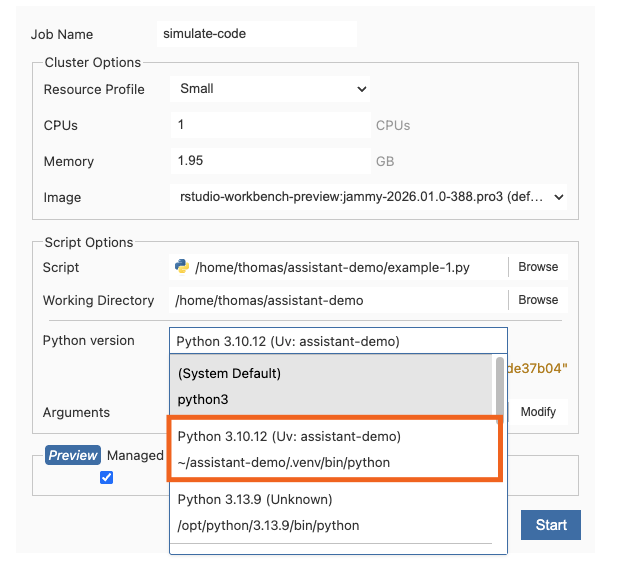
Available in Advanced license tier
We are committed to improving the Workbench experience for data analysis in both Python and R. In this release, we’ve improved how Workbench Jobs interact with Python and R environments in Positron Pro and VS Code sessions:
- Smart Python Environment Discovery in Positron Pro: Workbench Jobs in Positron Pro sessions now automatically discover and list project-specific Python virtual environments, not just global installations. This discovery happens automatically and caches the details, speeding up job launches.
- R Interpreter Support: Workbench Jobs in Positron Pro and VS Code now identify available R interpreters, presenting them as simple options in the job launch UI.
Users can now easily launch jobs with proper environment isolation without manual configuration, reducing friction.
Admins can learn more about Workbench jobs for VS Code here and Positron Pro here.
End users should explore the User Guide.
Positron version 2025.12.2-5
With this Workbench release, we’ve included Positron version 2025.12.2-5. See full release notes here.
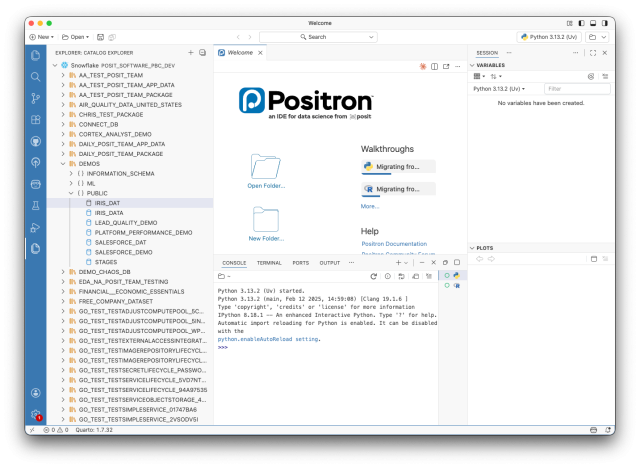
Highlights:
- Initial support for a new Catalog Explorer UI that allows connecting to data catalogs such as Snowflake (Polaris Catalog) or Databricks (Unity Catalog).
- Improvements to the default experience for editing Python code via the Pyrefly extension
- Preview support for Snowflake Cortex as a language model provider for Positron Assistant
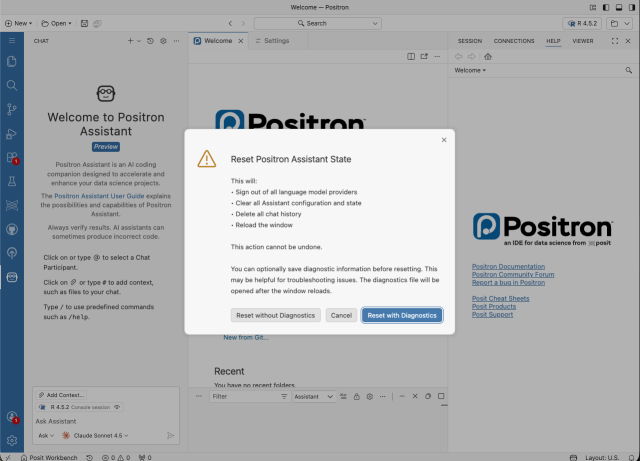
- Improvements to make Positron Assistant more reliable and easier to troubleshoot via the Reset State and Collect Diagnostics commands.
RStudio
This release includes several updates to the RStudio IDE to improve daily usability:
-
AI assistance is coming to RStudio IDE! Want to be among the first beta testers? Sign up.
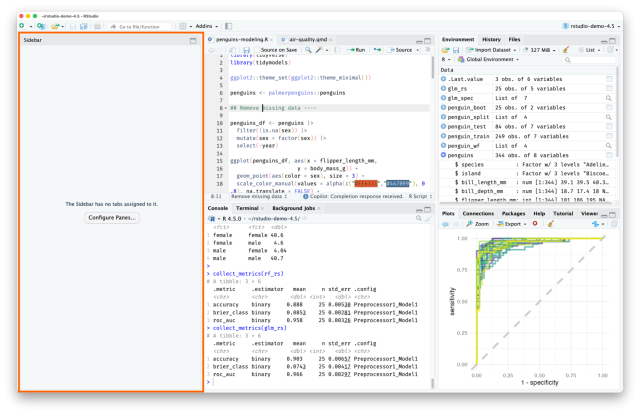
- Sidebar Pane: Configure the full height Sidebar Pane to display any of the tabs from the Environment or Output Panes in addition to the existing four pane layout.
- Find in Console: Search through Console output to locate specific results, error messages, or any text in the Console.
Quality of Life & Infrastructure Improvements
We have included several enhancements to improve daily usability and system performance:
-
-
- Workbench Homepage: We’ve added new middleware capabilities and UI improvements, including the ability to hide specific projects from the homepage view. Explore the admin guide.
- Launcher Performance: We have improved performance for Slurm configurations.
- Singularity: We now support deprecating Singularity images while keeping them accessible, helping admins gracefully migrate teams to newer image standards.
-
Fixed
See full changelog here
RStudio
Workbench
-
- (rstudio-pro#9279): Fixed an issue in Slurm clusters where R and Python versions were not detected in VS Code and Positron
Learn More
There’s a lot more in this release. You can read about all the features & bug fixes in the Posit Workbench and RStudio 2026.01.0 “Apple Blossom” release in the RStudio/Posit Workbench Release Notes.
We’d love to hear your feedback about the new release on our community forum.
To be notified of product updates, patches, etc., please subscribe to the Products emails.

Cindy Tong
Related Content

How to secure your organization's agent plugins in Posit Package Manag...

How Posit Team governs AI for enterprise data science and research
