Introducing pointblank: Data Validation in Python


Get our email updates
Interested in learning more about Posit + Python tools? Join our email list.
Pointblank is a new Python package that’ll help you validate data. If you have tabular data (and who doesn’t?), this is the package for you! I’ve long been interested in data quality, and so I’ve spent a lot of time building tooling that makes it possible to perform data quality checks. And there are so many reasons to care about data quality. If I were to put down just one good reason for why data quality is worth your time it is because having good data quality strongly determines the quality of decisions.
How does data validation help with data quality? It assesses the accuracy and quality of data before it gets used. It ensures that only “good” data gets through by setting rules and checks to catch errors, inconsistencies, and missing values.
Having the ability to distinguish bad data from good data is the first step in solving data quality issues, and the sustained practice of doing data validation will guard against intrusions of poor-quality data. Pointblank has been designed to really help here. Though it’s a fairly new package, it is currently quite capable. And, it’s available in PyPI. One of the examples below performs validation on a DuckDB table, so we have to ensure the installation of Pointblank includes components for working with DuckDB:
pip install 'pointblank[duckdb]'Alright! Let’s look at a few demonstrations of Pointblank’s capabilities for data validation.
The Data Validation Workflow
Let’s get right to performing a basic check of a Polars DataFrame. We’ll make use of the included small_table dataset.
import pointblank as pb

small_table = pb.load_dataset(dataset="small_table", tbl_type="polars")

validation_1 = (
    pb.Validate(
        data=small_table,
        tbl_name="small_table",
        label="Example Validation"
    )
    .col_vals_lt(columns="a", value=10)
    .col_vals_between(columns="d", left=0, right=5000)
    .col_vals_in_set(columns="f", set=["low", "mid", "high"])
    .col_vals_regex(columns="b", pattern=r"^[0-9]-[a-z]{3}-[0-9]{3}$")
    .interrogate()
)

validation_1There’s a lot to take in here, so let’s break down the code first! Note these three key pieces:
- the
Validate(data=...)argument takes a DataFrame (or database table) that you want to validate - the methods starting with
col_*specify validation steps that run on specific columns - the
interrogate()method executes the validation plan on the table (it’s the finishing step)
This common pattern is used in a validation workflow, where Validate and interrogate() bookend a validation plan generated through calling validation methods.
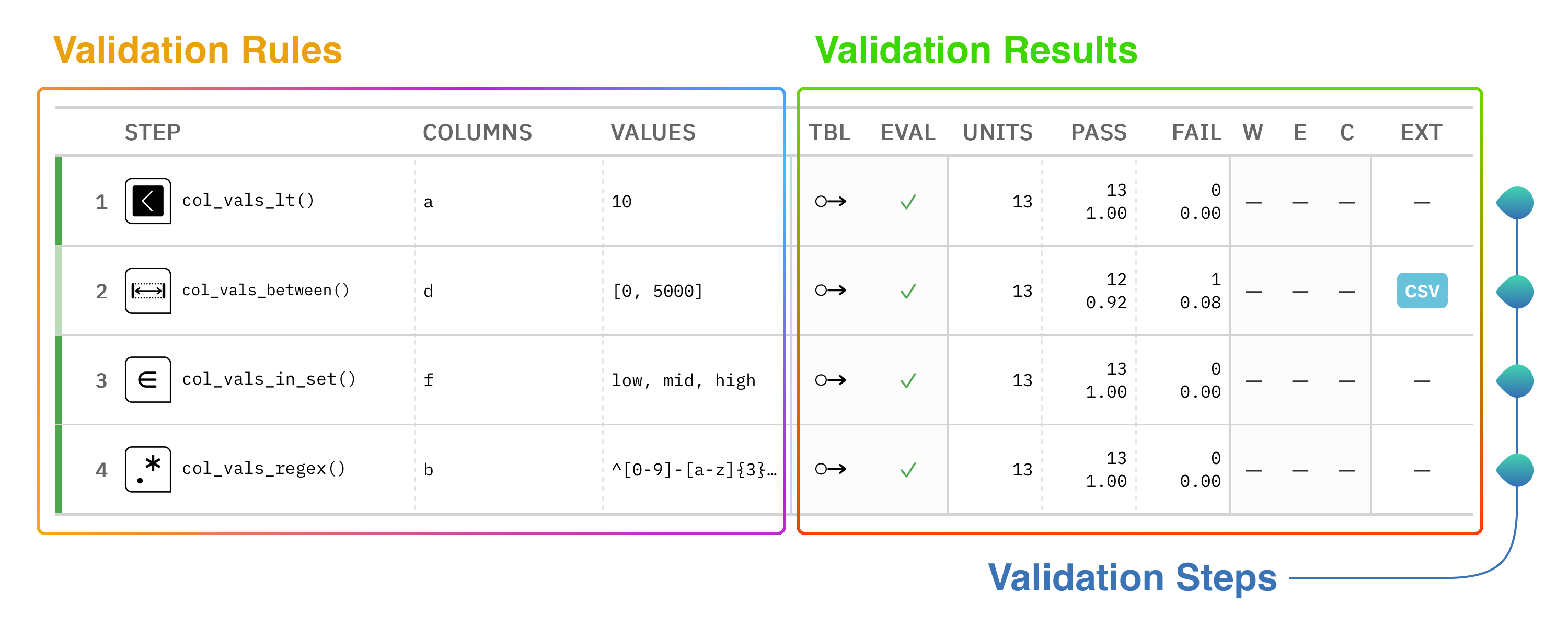
Now, onto the result: it’s a table! Here at Posit, we ❤️ Great Tables, so naturally, we use that package here in Pointblank to really give you the goods on how the validation went down. Each row in this reporting table represents a single validation step (one for each invocation of a col_vals_*() validation method). Generally speaking, the left side of the validation report tables outlines the key validation rules, and the right side provides the results of each validation step.
We tried to keep it simple in principle, but a lot of useful information can be packed into this validation table. Here’s a diagram that describes a few of the important parts of the validation report table:
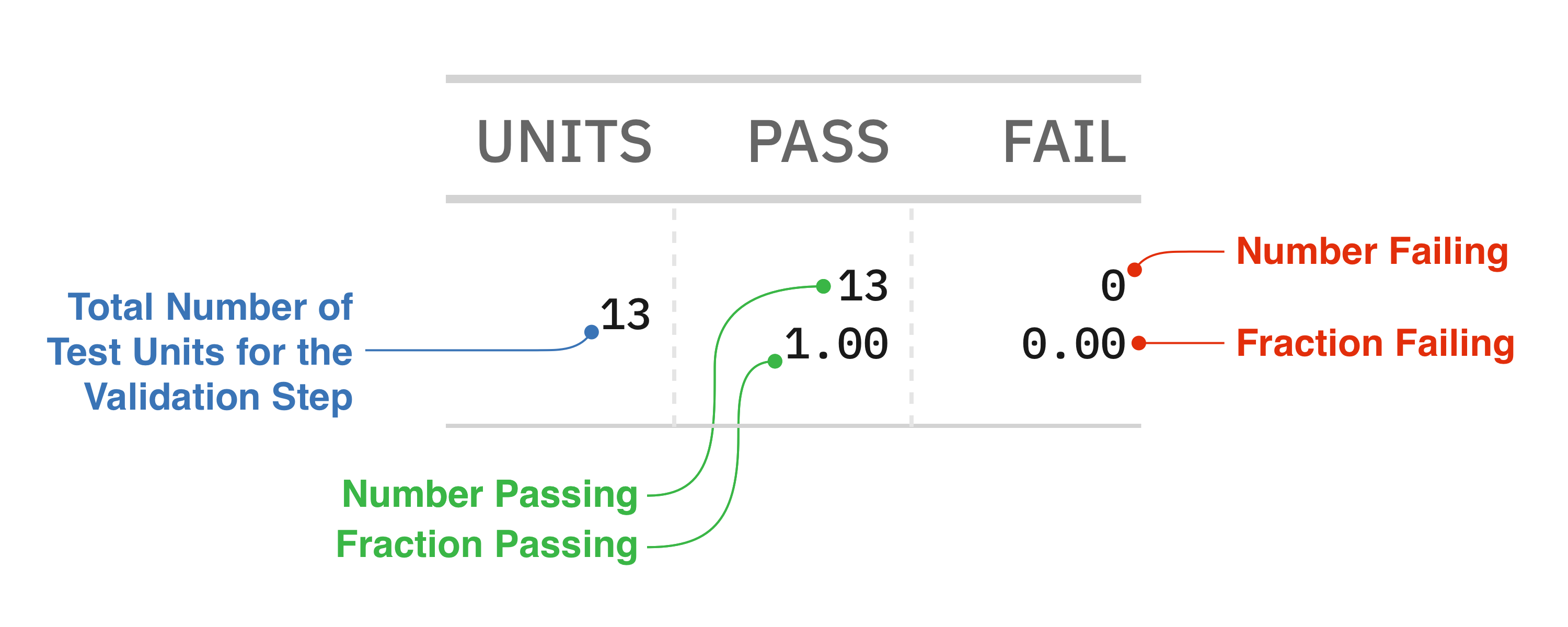
All of those numbers under the UNITS, PASS, and FAIL columns have to do with test units, a measure of central importance in Pointblank. Each validation step will execute a type of validation test on the target table. For example, a col_vals_lt() validation step can test that each value in a column is less than a specified number. The key finding that’s reported as a result of this test is the number of test units that pass or fail. This little diagram explains what those numbers mean:
Failing test units can be tied to threshold levels, which can provide a better indication of whether failures should raise some basic awareness or spur you into action. Here’s a validation workflow that sets three failure threshold levels that signal the severity of data quality problems:
import pointblank as pb
import polars as pl

validation_2 = (
    pb.Validate(
        data=pb.load_dataset(dataset="game_revenue", tbl_type="polars"),
        tbl_name="game_revenue",
        label="Data validation with threshold levels set.",
        thresholds=pb.Thresholds(warning=1, error=20, critical=0.10),
    )
    .col_vals_regex(columns="player_id", pattern=r"^[A-Z]{12}[0-9]{3}$")        # STEP 1
    .col_vals_gt(columns="session_duration", value=5)                           # STEP 2
    .col_vals_ge(columns="item_revenue", value=0.02)                            # STEP 3
    .col_vals_in_set(columns="item_type", set=["iap", "ad"])                    # STEP 4
    .col_vals_in_set(                                                           # STEP 5
        columns="acquisition",
        set=["google", "facebook", "organic", "crosspromo", "other_campaign"]
    )
    .col_vals_not_in_set(columns="country", set=["Mongolia", "Germany"])        # STEP 6
    .col_vals_between(                                                          # STEP 7
        columns="session_duration",
        left=10, right=50,
        pre = lambda df: df.select(pl.median("session_duration"))
    )
    .rows_distinct(columns_subset=["player_id", "session_id", "time"])          # STEP 8
    .row_count_match(count=2000)                                                # STEP 9
    .col_exists(columns="start_day")                                            # STEP 10
    .interrogate()
)

validation_2This data validation makes use of the many validation methods available in the library. Because thresholds have been set at the Validate(thresholds=) parameter, we can now see where certain validation steps have greater amounts of failures. Any validation steps with green indicators passed with flying colors, whereas: (1) gray indicates the ‘warning’ condition was met (at least one test unit failing), (2) yellow is for the ‘error’ condition (20 or more test units failing), and (3) red means ‘critical’ and that’s tripped when 10% of all test units are failing ones.
Reporting tables are essential to the package and they help communicate what went wrong (or well) in a validation workflow. Now let’s look at some additional reporting that Pointblank can give you to better understand where things might’ve gone wrong.
Reporting for Individual Validation Steps
The second validation step of the previous data validation showed 18 failing test units. That translates to 18 spots in a 2,000 row DataFrame where a data quality assertion failed. We often would like to know exactly what that failing data is; it’s usually the next step toward addressing data quality issues.
Pointblank offers a method that gives you a tabular report on a specific step: get_step_report(). The previous tables you’ve seen (the validation report table) dealt with providing a summary of all validation steps. In contrast, a focused report on a single step can help to get to the heart of a data quality issue. Here’s how that looks for Step 2:
validation_2.get_step_report(i=2)| Report for Validation Step 2 ASSERTION 18 / 2000 TEST UNIT FAILURES IN COLUMN 8 EXTRACT OF FIRST 10 ROWS (WITH TEST UNIT FAILURES IN RED): |
|||||||||||
This report provides the 18 rows where the failure occurred. If you scroll the table to the right you’ll see the column that underwent testing (session_duration) is highlighted in red. All of these values are 5.0 or less, which is in violation of the assertion (in the header) that session_duration > 5.
These types of bespoke reports are useful for finding a needle in a haystack. Another good use for a step report is when validating a table schema. Using the col_schema_match() validation method with a table schema prepared with the Schema class allows us to verify our understanding of the table structure. Here is a validation that performs a schema validation with the small_table dataset prepared as a DuckDB table:
import pointblank as pb

# Create a schema for the target table (`small_table` as a DuckDB table)
schema = pb.Schema(
    columns=[
        ("date_time", "timestamp(6)"),
        ("dates", "date"),
        ("a", "int64"),
        ("b",),
        ("c",),
        ("d", "float64"),
        ("e", ["bool", "boolean"]),
        ("f", "str"),
    ]
)

# Use the `col_schema_match()` validation method to perform a schema check
validation_3 = (
    pb.Validate(
        data=pb.load_dataset(dataset="small_table", tbl_type="duckdb"),
        tbl_name="small_table",
        label="Schema check"
    )
    .col_schema_match(schema=schema)
    .interrogate()
)

validation_3| Pointblank Validation | |||||||||||||||||||||||||||||||||||||||||||||||||||||||||||||||||||||||||||||
Schema check DuckDBsmall_table |
|||||||||||||||||||||||||||||||||||||||||||||||||||||||||||||||||||||||||||||
| STEP | COLUMNS | VALUES | TBL | EVAL | UNITS | PASS | FAIL | W | E | C | EXT | ||||||||||||||||||||||||||||||||||||||||||||||||||||||||||||||||||
|---|---|---|---|---|---|---|---|---|---|---|---|---|---|---|---|---|---|---|---|---|---|---|---|---|---|---|---|---|---|---|---|---|---|---|---|---|---|---|---|---|---|---|---|---|---|---|---|---|---|---|---|---|---|---|---|---|---|---|---|---|---|---|---|---|---|---|---|---|---|---|---|---|---|---|---|---|---|
| #4CA64C66 | 1 |
col_schema_match()
|
✓ | 1 | 0 0.00 |
1 1.00 |
— | — | — | — | |||||||||||||||||||||||||||||||||||||||||||||||||||||||||||||||||||
2026-04-13 17:56:16 UTC< 1 s2026-04-13 17:56:16 UTC |
|||||||||||||||||||||||||||||||||||||||||||||||||||||||||||||||||||||||||||||
Notes Step 1 (schema_check) ✗ Schema validation failed: 1 unmatched column(s), 1 dtype mismatch(es). Schema Comparison
|
|||||||||||||||||||||||||||||||||||||||||||||||||||||||||||||||||||||||||||||
This step fails, but the validation report table doesn’t tell us how (or where). Using `get_step_report() will show us what the underlying issues are:
validation_3.get_step_report(i=1)| Report for Validation Step 1 ✗ COLUMN SCHEMA MATCH COMPLETE IN ORDER COLUMN ≠ column DTYPE ≠ dtype float ≠ float64 |
|||||||
| TARGET | EXPECTED | ||||||
|---|---|---|---|---|---|---|---|
| COLUMN | DATA TYPE | COLUMN | DATA TYPE | ||||
| 1 | 1 | ✓ | ✓ | ||||
| 2 | 2 | ✗ | — | ||||
| 3 | 3 | ✓ | ✓ | ||||
| 4 | 4 | ✓ | |||||
| 5 | 5 | ✓ | |||||
| 6 | 6 | ✓ | ✓ | ||||
| 7 | 7 | ✓ | ✓ | ||||
| 8 | 8 | ✓ | ✗ | ||||
Supplied Column Schema: [('date_time', 'timestamp(6)'), ('dates', 'date'), ('a', 'int64'), ('b',), ('c',), ('d', 'float64'), ('e', ['bool', 'boolean']), ('f', 'str')] |
|||||||
The step report here shows the target table’s schema on the left side and the expectation of the schema on the right side. There appear to be two problems with our supplied schema:
- the second column is actually
dateinstead ofdates - the dtype of the
fcolumn is"string"and not"str"
The convenience of this step report means we only have to look at one display of information rather than having to collect up the individual pieces and make careful comparisons.
Much More in Store
Pointblank tries really hard to make it easy for you to test your data. All sorts of input tables are supported since we integrate with the brilliant Narwhals and Ibis libraries. And even though the project has only started four months ago, we already have an extensive catalog of well-tested validation methods.
We care a great deal about documentation so much recent effort has been placed on getting the User Guide written. We hope it provides for gentle introduction to the major features of the library. If you want some quick examples to get your imagination going, check out our gallery of examples.
We really care about what you want in a validation package, so talk to us :) We just started a Discord, so feel free to hop on and ask us anything. Alternatively, we always like to get issues so don’t be shy about letting us know how we could improve!

Rich Iannone
Related Content

Don't bring a spreadsheet to a data fight

Snowflake Native Apps vs. Connected Apps for financial services
